Creating Drafts, Recaps and Templates
Glissez pour afficher le menu
Writing is one of the most time-consuming parts of knowledge work – not because the ideas are hard, but because turning ideas into polished, well-structured text takes effort and focus. Agents can take on a significant portion of that effort, leaving you to direct and refine rather than produce from scratch.
Drafting from a Brief
The most effective way to use an agent for writing is to give it a brief rather than asking it to guess what you need. A brief does not have to be long – a few sentences covering the goal, the audience, the tone and the key points you want to make is enough to produce a useful first draft.
Think of the agent as a capable writer who knows nothing about your situation until you tell them. The more context you give, the less editing you will need to do.
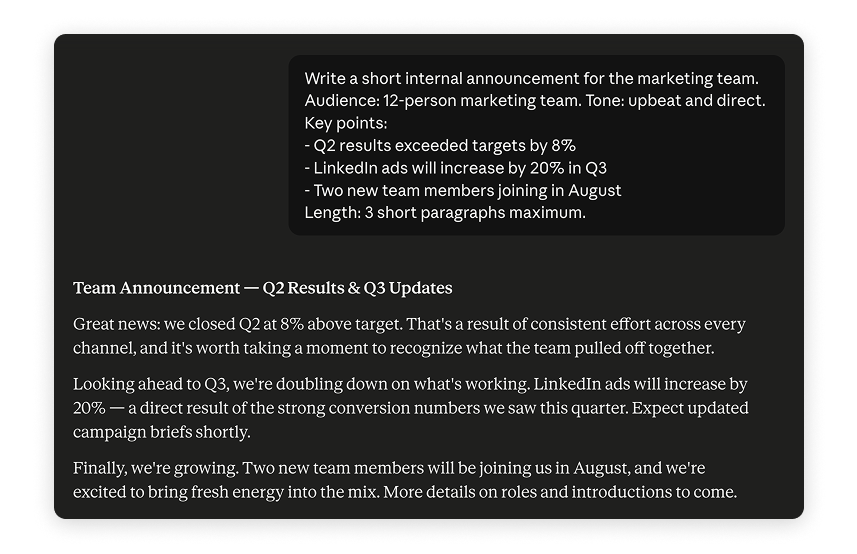

Agent-generated drafts are starting points, not finished products. Plan to spend time editing for voice, accuracy and context that the agent could not know. The goal is to eliminate the blank page problem, not to remove yourself from the writing process entirely.
Meeting Recaps and Status Updates
Two of the highest-value writing tasks to delegate are meeting recaps and status updates – both are time-consuming to write, follow a predictable structure, and do not require much creative input once you have the raw material.
For a meeting recap, paste the notes or transcript into the agent and ask for:
- A one-paragraph summary of what was discussed;
- A list of decisions made;
- A list of action items with owners and deadlines.
For a status update, give the agent bullet points of what happened this week and ask it to turn them into a structured update in whatever format your team uses.

Prompt template – a reusable prompt structure you write once and apply repeatedly to similar tasks. Instead of rewriting your instructions from scratch each time, you fill in the variable parts and run the same prompt. This is one of the most practical ways to build consistent agent workflows.
Building Reusable Templates
Once you find a prompt that produces good results for a recurring task, save it. Over time, a small library of prompt templates for your most common writing tasks – weekly updates, client emails, project briefs, meeting recaps – becomes one of your most valuable personal productivity tools.
A simple template looks like this:

You are helping me write a [type of document] for [audience]. The tone should be [tone]. Here are the key points to include: [bullet points]. Please produce a first draft of approximately [length].
Fill in the brackets, run it, edit the output. Most professionals who build this habit report cutting their routine writing time by 50 percent or more.
What about Using Notion AI or Copilot in Word for Drafting?
If your writing lives in a specific tool, using the AI built into that tool often produces better results than copying and pasting into a separate platform.

Notion AI is particularly strong for drafting within a structured workspace – it understands the context of the page you are working on and can generate content that fits naturally into your existing documents.
Copilot in Word works well for longer, more formal documents – reports, proposals, briefs – where you want the agent to work directly inside the document rather than handing you text to paste in.
Both are worth experimenting with if you already use these tools regularly.
Merci pour vos commentaires !
Demandez à l'IA

Demandez à l'IA

Posez n'importe quelle question ou essayez l'une des questions suggérées pour commencer notre discussion
Creating Drafts, Recaps and Templates
Writing is one of the most time-consuming parts of knowledge work – not because the ideas are hard, but because turning ideas into polished, well-structured text takes effort and focus. Agents can take on a significant portion of that effort, leaving you to direct and refine rather than produce from scratch.
Drafting from a Brief
The most effective way to use an agent for writing is to give it a brief rather than asking it to guess what you need. A brief does not have to be long – a few sentences covering the goal, the audience, the tone and the key points you want to make is enough to produce a useful first draft.
Think of the agent as a capable writer who knows nothing about your situation until you tell them. The more context you give, the less editing you will need to do.
Agent-generated drafts are starting points, not finished products. Plan to spend time editing for voice, accuracy and context that the agent could not know. The goal is to eliminate the blank page problem, not to remove yourself from the writing process entirely.
Meeting Recaps and Status Updates
Two of the highest-value writing tasks to delegate are meeting recaps and status updates – both are time-consuming to write, follow a predictable structure, and do not require much creative input once you have the raw material.
For a meeting recap, paste the notes or transcript into the agent and ask for:
- A one-paragraph summary of what was discussed;
- A list of decisions made;
- A list of action items with owners and deadlines.
For a status update, give the agent bullet points of what happened this week and ask it to turn them into a structured update in whatever format your team uses.
Prompt template – a reusable prompt structure you write once and apply repeatedly to similar tasks. Instead of rewriting your instructions from scratch each time, you fill in the variable parts and run the same prompt. This is one of the most practical ways to build consistent agent workflows.
Building Reusable Templates
Once you find a prompt that produces good results for a recurring task, save it. Over time, a small library of prompt templates for your most common writing tasks – weekly updates, client emails, project briefs, meeting recaps – becomes one of your most valuable personal productivity tools.
A simple template looks like this:
You are helping me write a [type of document] for [audience]. The tone should be [tone]. Here are the key points to include: [bullet points]. Please produce a first draft of approximately [length].
Fill in the brackets, run it, edit the output. Most professionals who build this habit report cutting their routine writing time by 50 percent or more.
What about Using Notion AI or Copilot in Word for Drafting?
If your writing lives in a specific tool, using the AI built into that tool often produces better results than copying and pasting into a separate platform.
Notion AI is particularly strong for drafting within a structured workspace – it understands the context of the page you are working on and can generate content that fits naturally into your existing documents.
Copilot in Word works well for longer, more formal documents – reports, proposals, briefs – where you want the agent to work directly inside the document rather than handing you text to paste in.
Both are worth experimenting with if you already use these tools regularly.
Merci pour vos commentaires !
