Challenge: Set Up and Run Your First Agent Task
Glissez pour afficher le menu
It is time to put everything from this section into practice. This challenge walks you through setting up an agent from scratch and completing a real task from start to finish.
What You Will Do
You will set up a project in Claude or Gemini, write your personal instructions, give the agent a real task from your work, and review the output critically before deciding what to do with it.
This should take between 10 and 15 minutes depending on how much you want to refine your instructions and iterate on the result.
Step 1: Set Up Your Project
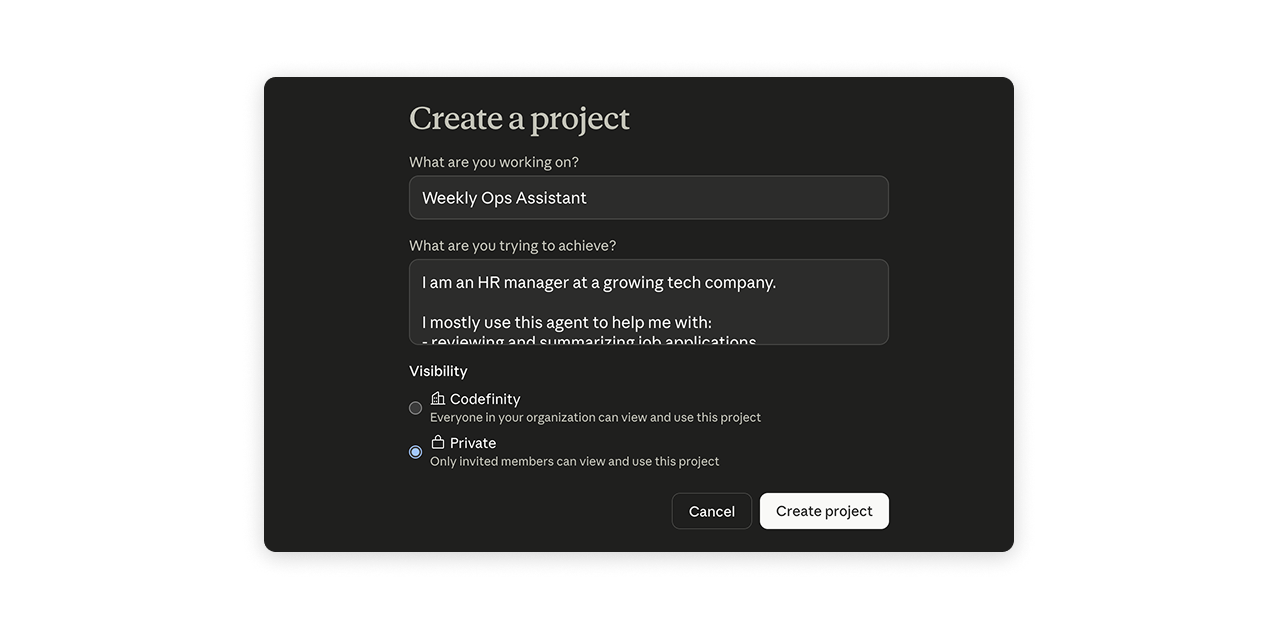
Open one of the following platforms and create a new Project:
- Claude at
claude.ai→ click "Projects" in the left sidebar → "New Project" - ChatGPT at
chatgpt.com→ click "New project" in the left sidebar;
Write your personal instructions using the template from the previous chapter as a starting point:
- Who you are and what you do;
- The types of tasks you will use the agent for most often;
- How you want responses formatted and what tone you prefer.
Step 2: Give the Agent a Real Task
Pick one of the following tasks – choose whichever is most relevant to your actual work right now:
- Option A – paste three to five recent emails you have received and ask the agent to summarize the key action items across all of them;
- Option B – describe a decision you are currently working through and ask the agent to help you outline the key considerations on each side;
- Option C – give the agent a document or report you have been meaning to read and ask it to produce a structured summary with the three most important takeaways.
Write a specific prompt using what you learned in the previous chapter – include the goal, the format you want, and any constraints that matter.
Step 3: Review and Iterate
Read the output carefully and check for the three common issues covered in the previous chapter: missing information, confident errors, and tone mismatch.
If something is not right, send one follow-up message with a specific instruction to fix it. Try to get to a result you would actually use in one or two iterations.

There is no single correct output for this challenge. The goal is to go through the full process – setup, prompt, output, review, iterate – and notice where it felt natural and where it felt unclear. Those friction points are exactly what the rest of the course will help you resolve.
What to Reflect On
After completing the task, take a moment to think about:
- Did the agent's output match what you expected, or did it surprise you in some way?
- What would you change about your instructions or your prompt to get a better result next time?
- Was the task you chose a good candidate for delegation, or did it turn out to need more human judgment than you anticipated?
You do not need to write your answers down – but carrying these questions into the next section will help you get significantly more out of what follows.
Merci pour vos commentaires !
Demandez à l'IA

Demandez à l'IA

Posez n'importe quelle question ou essayez l'une des questions suggérées pour commencer notre discussion
Challenge: Set Up and Run Your First Agent Task
It is time to put everything from this section into practice. This challenge walks you through setting up an agent from scratch and completing a real task from start to finish.
What You Will Do
You will set up a project in Claude or Gemini, write your personal instructions, give the agent a real task from your work, and review the output critically before deciding what to do with it.
This should take between 10 and 15 minutes depending on how much you want to refine your instructions and iterate on the result.
Step 1: Set Up Your Project
Open one of the following platforms and create a new Project:
- Claude at
claude.ai→ click "Projects" in the left sidebar → "New Project" - ChatGPT at
chatgpt.com→ click "New project" in the left sidebar;
Write your personal instructions using the template from the previous chapter as a starting point:
- Who you are and what you do;
- The types of tasks you will use the agent for most often;
- How you want responses formatted and what tone you prefer.
Step 2: Give the Agent a Real Task
Pick one of the following tasks – choose whichever is most relevant to your actual work right now:
- Option A – paste three to five recent emails you have received and ask the agent to summarize the key action items across all of them;
- Option B – describe a decision you are currently working through and ask the agent to help you outline the key considerations on each side;
- Option C – give the agent a document or report you have been meaning to read and ask it to produce a structured summary with the three most important takeaways.
Write a specific prompt using what you learned in the previous chapter – include the goal, the format you want, and any constraints that matter.
Step 3: Review and Iterate
Read the output carefully and check for the three common issues covered in the previous chapter: missing information, confident errors, and tone mismatch.
If something is not right, send one follow-up message with a specific instruction to fix it. Try to get to a result you would actually use in one or two iterations.
There is no single correct output for this challenge. The goal is to go through the full process – setup, prompt, output, review, iterate – and notice where it felt natural and where it felt unclear. Those friction points are exactly what the rest of the course will help you resolve.
What to Reflect On
After completing the task, take a moment to think about:
- Did the agent's output match what you expected, or did it surprise you in some way?
- What would you change about your instructions or your prompt to get a better result next time?
- Was the task you chose a good candidate for delegation, or did it turn out to need more human judgment than you anticipated?
You do not need to write your answers down – but carrying these questions into the next section will help you get significantly more out of what follows.
Merci pour vos commentaires !
