VLOOKUP Deep Dive
Glissez pour afficher le menu
What the VLOOKUP Function Does
The VLOOKUP function searches for a value in the first column of a table and returns a corresponding value from another column in the same row.
The name VLOOKUP stands for Vertical Lookup, meaning the search is performed down a column.
Basic Syntax
=VLOOKUP(lookup_value; table_array; col_index_num; [range_lookup])
lookup_value: the value to search for;table_array: the range that contains the lookup table;col_index_num: the column number in the table from which Excel returns the value;range_lookup: controls whether Excel performs an exact match or an approximate match. UseFALSEor0for an exact match (recommended).TRUEor1for an approximate match.
Example Retrieving Product Price
Assume the worksheet contains the following table.
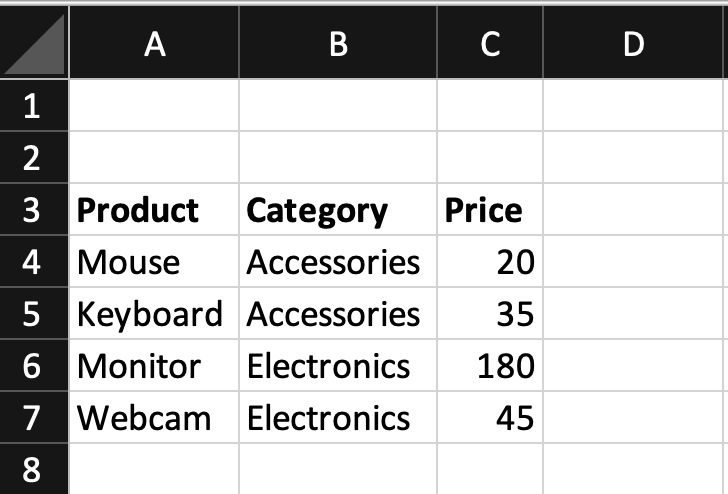
The table is located in A3:C7.
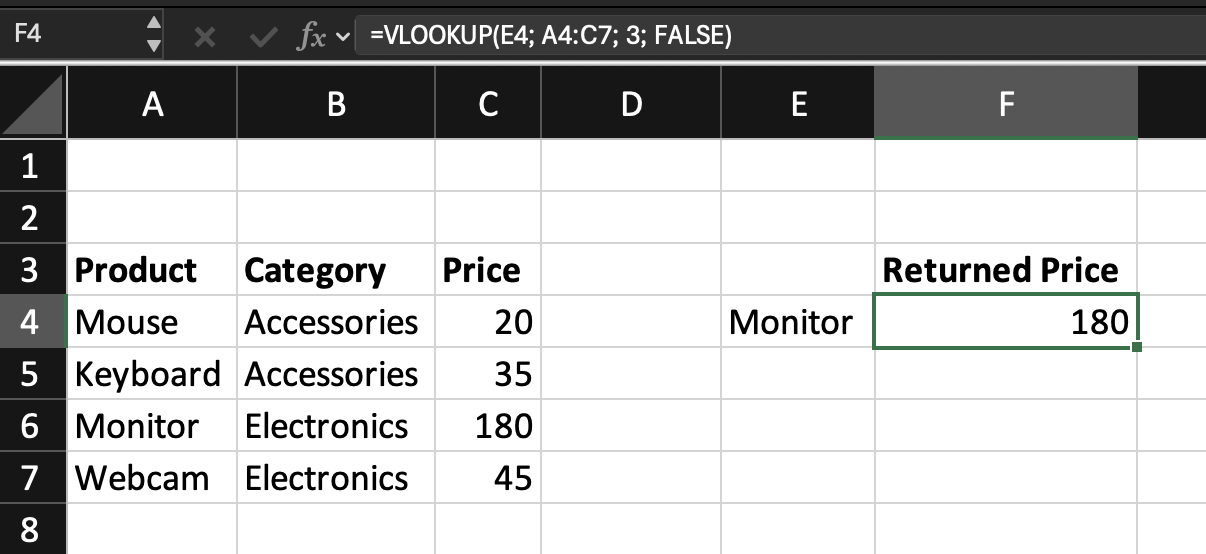
The product name to search is entered in cell E4.
The goal is to return the Price.
=VLOOKUP(E4; A4:C7; 3; FALSE)
E4: contains the product name to search;A4:C7: defines the lookup table;3: tells Excel to return the value from the third column of the table;FALSE: specifies an exact match.
How It Works
When the formula runs:
- Excel searches the first column of the table;
- It finds the row that matches the lookup value;
- It returns the value from the specified column.
If E3 contains Monitor, the result will be 180.

VLOOKUP can only search from left to right.
The lookup column must always be the first column of the table array.
For example, if the table is structured like this:
| Category | Product | Price |
VLOOKUP cannot search by Product to return Category.
This limitation is one reason modern lookup functions such as XLOOKUP and INDEX + XMATCH are often preferred.
Task
Scenario
A worksheet contains a table with: Product Code, Product Name, Category, and Price. A Product Code is entered in an input cell.
Your goal is to return the Category using the VLOOKUP function.
Task Instructions
- Search for the
Product Codein the first column of the table; - Return the
Categorycolumn.
Merci pour vos commentaires !
Demandez à l'IA

Demandez à l'IA

Posez n'importe quelle question ou essayez l'une des questions suggérées pour commencer notre discussion
VLOOKUP Deep Dive
What the VLOOKUP Function Does
The VLOOKUP function searches for a value in the first column of a table and returns a corresponding value from another column in the same row.
The name VLOOKUP stands for Vertical Lookup, meaning the search is performed down a column.
Basic Syntax
=VLOOKUP(lookup_value; table_array; col_index_num; [range_lookup])
lookup_value: the value to search for;table_array: the range that contains the lookup table;col_index_num: the column number in the table from which Excel returns the value;range_lookup: controls whether Excel performs an exact match or an approximate match. UseFALSEor0for an exact match (recommended).TRUEor1for an approximate match.
Example Retrieving Product Price
Assume the worksheet contains the following table.
The table is located in A3:C7.
The product name to search is entered in cell E4.
The goal is to return the Price.
=VLOOKUP(E4; A4:C7; 3; FALSE)
E4: contains the product name to search;A4:C7: defines the lookup table;3: tells Excel to return the value from the third column of the table;FALSE: specifies an exact match.
How It Works
When the formula runs:
- Excel searches the first column of the table;
- It finds the row that matches the lookup value;
- It returns the value from the specified column.
If E3 contains Monitor, the result will be 180.
VLOOKUP can only search from left to right.
The lookup column must always be the first column of the table array.
For example, if the table is structured like this:
| Category | Product | Price |
VLOOKUP cannot search by Product to return Category.
This limitation is one reason modern lookup functions such as XLOOKUP and INDEX + XMATCH are often preferred.
Task
Scenario
A worksheet contains a table with: Product Code, Product Name, Category, and Price. A Product Code is entered in an input cell.
Your goal is to return the Category using the VLOOKUP function.
Task Instructions
- Search for the
Product Codein the first column of the table; - Return the
Categorycolumn.
Merci pour vos commentaires !
