Rotating Elements in 2D and 3D
Pyyhkäise näyttääksesi valikon
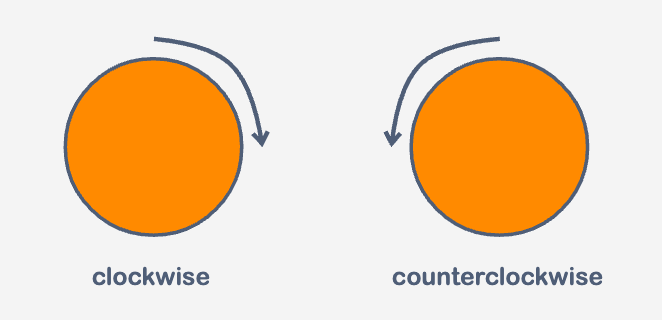
We can use the rotate() function to rotate elements. Positive values rotate the element clockwise, while negative values rotate it counterclockwise. The rotation angle is typically specified in degrees (deg), with the default value being 0deg indicating no rotation. Other acceptable units for rotation angles are turns (turn) and radians (rad).
Element Axes
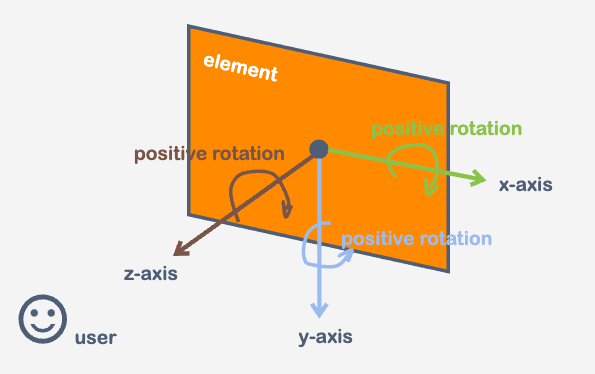
To understand how rotation works, we need to understand the element axes concept. There are three axes:
- The x-axis is horizontal, going from left to right;
- The y-axis is vertical, going from top to bottom;
- The z-axis is perpendicular to the screen, pointing towards the viewer.
Rotation Direction
By default, the rotate() property rotates the element around the z-axis. However, we can also apply rotation around the x-axis and y-axis using the following values:
transform: rotateX(angle);
transform: rotateY(angle);
Example 1
Consider the following example code, where we apply different rotation angles to demonstrate rotation around the z-axis:

index.html

index.css
Example 2
In this example, we explore rotation around the z-axis, x-axis, and y-axis:
index.html
index.css
Kiitos palautteestasi!
Kysy tekoälyä

Kysy tekoälyä

Kysy mitä tahansa tai kokeile jotakin ehdotetuista kysymyksistä aloittaaksesi keskustelumme
Rotating Elements in 2D and 3D
We can use the rotate() function to rotate elements. Positive values rotate the element clockwise, while negative values rotate it counterclockwise. The rotation angle is typically specified in degrees (deg), with the default value being 0deg indicating no rotation. Other acceptable units for rotation angles are turns (turn) and radians (rad).
Element Axes
To understand how rotation works, we need to understand the element axes concept. There are three axes:
- The x-axis is horizontal, going from left to right;
- The y-axis is vertical, going from top to bottom;
- The z-axis is perpendicular to the screen, pointing towards the viewer.
Rotation Direction
By default, the rotate() property rotates the element around the z-axis. However, we can also apply rotation around the x-axis and y-axis using the following values:
transform: rotateX(angle);
transform: rotateY(angle);
Example 1
Consider the following example code, where we apply different rotation angles to demonstrate rotation around the z-axis:
index.html
index.css
Example 2
In this example, we explore rotation around the z-axis, x-axis, and y-axis:
index.html
index.css
Kiitos palautteestasi!
