Understanding CSS Positioning
Pyyhkäise näyttääksesi valikon
In modern web development, we often need to place elements outside the normal flow, for example, showing text over a product card, opening a pop-up or modal, or displaying a mobile menu. All of this is handled using the position property.
position: static | relative | absolute | fixed | sticky
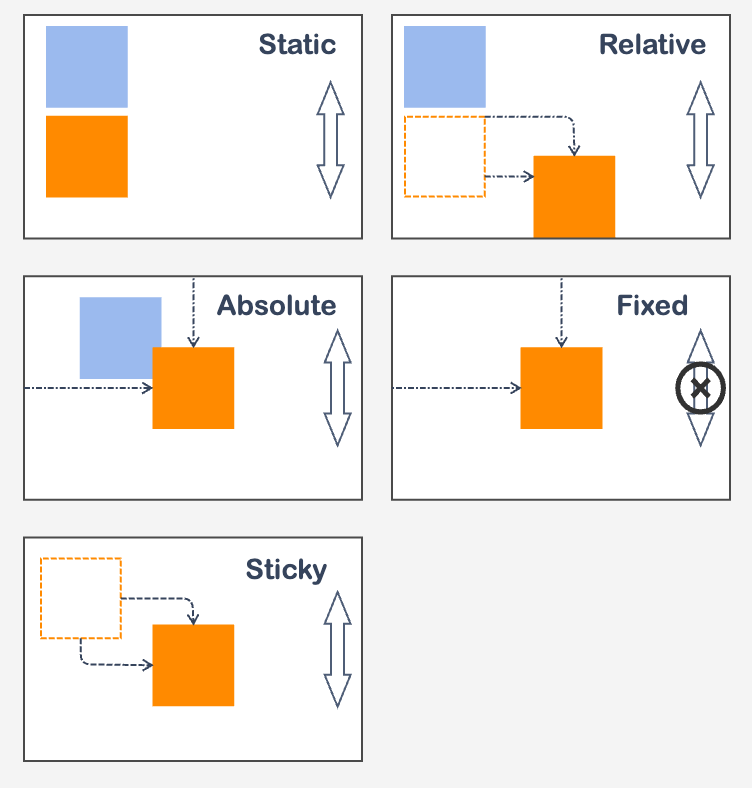
The position property changes how an element is placed on the page. By default, every element is position: static. Once you switch to another value, you can also use top, left, right, and bottom to control its exact location.
Default Document Flow
By default, elements appear on the page in the same order as in the HTML. This natural flow should be kept unless positioning is required for specific UI behaviors like popups, modals, dropdowns, or mobile menus.
Kiitos palautteestasi!
Kysy tekoälyä

Kysy tekoälyä

Kysy mitä tahansa tai kokeile jotakin ehdotetuista kysymyksistä aloittaaksesi keskustelumme
