Reaaliaikainen muokkaus
Pyyhkäise näyttääksesi valikon
Yksi pilvipohjaisten Excel-työkirjojen suurimmista eduista on reaaliaikainen yhteistyö. Useat käyttäjät voivat työskennellä samassa tiedostossa samanaikaisesti ilman erillisiä työkirjakopioita.
Kun jaettu työkirja tallennetaan OneDriveen tai SharePointiin, Excel synkronoi päivitykset automaattisesti kaikille yhteistyökumppaneille.
Yhteiskirjoittamisen ymmärtäminen
Reaaliaikaista yhteistyötä Excelissä kutsutaan usein yhteiskirjoittamiseksi. Tämä mahdollistaa usean käyttäjän muokata työkirjaa samanaikaisesti.
Kun yhteistyökumppanit avaavat saman tiedoston:
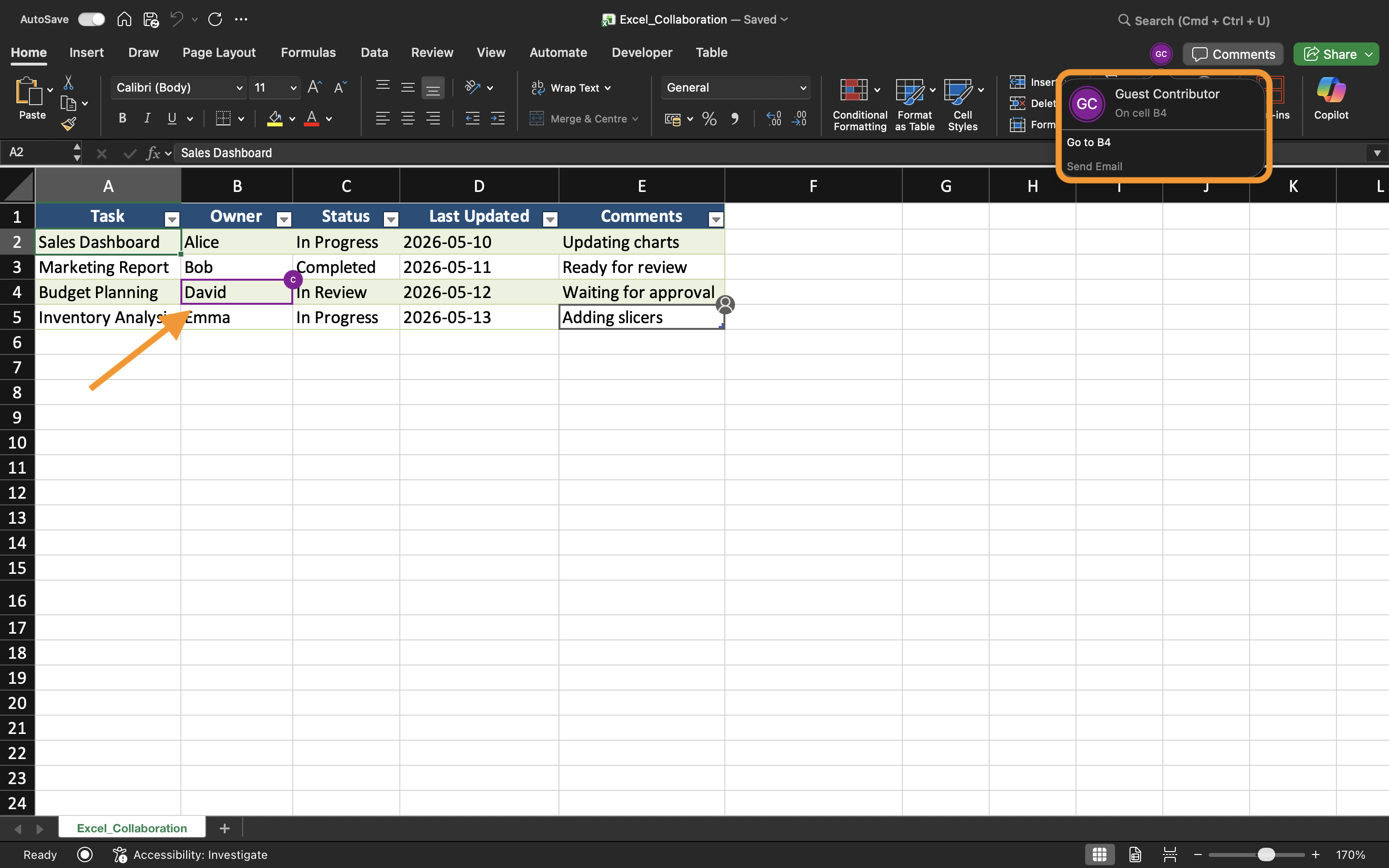
- Excel näyttää aktiiviset käyttäjät oikeassa yläkulmassa;
- Muutokset näkyvät automaattisesti käyttäjien muokatessa työkirjaa;
- Päivitykset synkronoituvat jatkuvasti taustalla.
Tämä luo huomattavasti nopeamman työnkulun verrattuna päivitettyjen työkirjaliitteiden manuaaliseen lähettämiseen.
Muutosten seuraaminen reaaliajassa
Kun yhteistyökumppanit muokkaavat työkirjaa, Excel päivittää solut reaaliajassa. Käyttäjät saattavat huomata korostettuja valintoja tai merkkejä, jotka osoittavat missä toinen henkilö parhaillaan työskentelee.
Esimerkiksi, jos yksi käyttäjä päivittää myyntilukuja samalla kun toinen muokkaa alueellisia tietoja, molemmat muutokset voivat näkyä lähes välittömästi jaetussa työkirjassa.
Tämä auttaa tiimejä pysymään synkronoituna yhteisissä työskentelytilanteissa.
Muokkausristiriitojen välttäminen
Vaikka Excel hoitaa suurimman osan synkronoinnista automaattisesti, ristiriitoja voi silti syntyä, jos useat käyttäjät muokkaavat samoja soluja samanaikaisesti.
Muokkausongelmien vähentämiseksi:
- Määritä eri laskentataulukkoalueet eri käyttäjille;
- Kommunikoi ennen suurten rakenteellisten muutosten tekemistä;
- Vältä laskentataulukoiden poistamista aktiivisen yhteistyön aikana;
- Pidä AutoSave-toiminto päällä.
Nämä käytännöt auttavat ylläpitämään sujuvampaa yhteistä työnkulkua.
Työskentely Excelin työpöytä- ja verkkoversiossa
Reaaliaikainen yhteistyö toimii sekä Excelin työpöytäsovelluksessa että Excel for the Web -versiossa. Käyttäjät voivat tehdä yhteistyötä myös eri laitteilla ja käyttöjärjestelmillä.
Jotkin edistyneet Excel-ominaisuudet voivat kuitenkin toimia eri tavoin käytetystä alustasta riippuen. Parhaan yhteistyökokemuksen saavuttamiseksi tiimien kannattaa käyttää yhteensopivia Excel-versioita aina kun mahdollista.
Reaaliaikaisen muokkauksen hyödyt
Reaaliaikainen muokkaus parantaa tiimityötä tekemällä yhteistyöstä nopeampaa ja läpinäkyvämpää. Tiimit voivat tarkastella päivityksiä välittömästi, vähentää viestintäviiveitä ja välttää sekaannusta vanhentuneiden työkirjakopioiden vuoksi.
Tämä työnkulku on erityisen hyödyllinen esimerkiksi:
- Budjetoinnissa;
- Myyntiraportoinnissa;
- Projektiseurannassa;
- Tiimiaikataulutuksessa;
- Operatiivisissa koontinäytöissä.
Tehtävä
Työkirja sisältää jaetun neljännesvuosittaisen myyntiraportin, jota hallinnoi useampi osaston jäsen. Tavoitteena on testata reaaliaikaista yhteistyötä ja tarkkailla, miten työkirjan päivitykset synkronoituvat käyttäjien välillä.
- Avaa jaettu työkirja kahdella eri laitteella tai selainistunnolla;
- Muokkaa eri laskentataulukon alueita samanaikaisesti;
- Tarkkaile, miten Excel synkronoi työkirjan muutokset;
- Varmista, että päivitykset näkyvät automaattisesti kaikille yhteistyökumppaneille;
- Testaa yhteistyötä sekä Excelin työpöytäversiossa että Excel for the Webissä.
Kiitos palautteestasi!
Kysy tekoälyä

Kysy tekoälyä

Kysy mitä tahansa tai kokeile jotakin ehdotetuista kysymyksistä aloittaaksesi keskustelumme
