Tiedostojenhallinnan Perusteet
Pyyhkäise näyttääksesi valikon
Hyvä tiedostojen hallinta on olennainen osa ammattimaista Excel-työskentelyä. Jopa hyvin suunnitellut työkirjat voivat muuttua vaikeasti hallittaviksi, jos tiedostot ovat huonosti järjestettyjä tai tallennettu epäjohdonmukaisesti.
Selkeä tiedostojen hallinta auttaa tiimejä löytämään työkirjat nopeasti, vähentää päällekkäisyyksiä ja ylläpitää luotettavia yhteistyöjärjestelmiä.
Excel-tiedostomuotojen ymmärtäminen
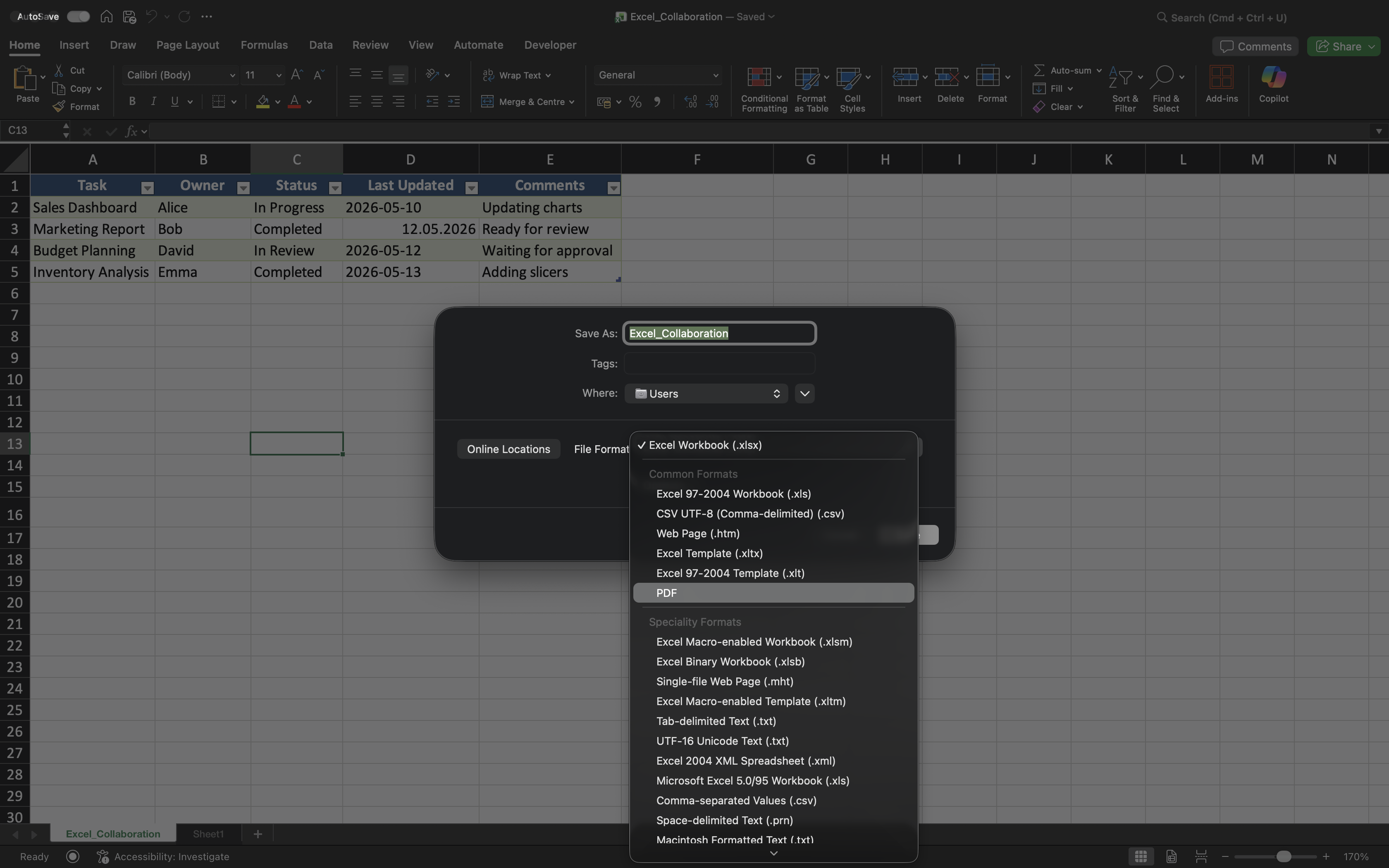
Excel tukee useita eri tarkoituksiin suunniteltuja tiedostomuotoja.
Yleisiä muotoja ovat:
- XLSX — Excelin vakio työkirjamuoto;
- XLSM — makroja tukeva työkirjamuoto;
- CSV — pelkkä tekstimuoto, jota käytetään yleisesti tiedonsiirtoon;
- PDF — muokattavaksi tarkoitettu muoto, jota käytetään valmiiden raporttien jakamiseen.
Oikean tiedostomuodon valinta auttaa välttämään yhteensopivuusongelmia ja parantaa työnkulun luotettavuutta.
Työkirjakansioiden järjestäminen
Jaetuissa Excel-projekteissa tulisi käyttää selkeitä ja johdonmukaisia kansiorakenteita. Tämä helpottaa työkirjojen löytämistä ja vähentää tarpeettomien kaksoiskappaleiden syntymistä.
Esimerkiksi tiimit usein erottelevat:
- Aktiiviset raportit;
- Arkistoidut tiedostot;
- Mallipohjat;
- Lopulliset vientitiedostot.
Hyvin järjestetyt kansiot auttavat ylläpitämään siistimpiä liiketoiminnan työnkulkuja ajan mittaan.
Johdonmukaiset työkirjanimet
Työkirjojen nimien tulisi kuvata selkeästi tiedoston sisältöä ja pysyä johdonmukaisina eri projekteissa.
Hyvät työkirjanimet sisältävät usein:
- Projektin tai raportin nimen;
- Raportointijakson tarvittaessa;
- Selkeän liiketoimintayhteyden.
Nimet kuten Sales_Report_Q2_2026.xlsx ovat huomattavasti helpompia hallita kuin epäselvät versiot, kuten Final_Report_New.xlsx.
Raporttien vienti ja jakaminen
Excel-työkirjoja ei aina jaeta muokattavina tiedostoina. Monissa liiketoimintaympäristöissä valmiit raportit viedään PDF-muotoon ennen jakelua.
PDF-vienti auttaa säilyttämään työkirjan muotoilun ja estää vastaanottajia tekemästä vahingossa muutoksia.
CSV-tiedostoja puolestaan käytetään yleisesti, kun tietoa siirretään eri järjestelmien tai sovellusten välillä.
Yhteistyöprosessien siistinä pitäminen
Projektien kasvaessa huono tiedostojen hallinta voi aiheuttaa sekaannusta ja versioiden hallinnan ongelmia. Tiimien tulisi välttää tarpeettomien paikallisten kopioiden tallentamista tai epäjohdonmukaisten nimeämiskäytäntöjen luomista.
Mahdollisuuksien mukaan:
- Tallenna jaetut työkirjat OneDriveen;
- Jaa linkkejä liitteiden sijaan;
- Arkistoi vanhentuneet työkirjaversiot;
- Pidä projektikansiot järjestyksessä.
Nämä käytännöt auttavat ylläpitämään siistimpiä ja luotettavampia yhteistyöympäristöjä.
Kiitos palautteestasi!
Kysy tekoälyä

Kysy tekoälyä

Kysy mitä tahansa tai kokeile jotakin ehdotetuista kysymyksistä aloittaaksesi keskustelumme
