Tasaisen datan uudelleenjärjestely relaatiotauluiksi
Pyyhkäise näyttääksesi valikon
Laaja tasainen taulukko on yksittäinen taulukko, joka sisältää kaiken tiedon jokaisesta tapahtumasta — asiakastiedot, tuotetiedot, päivämäärät ja tapahtuma-arvot ovat kaikki yhdessä paikassa. Taulukko on helppolukuinen, mutta ei sovellu relaatiotietomallin pohjaksi.
Toistojen ongelma: jokainen Acme Corp -tilaus toistaa asiakasnimen, alueen ja segmentin. Jos nämä tiedot muuttuvat, jokainen rivi on päivitettävä erikseen — mikä johtaa epäjohdonmukaisuuksiin ja turhaan tallennustilan kulutukseen.

Videolla käytetty työkirja on eri kuin tehtävässä käytetty työkirja. Jos haluat seurata opettajan vaiheita tunnin aikana, lataa videon alla oleva työkirja ennen aloittamista.
Vaihe 1 — Tunnista ja erottele dimensio-taulut
Dimensiotaulut kuvaavat kunkin tapahtuman kuka, mitä ja milloin -tietoja. Aloita näistä, koska niiden rajat ovat yleensä selkeimmät. Jokaisen rivin tulee olla yksilöllinen — poista kaksoiskappaleet liittämisen jälkeen.
- Customers -taulu: CustomerID (PK), CustomerName, Region, Segment;
- Products -taulu: ProductID (PK), ProductName, Category;
- Dates -taulu: Date (PK), Year, Month (number), Month name, Quarter.
Miksi päivämäärätaulun tulee kattaa koko vuosi?
Aikaan perustuvat laskelmat (vuosikertymä, liukuvat keskiarvot, jaksovertailut) vaativat jatkuvan, aukottoman kalenterin. Jos taulussa on vain tilauspäiviä, kuukaudet ilman myyntiä puuttuvat kokonaan ja laskelmat eivät toimi.
Vaihe 2 — Rakenna faktataulu
Faktataulu tallentaa tapahtumat — yksi rivi per tapahtuma. Se sisältää mitattavat arvot ja vierasavaimet, jotka yhdistävät tapahtuman dimensio-tauluihin. Taulu ei sisällä kuvailevaa tekstiä.
- Sales (faktataulu): OrderID (PK), OrderDate → Dates (FK), CustomerID → Customers (FK), ProductID → Products (FK), UnitPrice, Quantity, Total.
- PK — Pääavain (yksilöllinen tunniste jokaiselle tietueelle taulussa);
- FK — Viiteavain (kenttä, joka viittaa toisen taulun pääavaimeen).
Tähtimalli
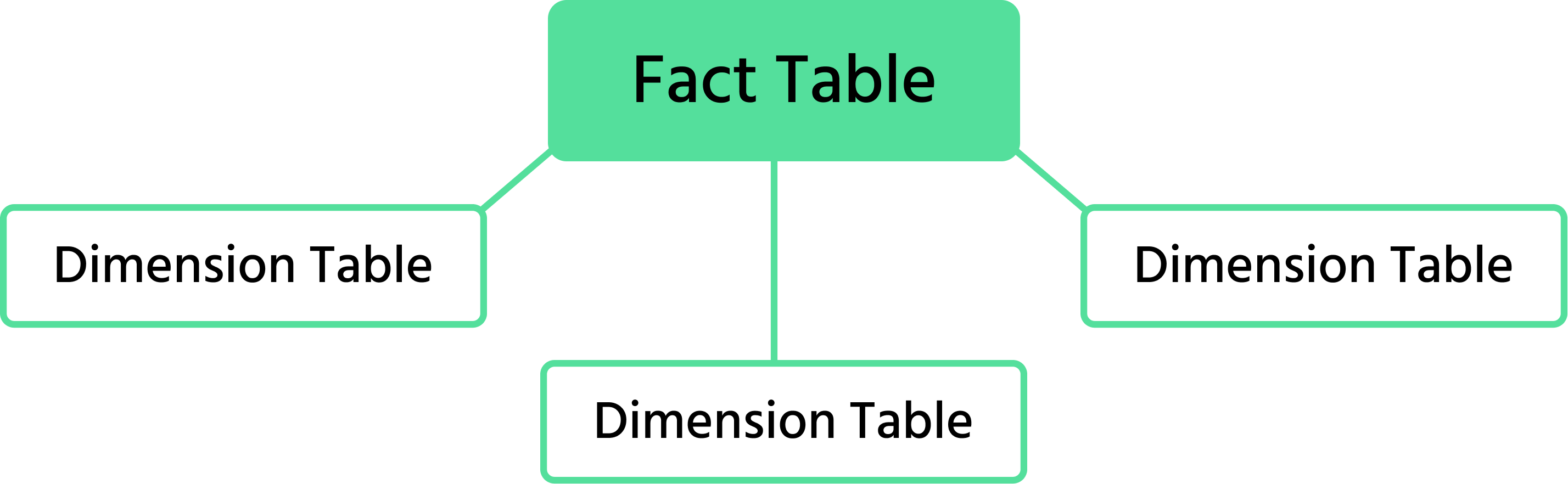
Neljän taulun kokonaisuus muodostaa tähtimallin: faktataulu sijaitsee keskellä ja ulottuvuustaulut säteilevät ulospäin, jokainen yhdistettynä pääavain/viiteavain-parilla.
Tehtävä
- Väritä leveän taulukon sarakkeet kohteen mukaan: asiakkaat (sininen), tuotteet (oranssi), päivämäärät (vihreä), faktatiedot (keltainen);
- Kopioi jokainen väriryhmä uudelle välilehdelle. Muunna alue nimetyksi Excel-taulukoksi (Lisää → Taulukko);
- Valitse pääavainsarake ja käytä Tiedot → Poista kaksoiskappaleet varmistaaksesi, että jokainen rivi on yksilöllinen.
- Päivämäärätaulukossa laajenna päivämääräsarake kattamaan jokainen päivä 1. tammikuuta - 31. joulukuuta, ja lisää sitten Vuosi, Kuukausi, Kuukauden nimi ja Vuosineljännes -sarakkeet käyttämällä
=YEAR(),=MONTH(),=TEXT(B2, "MMMM")ja vuosineljänneskaavaa="Q"&INT((MONTH(B2)-1)/3+1). - Liitä päivämäärätaulukko vain arvoina (ilman kaavoja) puhtaalle välilehdelle ennen taulukoksi muuntamista.
- Rakenna faktataulukko jäljelle jäävistä sarakkeista sekä kolmesta viiteavaimesta (
OrderDate,CustomerID,ProductID).
1. Mitkä ovat tärkeimmät hyödyt, kun tasainen taulukko muunnetaan faktatauluksi ja dimensioiksi? (Valitse kaksi)
2. Kun luodaan Customers-dimensio tasaisesta taulukosta, mikä vaihe on oleellinen?
Kiitos palautteestasi!
Kysy tekoälyä

Kysy tekoälyä

Kysy mitä tahansa tai kokeile jotakin ehdotetuista kysymyksistä aloittaaksesi keskustelumme
