Taulukot
Pyyhkäise näyttääksesi valikon
Alueet ovat tehokkaita, mutta ne ovat staattisia. Kun tietosi kasvavat jatkuvasti – uusia rivejä, uusia asiakkaita, uusia tapahtumia – tarvitset älykkäämmän ratkaisun. Tässä kohtaa taulukot astuvat kuvaan.
Keskeiset huomiot
- Taulukko muuttaa alueen rakenteelliseksi, kasvavaksi tietojoukoksi;
- Paina Ctrl / Cmd + T muuntaaksesi minkä tahansa alueen taulukoksi;
- Taulukot tuovat mukanaan suodattimet, rakenteelliset viittaukset ja automaattisen laajennuksen;
- Jokainen sarake = yksi tietotyyppi. Jokainen rivi = yksi tietue. Ei tyhjiä rivejä sisällä.
Mikä on taulukko?
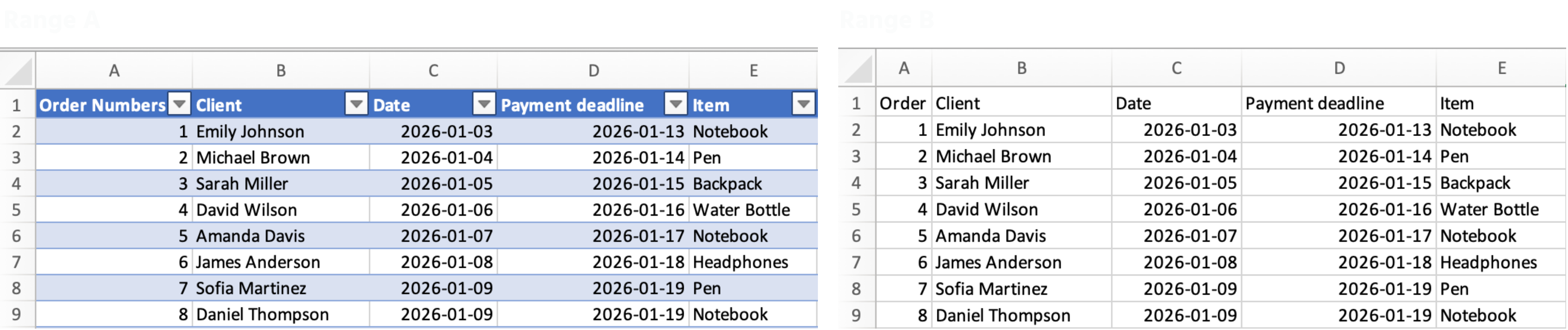
Taulukko on rakenteellinen alue, joka kertoo Excelille: "tämä on kasvava tietojoukko, käsittele sitä sellaisena."
Kun muutat alueen taulukoksi, Excel tekee automaattisesti seuraavaa:
- Lisää suodattimet ja lajittelupainikkeet otsikoihin;
- Laajentaa kaavat ja muotoilut jokaiseen uuteen riviin;
- Käyttää rakenteellisia viittauksia kuten
Sales[Total_Cost]sen sijaan, että käyttäisiK2:K54.
Taulukon luominen
- Napsauta mitä tahansa kohtaa datan sisällä;
- Paina Ctrl + T (Windows) tai Cmd + T (Mac);
- Varmista, että datassasi on otsikot → napsauta OK.
Oliko kaikki selvää?
Kiitos palautteestasi!
Osio 1. Luku 2
Kysy tekoälyä

Kysy tekoälyä

Kysy mitä tahansa tai kokeile jotakin ehdotetuista kysymyksistä aloittaaksesi keskustelumme
Osio 1. Luku 2
