Combining INDEX and XMATCH for Dynamic Lookups
Pyyhkäise näyttääksesi valikon
Why Combine INDEX and XMATCH
The INDEX function retrieves a value based on a row or column position. The XMATCH function searches for a value in a range and returns its position.
When these two functions are combined:
XMATCHfinds the position of the value;INDEXretrieves the corresponding value from another column.
Together they create a flexible lookup formula.
Example Retrieving Product Price
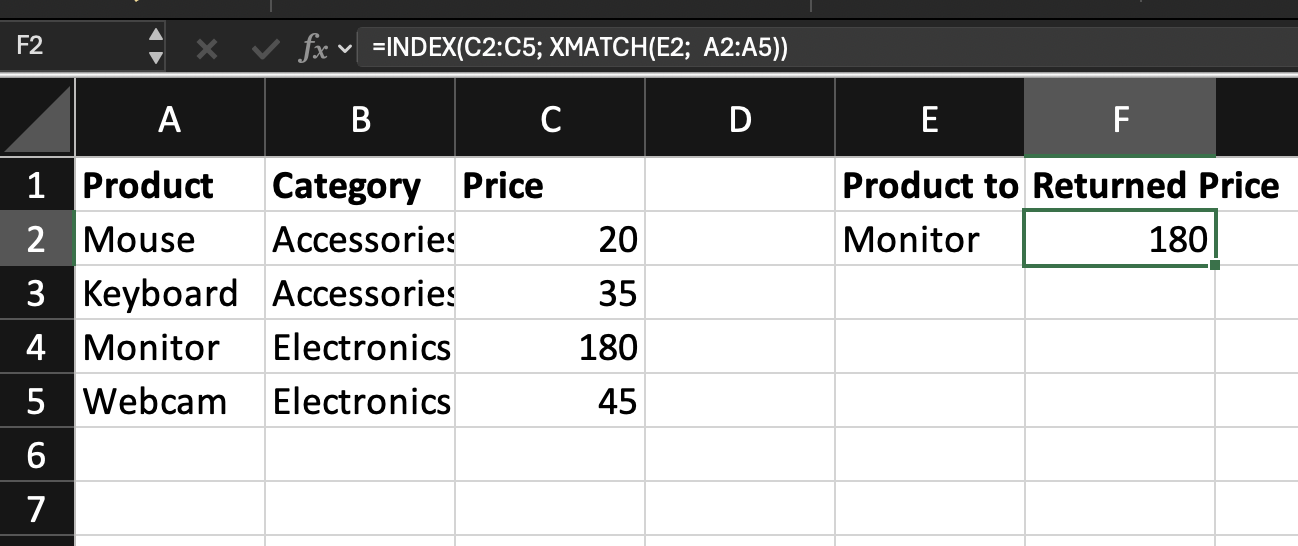
Assume the worksheet contains the following table.
The product name to search is entered in cell E2.
The goal is to return the Price of that product.
=INDEX(C2:C5; XMATCH(E2; A2:A5))
The XMATCH function runs first.
XMATCH(E2; A2:A5)
E2: contains the product name to search;A2:A5: contains the product list;XMATCH: searches the list and returns the position of the match.
If E2 contains Monitor, XMATCH returns 3 because Monitor is the third item in the range.
INDEX Uses the Position
The returned position is passed into the INDEX function.
INDEX(C2:C5; 3)
C2:C5: contains the product prices;3: refers to the third row inside the range;INDEX: returns the value located in that position. Result:180.
What Makes This Dynamic
XMATCH determines the row position automatically.
If the product name in E2 changes, XMATCH returns a different position and INDEX retrieves the corresponding value.
This allows the lookup formula to adapt to different inputs.
INDEX + XMATCH allows you to:
- Separate lookup and return columns;
- Work with columns in any order;
- Build dynamic lookup models.
This combination is commonly used when more control over the lookup process is required.
Task
Scenario
A worksheet contains a table with Product Name, Category, and Price.
A product name is entered in an input cell.
Your goal is to return the Category using a combination of INDEX and XMATCH.
Task Instructions
- Use
XMATCHto find the position of the product name in the product list; - Use
INDEXto retrieve the Category from the table; - Combine both functions into one formula.
Kiitos palautteestasi!
Kysy tekoälyä

Kysy tekoälyä

Kysy mitä tahansa tai kokeile jotakin ehdotetuista kysymyksistä aloittaaksesi keskustelumme
