Edición en Tiempo Real
Desliza para mostrar el menú
Una de las mayores ventajas de los libros de Excel basados en la nube es la colaboración en tiempo real. Varios usuarios pueden trabajar en el mismo archivo simultáneamente sin crear copias separadas del libro.
Cuando un libro compartido se almacena en OneDrive o SharePoint, Excel sincroniza las actualizaciones automáticamente entre todos los colaboradores.
Comprensión de la coautoría
La colaboración en tiempo real en Excel se conoce comúnmente como coautoría. Esto permite que varios usuarios editen el libro al mismo tiempo.
Cuando los colaboradores abren el mismo archivo:
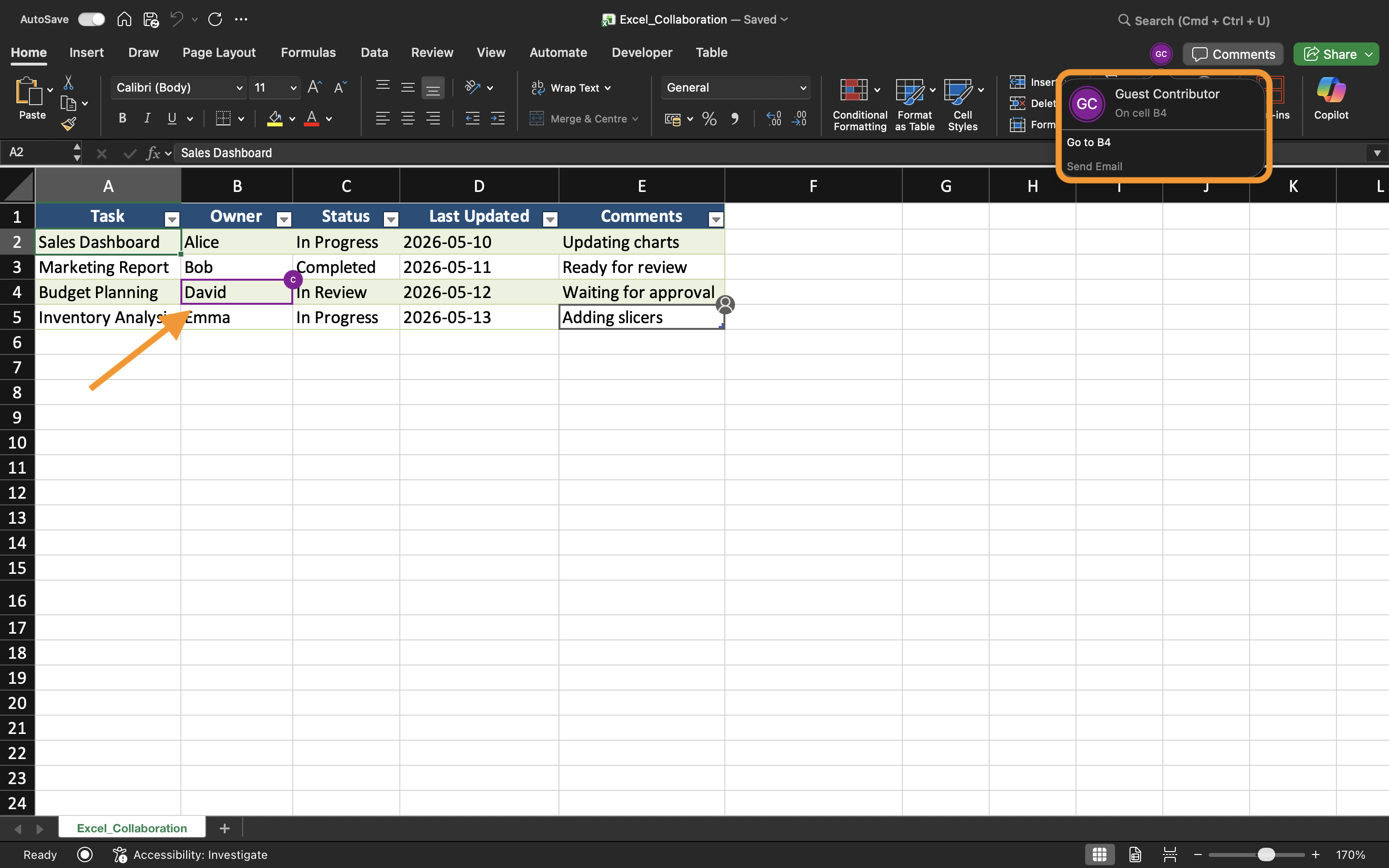
- Excel muestra los usuarios activos cerca de la esquina superior derecha;
- Los cambios aparecen automáticamente a medida que los usuarios editan el libro;
- Las actualizaciones se sincronizan continuamente en segundo plano.
Esto crea un flujo de trabajo mucho más rápido en comparación con el envío manual de archivos adjuntos actualizados del libro.
Visualización de cambios en vivo en el libro
A medida que los colaboradores editan el libro, Excel actualiza las celdas en tiempo real. Los usuarios pueden notar selecciones resaltadas o indicadores que muestran dónde está trabajando otra persona en ese momento.
Por ejemplo, si un usuario actualiza los números de ventas mientras otro edita los datos regionales, ambos cambios pueden aparecer casi instantáneamente en el libro compartido.
Esto ayuda a los equipos a mantenerse sincronizados durante las sesiones de trabajo colaborativo.
Evitar conflictos de edición
Aunque Excel gestiona la mayor parte de la sincronización automáticamente, aún pueden ocurrir conflictos cuando varios usuarios editan las mismas celdas al mismo tiempo.
Para reducir los problemas de edición:
- Asignar diferentes áreas de la hoja de cálculo a los colaboradores;
- Comunicar antes de realizar cambios estructurales importantes;
- Evitar eliminar hojas durante la colaboración activa;
- Mantener AutoGuardado habilitado.
Estas prácticas ayudan a mantener flujos de trabajo compartidos más fluidos.
Trabajo entre Excel de escritorio y web
La colaboración en tiempo real funciona tanto en la aplicación de escritorio de Excel como en Excel para la web. Los usuarios pueden colaborar incluso cuando trabajan desde diferentes dispositivos y sistemas operativos.
Sin embargo, algunas funciones avanzadas de Excel pueden comportarse de manera diferente según la plataforma utilizada. Para una mejor experiencia de colaboración, los equipos deben intentar usar versiones compatibles de Excel siempre que sea posible.
Beneficios de la edición en tiempo real
La edición en tiempo real mejora el trabajo en equipo al hacer la colaboración más rápida y transparente. Los equipos pueden revisar actualizaciones de inmediato, reducir retrasos en la comunicación y evitar confusiones causadas por copias desactualizadas del libro.
Este flujo de trabajo es especialmente útil para:
- Planificación de presupuestos;
- Informes de ventas;
- Seguimiento de proyectos;
- Programación de equipos;
- Paneles operativos.
Tarea
El libro de trabajo contiene un informe de ventas trimestral compartido, gestionado por varios miembros del departamento. El objetivo es probar la colaboración en tiempo real y observar cómo se sincronizan las actualizaciones del libro entre los usuarios.
- Abrir el libro de trabajo compartido desde dos dispositivos o sesiones de navegador diferentes;
- Editar diferentes áreas de la hoja de cálculo simultáneamente;
- Observar cómo Excel sincroniza los cambios en el libro de trabajo;
- Verificar que las actualizaciones aparezcan automáticamente para todos los colaboradores;
- Probar la colaboración utilizando tanto Excel de escritorio como Excel para la Web.
¡Gracias por tus comentarios!
Pregunte a AI

Pregunte a AI

Pregunte lo que quiera o pruebe una de las preguntas sugeridas para comenzar nuestra charla
