String Slicing in Python
Desliza para mostrar el menú
Sometimes you need to retrieve multiple elements from a text. This is where slicing comes in handy. Slicing allows us to access a range of elements without modifying the original sequence. To retrieve multiple characters at once, use square brackets ([]) and a colon (:) to specify the start and end indices.
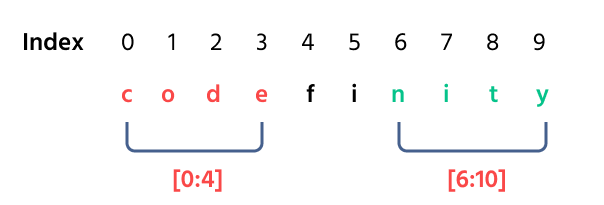
The end position is always one more than the last character's index you want to include. In the example above, there are 10 positions, but the final index is 9.

12345678# Initial strings platform_name = "codefinity" greeting_message = "How are you" # Slice strings to extract substrings # Spaces count as characters and have their own indices print(platform_name[0:4], platform_name[6:10]) print(greeting_message[2:5], greeting_message[6:11])
You are given the string "Python" stored in the language variable, extract the substrings "tho" and "on". The indices for this string are shown below.

¡Gracias por tus comentarios!
Pregunte a AI

Pregunte a AI

Pregunte lo que quiera o pruebe una de las preguntas sugeridas para comenzar nuestra charla
