Minigráficos
Desliza para mostrar el menú
Los minigráficos son la forma más compacta de agregar contexto visual a una tabla. En lugar de pedirle al lector que mire de una celda de la tabla a un gráfico separado en otra parte de la hoja, un minigráfico coloca la tendencia directamente dentro de la celda.
No reemplazan a los gráficos completos. Un minigráfico no puede mostrar etiquetas de eje, valores exactos ni comparaciones detalladas entre muchos productos a la vez. Lo que permite es que el lector recorra una columna de minigráficos y vea de inmediato qué productos están en tendencia ascendente, cuáles están estables y cuáles están en descenso, sin salir de la tabla.
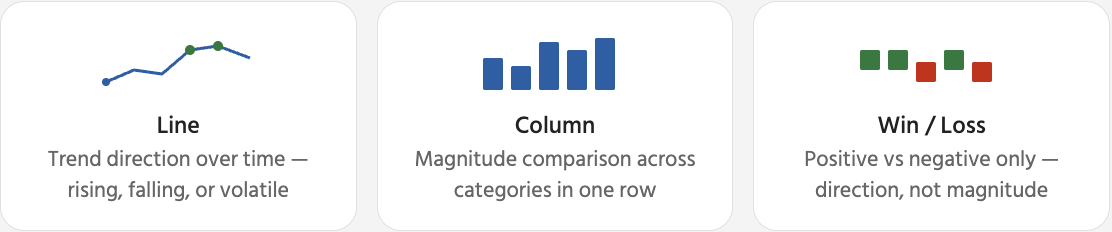
Una vez seleccionado un minigráfico, aparece una pestaña Minigráfico contextual en la cinta de opciones. Aquí es donde se controla el aspecto del minigráfico y qué puntos de datos se destacan. Las opciones más útiles son los marcadores y los resaltados de puntos: ayudan al lector a identificar rápidamente el punto máximo y el mínimo sin leer los números subyacentes.

Eliminar minigráficos: seleccionar la(s) celda(s) del minigráfico → pestaña Minigráfico → Borrar → Borrar minigráficos seleccionados. Esto elimina solo el indicador visual; los datos de la tabla en la misma fila permanecen completamente sin cambios. Al presionar Suprimir se elimina el contenido de la celda, no el minigráfico.
¡Gracias por tus comentarios!
Pregunte a AI

Pregunte a AI

Pregunte lo que quiera o pruebe una de las preguntas sugeridas para comenzar nuestra charla
Minigráficos
Los minigráficos son la forma más compacta de agregar contexto visual a una tabla. En lugar de pedirle al lector que mire de una celda de la tabla a un gráfico separado en otra parte de la hoja, un minigráfico coloca la tendencia directamente dentro de la celda.
No reemplazan a los gráficos completos. Un minigráfico no puede mostrar etiquetas de eje, valores exactos ni comparaciones detalladas entre muchos productos a la vez. Lo que permite es que el lector recorra una columna de minigráficos y vea de inmediato qué productos están en tendencia ascendente, cuáles están estables y cuáles están en descenso, sin salir de la tabla.
Una vez seleccionado un minigráfico, aparece una pestaña Minigráfico contextual en la cinta de opciones. Aquí es donde se controla el aspecto del minigráfico y qué puntos de datos se destacan. Las opciones más útiles son los marcadores y los resaltados de puntos: ayudan al lector a identificar rápidamente el punto máximo y el mínimo sin leer los números subyacentes.
Eliminar minigráficos: seleccionar la(s) celda(s) del minigráfico → pestaña Minigráfico → Borrar → Borrar minigráficos seleccionados. Esto elimina solo el indicador visual; los datos de la tabla en la misma fila permanecen completamente sin cambios. Al presionar Suprimir se elimina el contenido de la celda, no el minigráfico.
¡Gracias por tus comentarios!
