Formato
Desliza para mostrar el menú
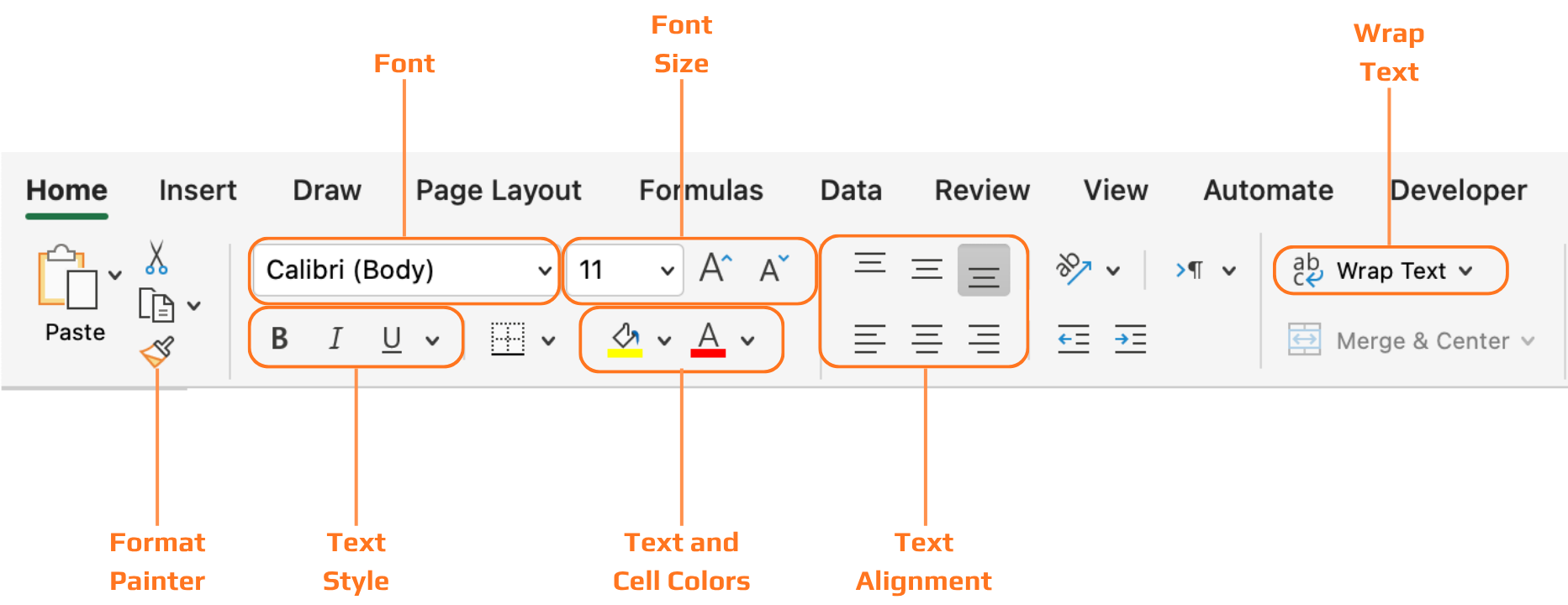
Todas las herramientas cubiertas en este capítulo se encuentran en la pestaña Inicio de la cinta de opciones, organizadas en grupos: Fuente, Alineación, Número y Estilos. El trabajo consiste en seleccionar primero las celdas y luego aplicar el formato a lo que esté seleccionado.
Encabezados
Sin encabezados formateados, una tabla de datos es solo una cuadrícula de texto. El lector debe esforzarse para entender qué significa cada columna antes de poder leer los valores. El texto en negrita y el sombreado de fondo resuelven esto de un vistazo: la fila de encabezado se separa visualmente de las filas de datos, y el ojo identifica inmediatamente dónde buscar las etiquetas de las columnas.

Cuando conviertes un rango en una Tabla de Excel usando Ctrl+T, el formato de encabezado se aplica automáticamente, y puedes elegir entre estilos de tabla predefinidos en la pestaña Diseño de tabla. Esta suele ser la forma más rápida de obtener un formato de encabezado limpio y consistente sin hacerlo manualmente.
¡Gracias por tus comentarios!
Pregunte a AI

Pregunte a AI

Pregunte lo que quiera o pruebe una de las preguntas sugeridas para comenzar nuestra charla
