HLOOKUP in Practice
Desliza para mostrar el menú
What the HLOOKUP Function Does
The HLOOKUP function searches for a value in the first row of a table and returns a value from a specified row in the same column.
The name HLOOKUP stands for Horizontal Lookup, meaning the search is performed across a row.
This function works similarly to VLOOKUP but operates on horizontally structured data.
Basic Syntax
=HLOOKUP(lookup_value; table_array; row_index_num; [range_lookup])
lookup_value: the value to search for;table_array: the range containing the lookup table;row_index_num: the row number in the table from which Excel returns the value;range_lookup: specifies whether the match should be exact or approximate.FALSEfor an exact match,TRUE(or omitted) for an approximate match.
Example Retrieving Monthly Sales
Assume the worksheet contains the following table.
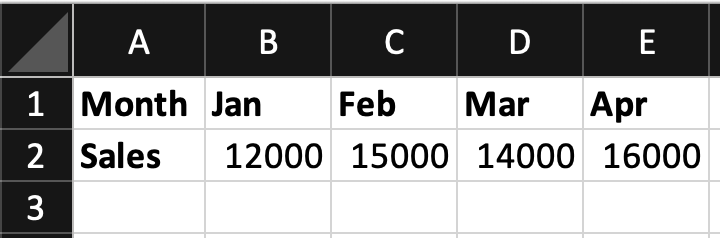
The table is located in A1:E2.
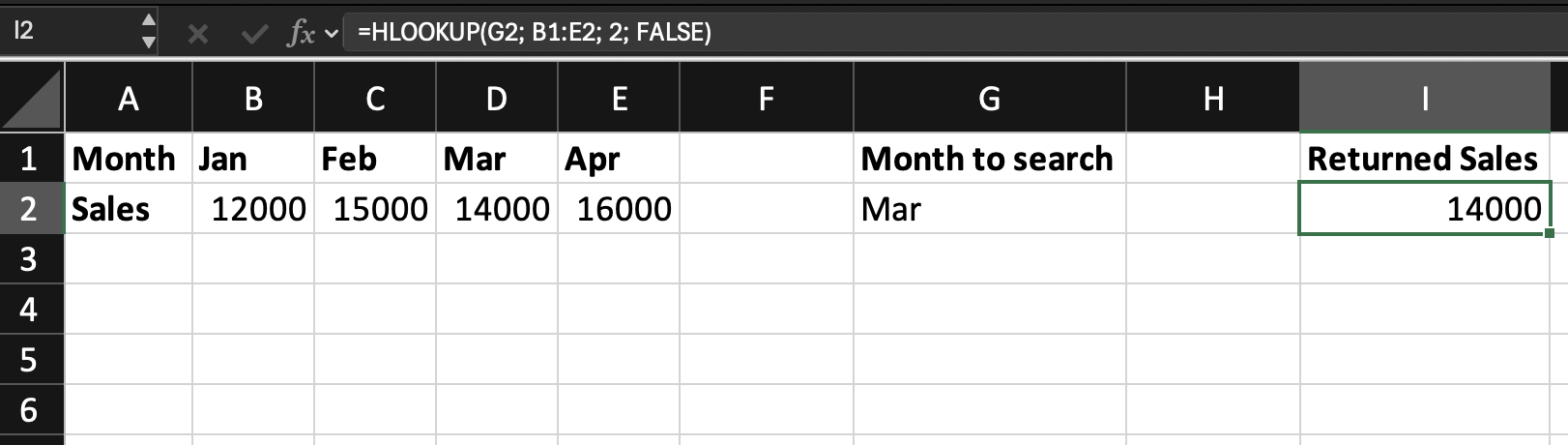
The month to search is entered in cell I2.
The goal is to return the Sales value for that month.
=HLOOKUP(I2; B1:E2; 2; FALSE)
I2: contains the month to search;B1:E2: defines the lookup table;2: tells Excel to return the value from the second row of the table;FALSE: specifies an exact match.
How It Works
When the formula runs:
- Excel searches across the first row of the table;
- It finds the column that matches the lookup value;
- It returns the value from the specified row in that column.
If I2 contains Mar, the result will be 14000.

HLOOKUP requires the lookup value to appear in the first row of the table.
If the structure changes or the lookup row moves, the formula may stop working correctly.
Modern lookup functions such as XLOOKUP or INDEX + XMATCH usually provide more flexibility.
Task
Scenario
A worksheet contains a horizontal table with quarterly revenue.
The quarter to search is entered in an input cell.
Your goal is to return the Revenue value for that quarter using HLOOKUP.
Task Instructions
- Search for the
Quarterin the first row of the table; - Return the
Revenuevalue from the second row.
¡Gracias por tus comentarios!
Pregunte a AI

Pregunte a AI

Pregunte lo que quiera o pruebe una de las preguntas sugeridas para comenzar nuestra charla
HLOOKUP in Practice
What the HLOOKUP Function Does
The HLOOKUP function searches for a value in the first row of a table and returns a value from a specified row in the same column.
The name HLOOKUP stands for Horizontal Lookup, meaning the search is performed across a row.
This function works similarly to VLOOKUP but operates on horizontally structured data.
Basic Syntax
=HLOOKUP(lookup_value; table_array; row_index_num; [range_lookup])
lookup_value: the value to search for;table_array: the range containing the lookup table;row_index_num: the row number in the table from which Excel returns the value;range_lookup: specifies whether the match should be exact or approximate.FALSEfor an exact match,TRUE(or omitted) for an approximate match.
Example Retrieving Monthly Sales
Assume the worksheet contains the following table.
The table is located in A1:E2.
The month to search is entered in cell I2.
The goal is to return the Sales value for that month.
=HLOOKUP(I2; B1:E2; 2; FALSE)
I2: contains the month to search;B1:E2: defines the lookup table;2: tells Excel to return the value from the second row of the table;FALSE: specifies an exact match.
How It Works
When the formula runs:
- Excel searches across the first row of the table;
- It finds the column that matches the lookup value;
- It returns the value from the specified row in that column.
If I2 contains Mar, the result will be 14000.
HLOOKUP requires the lookup value to appear in the first row of the table.
If the structure changes or the lookup row moves, the formula may stop working correctly.
Modern lookup functions such as XLOOKUP or INDEX + XMATCH usually provide more flexibility.
Task
Scenario
A worksheet contains a horizontal table with quarterly revenue.
The quarter to search is entered in an input cell.
Your goal is to return the Revenue value for that quarter using HLOOKUP.
Task Instructions
- Search for the
Quarterin the first row of the table; - Return the
Revenuevalue from the second row.
¡Gracias por tus comentarios!
