Instrucción Continue
Desliza para mostrar el menú
La instrucción continue se utiliza para saltar a la siguiente iteración del bucle.
Cuando usamos la instrucción continue, cualquier código que le siga dentro del bloque de código se ignora y el bucle pasa a la siguiente iteración.
Veamos un ejemplo:
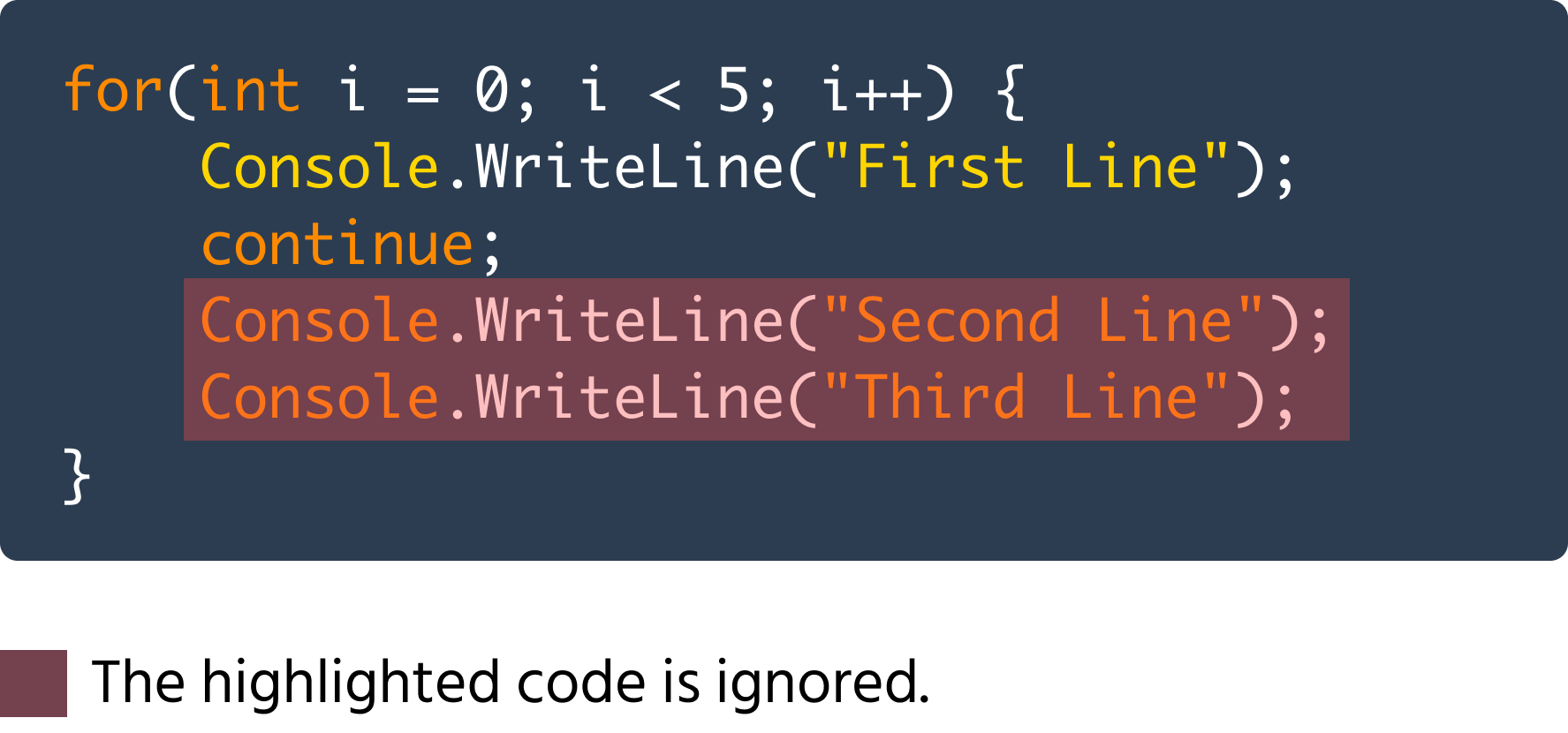
Como se puede ver en el código anterior, los métodos Console.WriteLine segundo y tercero se ignoran en cada iteración.
De manera similar, también podemos ignorar código condicionalmente usando la instrucción continue:

main.cs
1234567891011121314151617using System; namespace ConsoleApp { internal class Program { static void Main(string[] args) { for(int i = 0; i < 5; i++) { if(i == 3) { continue; } Console.WriteLine(i); } } } }
En el ejemplo anterior, la instrucción Console.WriteLine se omite en la cuarta iteración.
Un ejemplo más práctico de la instrucción continue es el siguiente código:
main.cs
1234567891011121314151617using System; namespace ConsoleApp { internal class Program { static void Main(string[] args) { for(int i = 0; i < 10; i++) { if(i % 2 != 0) { continue; } Console.WriteLine(i); } } } }
El código anterior itera desde los números 0 hasta 9. Verifica si i es impar usando la condición i % 2 != 0, ya que un número impar dividido por 2 siempre da un resto distinto de cero. Si un número es impar, salta a la siguiente iteración, y si un número es par no salta y, por lo tanto, muestra i. De esta manera, muestra todos los números pares entre 0 y 9.
¡Gracias por tus comentarios!
Pregunte a AI

Pregunte a AI

Pregunte lo que quiera o pruebe una de las preguntas sugeridas para comenzar nuestra charla
Instrucción Continue
La instrucción continue se utiliza para saltar a la siguiente iteración del bucle.
Cuando usamos la instrucción continue, cualquier código que le siga dentro del bloque de código se ignora y el bucle pasa a la siguiente iteración.
Veamos un ejemplo:
Como se puede ver en el código anterior, los métodos Console.WriteLine segundo y tercero se ignoran en cada iteración.
De manera similar, también podemos ignorar código condicionalmente usando la instrucción continue:
main.cs
1234567891011121314151617using System; namespace ConsoleApp { internal class Program { static void Main(string[] args) { for(int i = 0; i < 5; i++) { if(i == 3) { continue; } Console.WriteLine(i); } } } }
En el ejemplo anterior, la instrucción Console.WriteLine se omite en la cuarta iteración.
Un ejemplo más práctico de la instrucción continue es el siguiente código:
main.cs
1234567891011121314151617using System; namespace ConsoleApp { internal class Program { static void Main(string[] args) { for(int i = 0; i < 10; i++) { if(i % 2 != 0) { continue; } Console.WriteLine(i); } } } }
El código anterior itera desde los números 0 hasta 9. Verifica si i es impar usando la condición i % 2 != 0, ya que un número impar dividido por 2 siempre da un resto distinto de cero. Si un número es impar, salta a la siguiente iteración, y si un número es par no salta y, por lo tanto, muestra i. De esta manera, muestra todos los números pares entre 0 y 9.
¡Gracias por tus comentarios!
