What Are CSS Animations?
Swipe um das Menü anzuzeigen
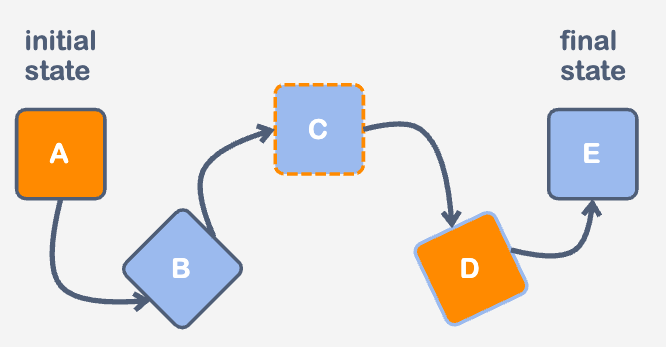
Animations can create complex and dynamic effects to improve user interactive experience. Animations do not require a specific trigger event and can be set to repeat infinitely. Additionally, animations can have multiple intermediate states between the initial and final states, providing greater flexibility and control over the visual effects produced.
Create animation
We can create animations using the @keyframes rule, which defines a set of CSS styles at various points in an animation. Also, we set the name for the animation. It must be descriptive, that is, saying what kind of animation it is.
@keyframes AnimationName {
 /* Styles at various points (at least initial and final) */
}
To determine the change of properties at a specific point in time, we can use the keywords: from (0%) and to (100%). Most often, the percentage values are used.
@keyframes AnimationName {
  0% {
    /* Properties to be changed */
  }

  10% {
    /* Properties to be changed */
  }

  30% {
    /* Properties to be changed */
  }

  /* As many as we need */

  100% {
    /* Properties to be changed */
  }
}
Once the animation has been declared, we can utilize the keyframes name as the value for the animation-name property across various elements. Another advantage of animations is that they can be applied repeatedly to multiple elements.
selector {
  animation-name: AnimationName;
}
Practice
Let's add some animation to the div element. Our task is to change the background-color property in time. The initial state will be green, then at the 60% we need to make it red, and in the final state, we need blue. Additionally, we will specify the animation-duration property to notice the animation in work.

index.html

index.css
Danke für Ihr Feedback!
Fragen Sie AI

Fragen Sie AI

Fragen Sie alles oder probieren Sie eine der vorgeschlagenen Fragen, um unser Gespräch zu beginnen
What Are CSS Animations?
Animations can create complex and dynamic effects to improve user interactive experience. Animations do not require a specific trigger event and can be set to repeat infinitely. Additionally, animations can have multiple intermediate states between the initial and final states, providing greater flexibility and control over the visual effects produced.
Create animation
We can create animations using the @keyframes rule, which defines a set of CSS styles at various points in an animation. Also, we set the name for the animation. It must be descriptive, that is, saying what kind of animation it is.
@keyframes AnimationName {
 /* Styles at various points (at least initial and final) */
}
To determine the change of properties at a specific point in time, we can use the keywords: from (0%) and to (100%). Most often, the percentage values are used.
@keyframes AnimationName {
  0% {
    /* Properties to be changed */
  }

  10% {
    /* Properties to be changed */
  }

  30% {
    /* Properties to be changed */
  }

  /* As many as we need */

  100% {
    /* Properties to be changed */
  }
}
Once the animation has been declared, we can utilize the keyframes name as the value for the animation-name property across various elements. Another advantage of animations is that they can be applied repeatedly to multiple elements.
selector {
  animation-name: AnimationName;
}
Practice
Let's add some animation to the div element. Our task is to change the background-color property in time. The initial state will be green, then at the 60% we need to make it red, and in the final state, we need blue. Additionally, we will specify the animation-duration property to notice the animation in work.
index.html
index.css
Danke für Ihr Feedback!
