Comments and Communication
Swipe um das Menü anzuzeigen
Excel ermöglicht es Mitwirkenden, direkt in freigegebenen Arbeitsmappen über Kommentare und Erwähnungen zu kommunizieren. Dies unterstützt Teams dabei, Änderungen zu besprechen, Fragen zu stellen und Daten zu überprüfen, ohne auf externe Nachrichtendienste angewiesen zu sein.
Kommentare sind besonders nützlich, wenn mehrere Benutzer an Berichten, Budgets, Prognosen oder Projektübersichten arbeiten.
Verständnis von Thread-Kommentaren
Moderne Excel-Versionen verwenden Thread-Kommentare, die es Benutzern ermöglichen, Diskussionen an bestimmte Zellen anzuhängen.
Wenn ein Kommentar hinzugefügt wird:
- Erscheint ein kleiner Indikator in der Zelle;
- Mitwirkende können auf die Diskussion antworten;
- Die Unterhaltung bleibt mit den Arbeitsblattdaten verbunden.
Dies macht die Kommunikation in Arbeitsmappen organisierter und leichter nachzuverfolgen.
Hinzufügen von Kommentaren zu Zellen
Um einen Kommentar einzufügen:
- Zelle auswählen;
- Zelle mit der rechten Maustaste anklicken;
- Neuer Kommentar auswählen;
- Nachricht eingeben.
Kommentare werden häufig verwendet, um:
- Datenaktualisierungen anzufordern;
- Berechnungen zu erläutern;
- Ungewöhnliche Werte zu überprüfen;
- Rückmeldungen für Mitwirkende zu hinterlassen.
Da Kommentare an Arbeitsblattzellen angehängt bleiben, bleiben Diskussionen mit den relevanten Daten verbunden.
Verwendung von Erwähnungen
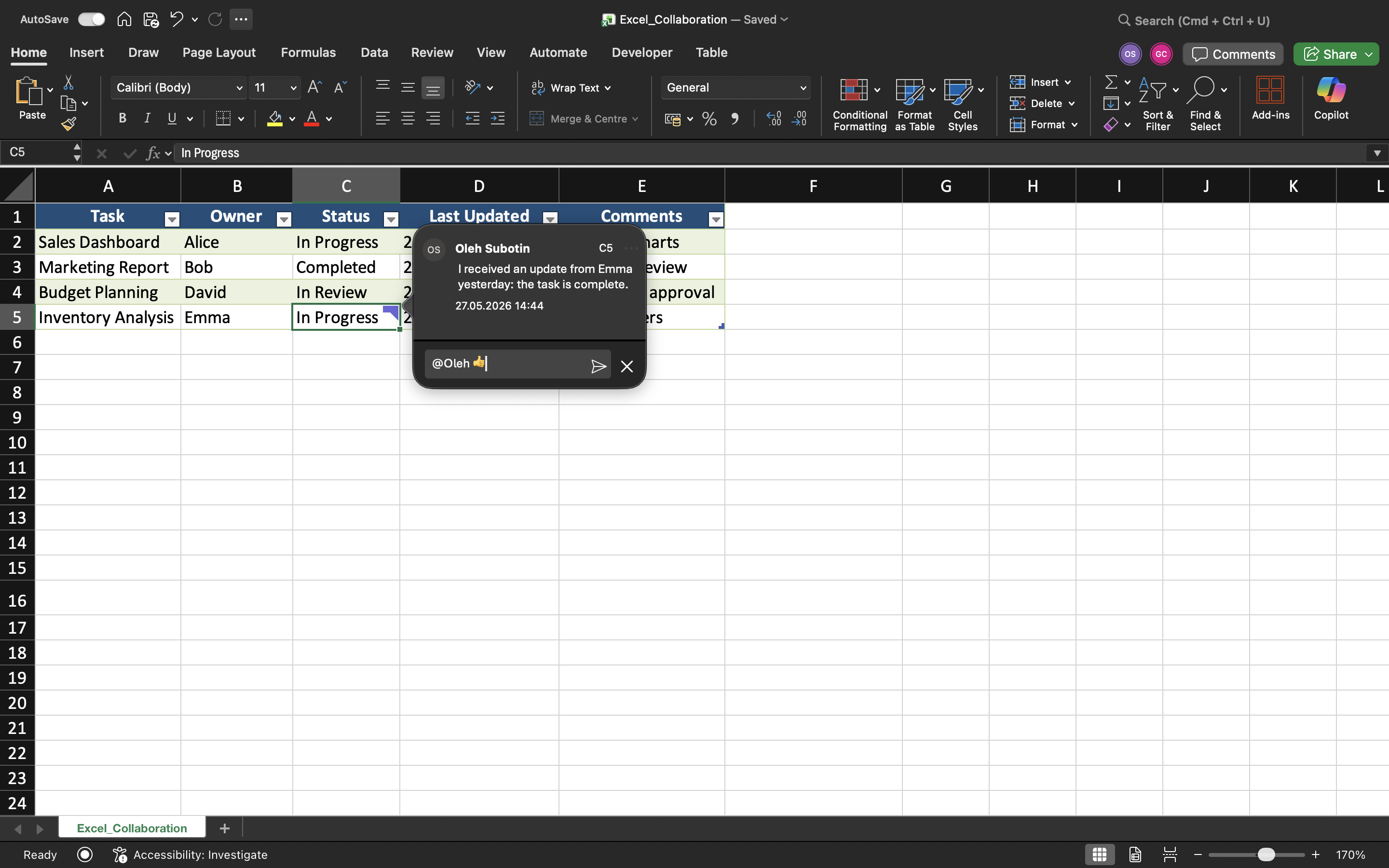
Excel unterstützt @Erwähnungen in Kommentaren. Erwähnungen benachrichtigen bestimmte Mitwirkende und lenken die Aufmerksamkeit auf wichtige Änderungen in der Arbeitsmappe.
Beispiel:
@Daniel Bitte überprüfe die Umsatzzahlen für Q3.
Wenn ein Mitwirkender erwähnt wird, kann Excel je nach Freigabeumgebung und Kontoeinstellungen eine Benachrichtigung senden.
Erwähnungen verbessern die Kommunikation und verringern Missverständnisse bei der Zusammenarbeit an Projekten.
Kommentare auflösen
Sobald ein Problem erledigt oder überprüft wurde, können Kommentare als Erledigt markiert werden.
Erledigte Kommentare:
- Bleiben im Verlauf der Arbeitsmappe gespeichert;
- Reduzieren die Unübersichtlichkeit im Arbeitsblatt;
- Helfen Teams, abgeschlossene Diskussionen nachzuverfolgen.
Dies sorgt für übersichtlichere Arbeitsabläufe bei der Zusammenarbeit, insbesondere in großen, gemeinsam genutzten Arbeitsmappen.
Notizen vs. Kommentare
Excel enthält außerdem Notizen, die sich von modernen Thread-Kommentaren unterscheiden.
In modernen kollaborativen Arbeitsabläufen werden Kommentare in der Regel Notizen vorgezogen.
Aufgabe
Die Arbeitsmappe enthält einen gemeinsamen Projekt-Tracker, der von mehreren Teammitgliedern genutzt wird. Ziel ist es, Aktualisierungen der Arbeitsmappe mithilfe von Kommentaren und Erwähnungen zu kommunizieren.
- Kommentare zu mehreren Arbeitsblattzellen hinzufügen;
- Auf einen bestehenden Kommentar antworten;
- Eine @Erwähnung in einem Kommentar verwenden;
- Eine abgeschlossene Diskussion als erledigt markieren;
- Notizen und Kommentare innerhalb der Arbeitsmappe vergleichen.
Danke für Ihr Feedback!
Fragen Sie AI

Fragen Sie AI

Fragen Sie alles oder probieren Sie eine der vorgeschlagenen Fragen, um unser Gespräch zu beginnen
Comments and Communication
Excel ermöglicht es Mitwirkenden, direkt in freigegebenen Arbeitsmappen über Kommentare und Erwähnungen zu kommunizieren. Dies unterstützt Teams dabei, Änderungen zu besprechen, Fragen zu stellen und Daten zu überprüfen, ohne auf externe Nachrichtendienste angewiesen zu sein.
Kommentare sind besonders nützlich, wenn mehrere Benutzer an Berichten, Budgets, Prognosen oder Projektübersichten arbeiten.
Verständnis von Thread-Kommentaren
Moderne Excel-Versionen verwenden Thread-Kommentare, die es Benutzern ermöglichen, Diskussionen an bestimmte Zellen anzuhängen.
Wenn ein Kommentar hinzugefügt wird:
- Erscheint ein kleiner Indikator in der Zelle;
- Mitwirkende können auf die Diskussion antworten;
- Die Unterhaltung bleibt mit den Arbeitsblattdaten verbunden.
Dies macht die Kommunikation in Arbeitsmappen organisierter und leichter nachzuverfolgen.
Hinzufügen von Kommentaren zu Zellen
Um einen Kommentar einzufügen:
- Zelle auswählen;
- Zelle mit der rechten Maustaste anklicken;
- Neuer Kommentar auswählen;
- Nachricht eingeben.
Kommentare werden häufig verwendet, um:
- Datenaktualisierungen anzufordern;
- Berechnungen zu erläutern;
- Ungewöhnliche Werte zu überprüfen;
- Rückmeldungen für Mitwirkende zu hinterlassen.
Da Kommentare an Arbeitsblattzellen angehängt bleiben, bleiben Diskussionen mit den relevanten Daten verbunden.
Verwendung von Erwähnungen
Excel unterstützt @Erwähnungen in Kommentaren. Erwähnungen benachrichtigen bestimmte Mitwirkende und lenken die Aufmerksamkeit auf wichtige Änderungen in der Arbeitsmappe.
Beispiel:
@Daniel Bitte überprüfe die Umsatzzahlen für Q3.
Wenn ein Mitwirkender erwähnt wird, kann Excel je nach Freigabeumgebung und Kontoeinstellungen eine Benachrichtigung senden.
Erwähnungen verbessern die Kommunikation und verringern Missverständnisse bei der Zusammenarbeit an Projekten.
Kommentare auflösen
Sobald ein Problem erledigt oder überprüft wurde, können Kommentare als Erledigt markiert werden.
Erledigte Kommentare:
- Bleiben im Verlauf der Arbeitsmappe gespeichert;
- Reduzieren die Unübersichtlichkeit im Arbeitsblatt;
- Helfen Teams, abgeschlossene Diskussionen nachzuverfolgen.
Dies sorgt für übersichtlichere Arbeitsabläufe bei der Zusammenarbeit, insbesondere in großen, gemeinsam genutzten Arbeitsmappen.
Notizen vs. Kommentare
Excel enthält außerdem Notizen, die sich von modernen Thread-Kommentaren unterscheiden.
In modernen kollaborativen Arbeitsabläufen werden Kommentare in der Regel Notizen vorgezogen.
Aufgabe
Die Arbeitsmappe enthält einen gemeinsamen Projekt-Tracker, der von mehreren Teammitgliedern genutzt wird. Ziel ist es, Aktualisierungen der Arbeitsmappe mithilfe von Kommentaren und Erwähnungen zu kommunizieren.
- Kommentare zu mehreren Arbeitsblattzellen hinzufügen;
- Auf einen bestehenden Kommentar antworten;
- Eine @Erwähnung in einem Kommentar verwenden;
- Eine abgeschlossene Diskussion als erledigt markieren;
- Notizen und Kommentare innerhalb der Arbeitsmappe vergleichen.
Danke für Ihr Feedback!
