Von Daten zum Diagramm
Swipe um das Menü anzuzeigen
Excel bietet zwei Möglichkeiten, ein Diagramm zu erstellen. Empfohlene Diagramme ist der schnellere Einstiegspunkt. Excel analysiert die ausgewählten Daten und schlägt Diagrammtypen vor, die zu deren Struktur passen. Die Gruppe Diagramme auf der Registerkarte Einfügen ermöglicht die manuelle Auswahl eines beliebigen Diagrammtyps.

Säulen- / Balkendiagramm
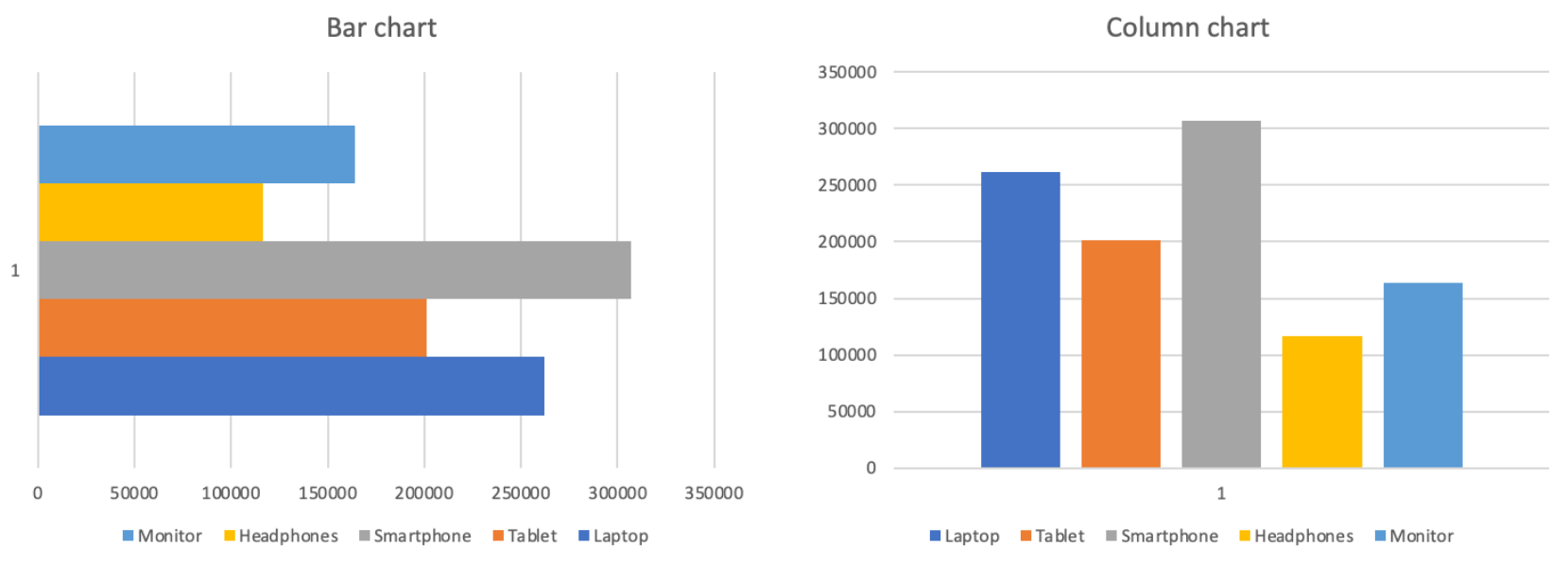
Die Höhe jeder Säule stellt den Wert dar. Abstände zwischen den Säulen betonen, dass die Kategorien diskret und unabhängig sind und nicht Teil einer kontinuierlichen Sequenz.
Vergleich:
- Gesamtumsatz nach Produkt;
- Verkäufe nach Region oder Kategorie;
- Jegliche Rangfolge oder Gegenüberstellung;
- Nicht ideal zur Darstellung von Veränderungen über die Zeit.
Liniendiagramm
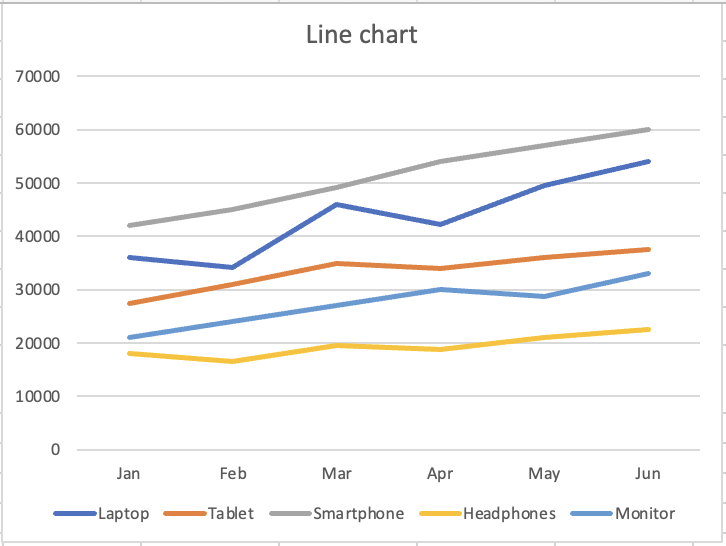
Die durchgehende Linie impliziert Bewegung und Entwicklung. Jeder Punkt ist mit dem nächsten verbunden und zeigt Richtung und Dynamik. Die visuelle Form vermittelt dem Betrachter: "Hier verändert sich etwas."
Trend über die Zeit:
- Monatlicher Umsatz pro Produkt;
- Jegliche Kennzahl, die über Zeiträume verfolgt wird;
- Vergleich von Trends mehrerer Reihen;
- Nicht ideal zum Vergleich diskreter Kategorien.
Danke für Ihr Feedback!
Fragen Sie AI

Fragen Sie AI

Fragen Sie alles oder probieren Sie eine der vorgeschlagenen Fragen, um unser Gespräch zu beginnen
Von Daten zum Diagramm
Excel bietet zwei Möglichkeiten, ein Diagramm zu erstellen. Empfohlene Diagramme ist der schnellere Einstiegspunkt. Excel analysiert die ausgewählten Daten und schlägt Diagrammtypen vor, die zu deren Struktur passen. Die Gruppe Diagramme auf der Registerkarte Einfügen ermöglicht die manuelle Auswahl eines beliebigen Diagrammtyps.
Säulen- / Balkendiagramm
Die Höhe jeder Säule stellt den Wert dar. Abstände zwischen den Säulen betonen, dass die Kategorien diskret und unabhängig sind und nicht Teil einer kontinuierlichen Sequenz.
Vergleich:
- Gesamtumsatz nach Produkt;
- Verkäufe nach Region oder Kategorie;
- Jegliche Rangfolge oder Gegenüberstellung;
- Nicht ideal zur Darstellung von Veränderungen über die Zeit.
Liniendiagramm
Die durchgehende Linie impliziert Bewegung und Entwicklung. Jeder Punkt ist mit dem nächsten verbunden und zeigt Richtung und Dynamik. Die visuelle Form vermittelt dem Betrachter: "Hier verändert sich etwas."
Trend über die Zeit:
- Monatlicher Umsatz pro Produkt;
- Jegliche Kennzahl, die über Zeiträume verfolgt wird;
- Vergleich von Trends mehrerer Reihen;
- Nicht ideal zum Vergleich diskreter Kategorien.
Danke für Ihr Feedback!
