Tabellen
Swipe um das Menü anzuzeigen
Bereiche sind leistungsstark, aber sie sind statisch. Wenn Ihre Daten ständig wachsen – neue Zeilen, neue Kunden, neue Transaktionen – benötigen Sie etwas Intelligenteres. Hier kommen Tabellen ins Spiel.
Wichtigste Erkenntnisse
- Eine Tabelle verwandelt einen Bereich in einen strukturierten, wachsenden Datensatz;
- Mit Strg / Cmd + T lässt sich jeder Bereich in eine Tabelle umwandeln;
- Tabellen bieten Filter, strukturierte Verweise und automatische Erweiterung;
- Jede Spalte = ein Datentyp. Jede Zeile = ein Datensatz. Keine leeren Zeilen innerhalb der Tabelle.
Was ist eine Tabelle?
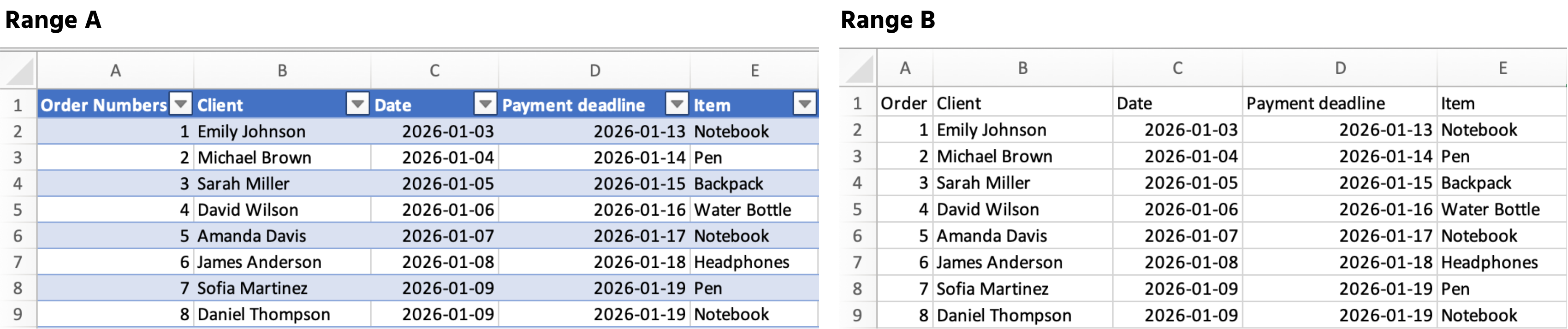
Eine Tabelle ist ein strukturierter Bereich, der Excel signalisiert: "Dies ist ein wachsender Datensatz, behandle ihn als solchen."
Sobald Sie einen Bereich in eine Tabelle umwandeln, führt Excel automatisch Folgendes aus:
- Fügt Filter und Sortierschaltflächen zu den Überschriften hinzu;
- Erweitert Formeln und Formatierungen auf jede neue Zeile;
- Verwendet strukturierte Verweise wie
Sales[Total_Cost]anstelle vonK2:K54.
So erstellen Sie eine Tabelle
- Irgendwo innerhalb Ihrer Daten klicken;
- Strg + T (Windows) oder Cmd + T (Mac) drücken;
- Bestätigen, dass Ihre Daten Überschriften haben → auf OK klicken.
War alles klar?
Danke für Ihr Feedback!
Abschnitt 1. Kapitel 2
Fragen Sie AI

Fragen Sie AI

Fragen Sie alles oder probieren Sie eine der vorgeschlagenen Fragen, um unser Gespräch zu beginnen
Abschnitt 1. Kapitel 2
