Einfache Formeln und Berechnungen in Excel
Swipe um das Menü anzuzeigen
Die Formeleingabe kann Ausdrücke umwandeln und deren Ergebnisse liefern. Sie unterstützt die meisten gängigen Ausdrücke, die einem einfallen.
Natürlich können diese kombiniert werden, um komplexere Ausdrücke zu erstellen. Excel übernimmt alle Berechnungen für Sie, mit oder ohne Klammern. Zum Beispiel:

Aber denken Sie daran, dies ist Excel und keine Taschenrechner-App. Das volle Potenzial entfaltet sich durch die Verwendung von Zellbezügen anstelle von festen Werten. Zum Beispiel kann die Summe von Werten in einer Zeile mit Zellbezügen berechnet werden. Wenn sich der Wert in einer Zelle ändert, wird die Summe automatisch aktualisiert.

Es ist wichtig, darauf zu achten, dass eine Zelle nicht zur Berechnung eines Wertes für sich selbst verwendet wird, wenn sie bereits in der Berechnung der zu aktualisierenden Zelle verwendet wurde. Dies kann zu zirkulären Bezügen und möglicherweise zu falschen Ergebnissen führen.
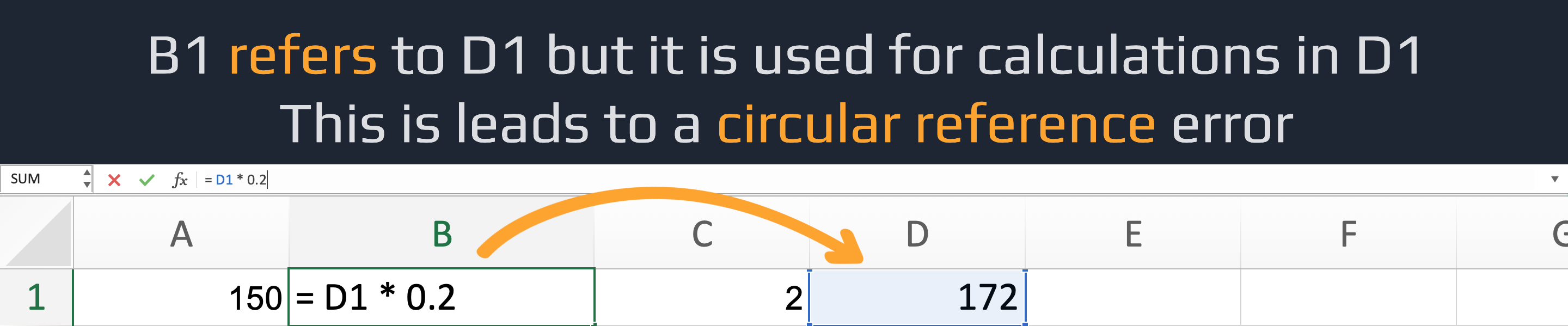
Ein Fehler durch zirkulären Bezug in Excel tritt auf, wenn eine Formel direkt oder über eine Kette anderer Zellen auf ihre eigene Zelle verweist. Dies erzeugt eine Endlosschleife, die Excel nicht auflösen kann. Zum Beispiel verursacht =A1 + 5 in Zelle A1 einen direkten zirkulären Bezug.
Danke für Ihr Feedback!
Fragen Sie AI

Fragen Sie AI

Fragen Sie alles oder probieren Sie eine der vorgeschlagenen Fragen, um unser Gespräch zu beginnen
