Verwalten von Dateien im Arbeitsbereich
Swipe um das Menü anzuzeigen

In Databricks gibt es eine klare Unterscheidung zwischen Workspace-Dateien (Ihre Notebooks und Ihren Code) und Datenobjekten (Ihre Tabellen und Rohdateien). Der Katalog ist das moderne Gateway zur Verwaltung und Entdeckung dieser Datenobjekte.
Eines der ersten Dinge, die Sie lernen müssen, ist, dass Databricks "zwei Seiten" hat. Eine Seite ist für Ihre Arbeit – Ihre Skripte und Notebooks. Die andere Seite ist für die eigentlichen Daten, die Sie analysieren. Zu verstehen, wo sich was befindet, erspart Ihnen viel Frustration, wenn Sie mit dem Schreiben von Code beginnen.
Workspace-Dateien: Wo Ihr Code lebt
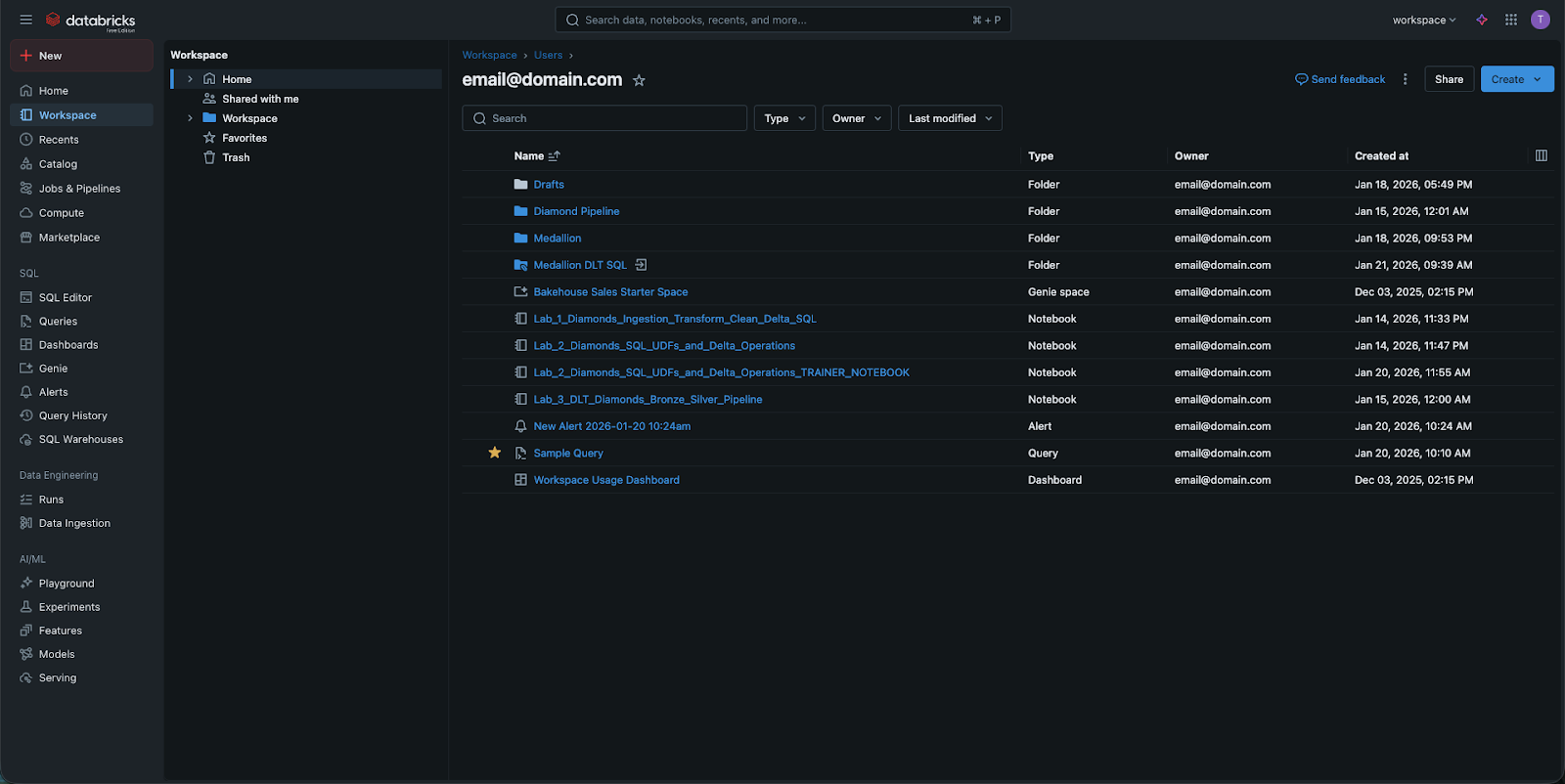
Wenn Sie auf die Workspace-Registerkarte in der Seitenleiste klicken, sehen Sie ein Dateisystem für Ihre Logik.
- Hier erstellen Sie Ordner, Unterordner und Notebooks.
- Sie können hier auch Nicht-Notebook-Dateien speichern, wie kleine Python-Skripte oder Anforderungsdateien.
- Wichtig: Dies sind keine "Datentabellen". Sie speichern hier keine 100GB-CSV-Datei. Dieser Bereich ist für Ihr geistiges Eigentum – den Code, der Databricks anweist, was zu tun ist.
Der Katalog: Speicherort Ihrer Daten
Um Ihre Daten anzuzeigen, wechseln Sie zum Tab Katalog. Früher nutzte Databricks hauptsächlich das DBFS (Databricks File System). Obwohl Sie in älterer Dokumentation noch Hinweise auf DBFS finden können, gilt dies inzwischen als veralteter Ansatz.
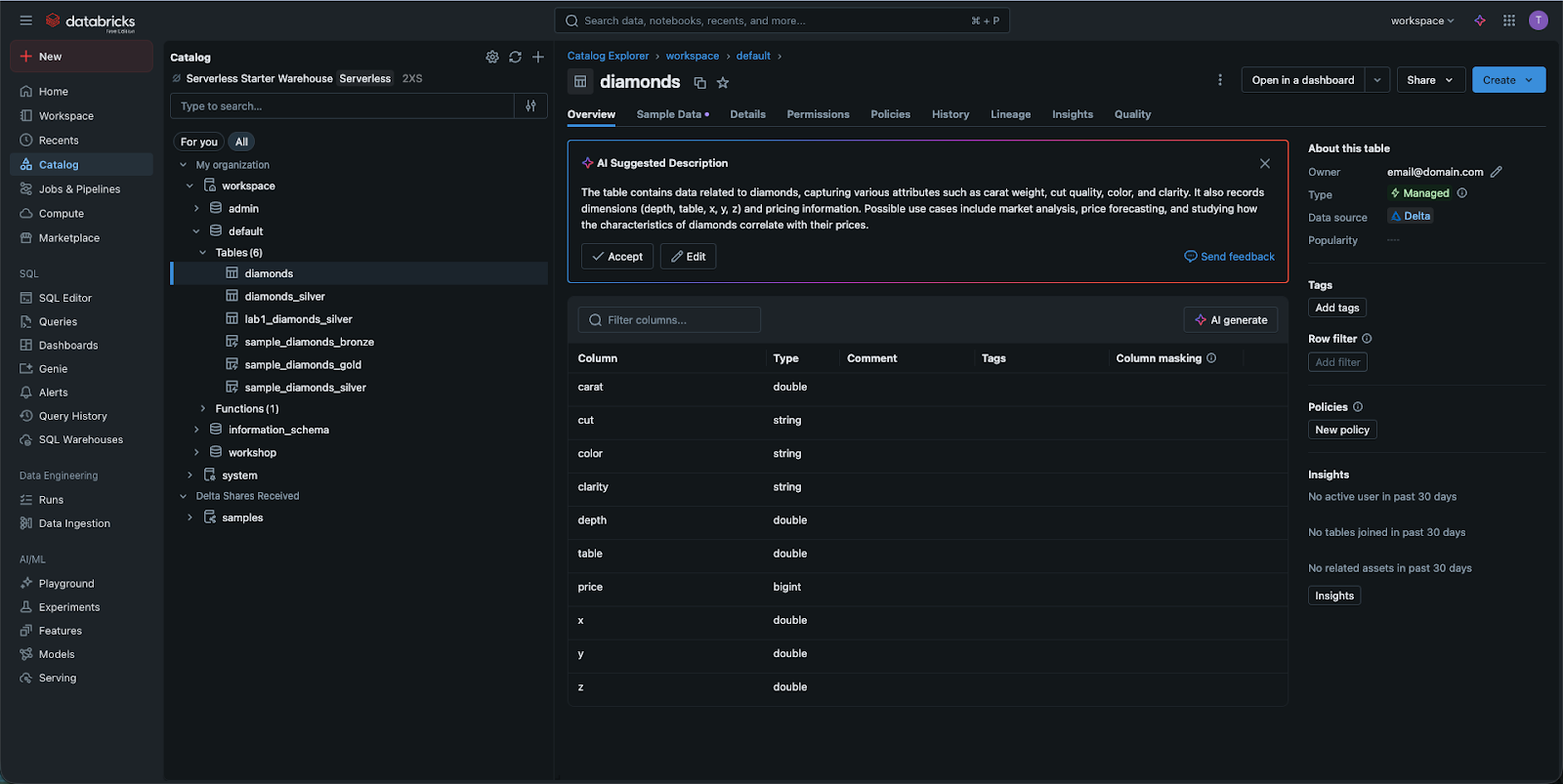
Heute wird der Katalog (basierend auf Unity Catalog) verwendet. Dieser bietet eine strukturierte, „SQL-ähnliche“ Möglichkeit, Ihre Daten zu betrachten:
- Unity-Kataloge: logische Gruppierungen (z. B. production_data oder marketing_data) von Schemata;
- Schemata (oder Datenbanken): Organisation von Tabellen innerhalb eines Katalogs sowie Volumes (siehe unten), ML-Modelle und Funktionen;
- Tabellen: die tatsächlichen Zeilen und Spalten, die abgefragt werden.
Volumes: Umgang mit Rohdateien
Manchmal liegen Daten noch nicht als Tabelle vor – zum Beispiel als rohe CSV- oder Bilddateien. In der modernen Databricks-Oberfläche werden diese in Volumes gespeichert. Ein Volume kann als Brücke zwischen der alten „Ordner“-Denkweise und der neuen, sicheren „Katalog“-Denkweise betrachtet werden. Sie können diese Volumes direkt in der Katalog-Oberfläche durchsuchen, um Ihre Rohdateien zu sehen, bevor sie in Tabellen geladen werden.
Warum ist diese Unterscheidung wichtig?
Letztlich geht es um Sicherheit und Performance. Durch die Trennung von Code im Workspace und Daten im Catalog ermöglicht Databricks Administratoren, einem Benutzer die Berechtigung zum Bearbeiten eines Notebooks zu geben, ohne ihm zwangsläufig Zugriff auf sensible Daten in einer Tabelle zu gewähren. Diese „Trennung der Verantwortlichkeiten“ macht Databricks zu einer unternehmensgerechten Plattform.
1. Wenn Sie einen neuen Ordner erstellen möchten, um Ihre Python-Notebooks zu organisieren, welche Seitenleisten-Registerkarte sollten Sie verwenden?
2. Was ist die moderne, empfohlene Methode zur Verwaltung und Entdeckung von Datentabellen in Databricks?
3. Welcher veraltete Begriff könnte in älterer Databricks-Dokumentation erscheinen, der jetzt durch Katalog und Volumes ersetzt wird?
Danke für Ihr Feedback!
Fragen Sie AI

Fragen Sie AI

Fragen Sie alles oder probieren Sie eine der vorgeschlagenen Fragen, um unser Gespräch zu beginnen
Verwalten von Dateien im Arbeitsbereich
In Databricks gibt es eine klare Unterscheidung zwischen Workspace-Dateien (Ihre Notebooks und Ihren Code) und Datenobjekten (Ihre Tabellen und Rohdateien). Der Katalog ist das moderne Gateway zur Verwaltung und Entdeckung dieser Datenobjekte.
Eines der ersten Dinge, die Sie lernen müssen, ist, dass Databricks "zwei Seiten" hat. Eine Seite ist für Ihre Arbeit – Ihre Skripte und Notebooks. Die andere Seite ist für die eigentlichen Daten, die Sie analysieren. Zu verstehen, wo sich was befindet, erspart Ihnen viel Frustration, wenn Sie mit dem Schreiben von Code beginnen.
Workspace-Dateien: Wo Ihr Code lebt
Wenn Sie auf die Workspace-Registerkarte in der Seitenleiste klicken, sehen Sie ein Dateisystem für Ihre Logik.
- Hier erstellen Sie Ordner, Unterordner und Notebooks.
- Sie können hier auch Nicht-Notebook-Dateien speichern, wie kleine Python-Skripte oder Anforderungsdateien.
- Wichtig: Dies sind keine "Datentabellen". Sie speichern hier keine 100GB-CSV-Datei. Dieser Bereich ist für Ihr geistiges Eigentum – den Code, der Databricks anweist, was zu tun ist.
Der Katalog: Speicherort Ihrer Daten
Um Ihre Daten anzuzeigen, wechseln Sie zum Tab Katalog. Früher nutzte Databricks hauptsächlich das DBFS (Databricks File System). Obwohl Sie in älterer Dokumentation noch Hinweise auf DBFS finden können, gilt dies inzwischen als veralteter Ansatz.
Heute wird der Katalog (basierend auf Unity Catalog) verwendet. Dieser bietet eine strukturierte, „SQL-ähnliche“ Möglichkeit, Ihre Daten zu betrachten:
- Unity-Kataloge: logische Gruppierungen (z. B. production_data oder marketing_data) von Schemata;
- Schemata (oder Datenbanken): Organisation von Tabellen innerhalb eines Katalogs sowie Volumes (siehe unten), ML-Modelle und Funktionen;
- Tabellen: die tatsächlichen Zeilen und Spalten, die abgefragt werden.
Volumes: Umgang mit Rohdateien
Manchmal liegen Daten noch nicht als Tabelle vor – zum Beispiel als rohe CSV- oder Bilddateien. In der modernen Databricks-Oberfläche werden diese in Volumes gespeichert. Ein Volume kann als Brücke zwischen der alten „Ordner“-Denkweise und der neuen, sicheren „Katalog“-Denkweise betrachtet werden. Sie können diese Volumes direkt in der Katalog-Oberfläche durchsuchen, um Ihre Rohdateien zu sehen, bevor sie in Tabellen geladen werden.
Warum ist diese Unterscheidung wichtig?
Letztlich geht es um Sicherheit und Performance. Durch die Trennung von Code im Workspace und Daten im Catalog ermöglicht Databricks Administratoren, einem Benutzer die Berechtigung zum Bearbeiten eines Notebooks zu geben, ohne ihm zwangsläufig Zugriff auf sensible Daten in einer Tabelle zu gewähren. Diese „Trennung der Verantwortlichkeiten“ macht Databricks zu einer unternehmensgerechten Plattform.
Danke für Ihr Feedback!
