What Is Responsive Web Design?
Stryg for at vise menuen
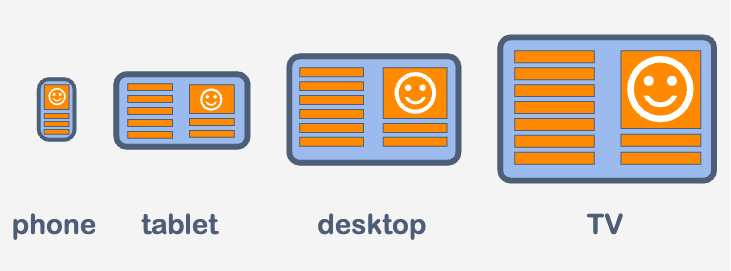
We can not imagine modern web development without adaptive/responsive designs. It allows users to use web sources equally on any device: a smartphone, a tablet, a desktop, or a TV.
How does it work?
- Development team defines how each element will look depending on the screen size;
- Set the necessary instructions to the code;
- Browser tracks the changes of a viewport;
- Browser applies the rules that the dev team put in the form of the code.
Media-queries
Media-query is what makes adaptive/responsive designs possible. With the help of these queries, developers can set the styles of any element depending on the screen size.
Note
We can perceive media-query as instructions: "If a user screen is a desktop, apply such styles to the element. If a user screen is a smartphone, apply other styles to the element. And so on.".
The basic syntax of the media-query is as follows:
@media <media_type> <operator> (<media_feature>) {
 /* CSS rules */
}
<media_type>- declares the type of device. Possible values:all- default value. If nothing is specified, the media rule works for all devices;print- the media rule works for the devices that produce printed documents, like printers;screen- the media rule works for all devices with the physical screen.
<media_feature>- declares device characteristics. Most common use:min-width:- the minimum width of the viewport;max-width:- the maximum width of the viewport.
<operator>- media-type and media-feature are separated by the optional logical operator. Its values can be:andor,.
Note
In the following chapters, we will consider using media-queries in practice.
Tak for dine kommentarer!
Spørg AI

Spørg AI

Spørg om hvad som helst eller prøv et af de foreslåede spørgsmål for at starte vores chat
What Is Responsive Web Design?
We can not imagine modern web development without adaptive/responsive designs. It allows users to use web sources equally on any device: a smartphone, a tablet, a desktop, or a TV.
How does it work?
- Development team defines how each element will look depending on the screen size;
- Set the necessary instructions to the code;
- Browser tracks the changes of a viewport;
- Browser applies the rules that the dev team put in the form of the code.
Media-queries
Media-query is what makes adaptive/responsive designs possible. With the help of these queries, developers can set the styles of any element depending on the screen size.
Note
We can perceive media-query as instructions: "If a user screen is a desktop, apply such styles to the element. If a user screen is a smartphone, apply other styles to the element. And so on.".
The basic syntax of the media-query is as follows:
@media <media_type> <operator> (<media_feature>) {
 /* CSS rules */
}
<media_type>- declares the type of device. Possible values:all- default value. If nothing is specified, the media rule works for all devices;print- the media rule works for the devices that produce printed documents, like printers;screen- the media rule works for all devices with the physical screen.
<media_feature>- declares device characteristics. Most common use:min-width:- the minimum width of the viewport;max-width:- the maximum width of the viewport.
<operator>- media-type and media-feature are separated by the optional logical operator. Its values can be:andor,.
Note
In the following chapters, we will consider using media-queries in practice.
Tak for dine kommentarer!
