Redigering i realtid
Stryg for at vise menuen
En af de største fordele ved cloud-baserede Excel-projektmapper er samarbejde i realtid. Flere brugere kan arbejde i den samme fil samtidigt uden at oprette separate kopier af projektmappen.
Når en delt projektmappe er gemt i OneDrive eller SharePoint, synkroniserer Excel automatisk opdateringer på tværs af alle samarbejdspartnere.
Forståelse af Samredigering
Samarbejde i realtid i Excel kaldes ofte samredigering. Dette gør det muligt for flere brugere at redigere projektmappen på samme tid.
Når samarbejdspartnere åbner den samme fil:
- Viser Excel aktive brugere øverst til højre;
- Ændringer vises automatisk, mens brugerne redigerer projektmappen;
- Opdateringer synkroniseres løbende i baggrunden.
Dette skaber et langt hurtigere arbejdsflow sammenlignet med at sende opdaterede projektmapper som vedhæftede filer manuelt.
Se Ændringer i Projektmappen Live
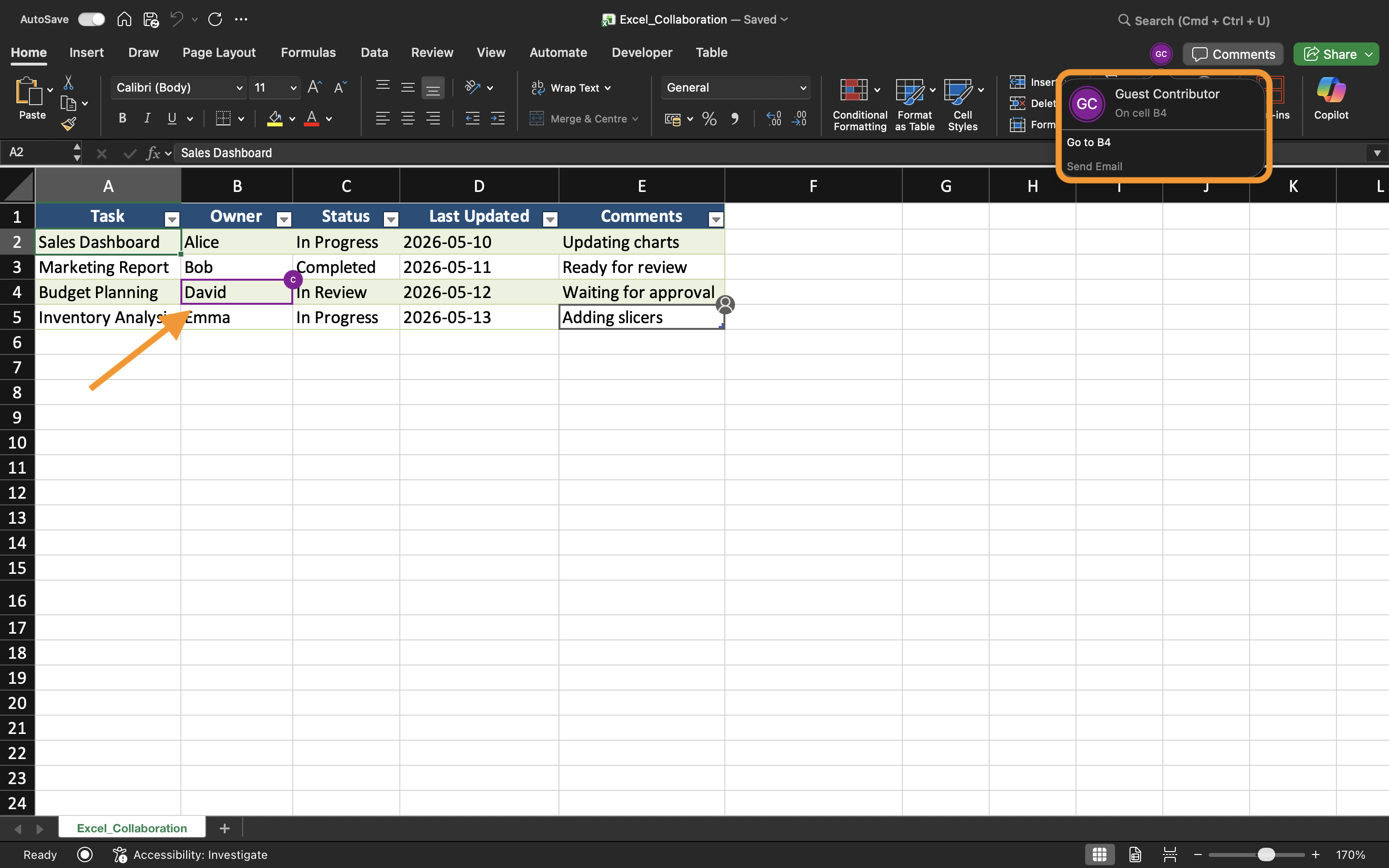
Når samarbejdspartnere redigerer projektmappen, opdaterer Excel celler i realtid. Brugere kan bemærke fremhævede markeringer eller indikatorer, der viser, hvor en anden person arbejder i øjeblikket.
For eksempel, hvis én bruger opdaterer salgstal, mens en anden redigerer regionale data, kan begge ændringer vises næsten øjeblikkeligt i den delte projektmappe.
Dette hjælper teams med at forblive synkroniserede under samarbejdssessioner.
Undgå Redigeringskonflikter
Selvom Excel håndterer de fleste synkroniseringer automatisk, kan der stadig opstå konflikter, når flere brugere redigerer de samme celler samtidigt.
For at reducere redigeringsproblemer:
- Tildel forskellige områder af regnearket til samarbejdspartnere;
- Kommunikér før større strukturelle ændringer foretages;
- Undgå at slette regneark under aktivt samarbejde;
- Hold AutoSave aktiveret.
Disse fremgangsmåder hjælper med at opretholde et mere smidigt delt arbejdsflow.
Arbejde på Tværs af Excel til Desktop og Web
Samarbejde i realtid fungerer både i Excel Desktop App og Excel til Web. Brugere kan samarbejde, selv når de arbejder fra forskellige enheder og operativsystemer.
Dog kan nogle avancerede Excel-funktioner opføre sig forskelligt afhængigt af den anvendte platform. For den bedste samarbejdsoplevelse bør teams så vidt muligt bruge kompatible Excel-versioner.
Fordele ved Redigering i Realtid
Redigering i realtid forbedrer teamwork ved at gøre samarbejdet hurtigere og mere gennemsigtigt. Teams kan straks gennemgå opdateringer, reducere kommunikationsforsinkelser og undgå forvirring forårsaget af forældede projektmapper.
Dette arbejdsflow er især nyttigt til:
- Budgetplanlægning;
- Salgsrapportering;
- Projektopfølgning;
- Teamplanlægning;
- Driftsdashboards.
Opgave
Projektmappen indeholder en delt kvartalsvis salgsrapport, som administreres af flere afdelingsmedlemmer. Målet er at teste realtidssamarbejde og observere, hvordan opdateringer i projektmappen synkroniseres mellem brugere.
- Åbn den delte projektmappe fra to separate enheder eller browsersessioner;
- Redigér forskellige områder af regnearket samtidigt;
- Observer hvordan Excel synkroniserer ændringer i projektmappen;
- Bekræft at opdateringer vises automatisk for alle samarbejdspartnere;
- Test samarbejde ved brug af både Excel til Desktop og Excel til internettet.
Tak for dine kommentarer!
Spørg AI

Spørg AI

Spørg om hvad som helst eller prøv et af de foreslåede spørgsmål for at starte vores chat
