Adgangskodebeskyttelse
Stryg for at vise menuen
Excel giver brugere mulighed for at anvende adgangskodebeskyttelse på projektmapper for at begrænse uautoriseret adgang. Adgangskoder hjælper med at beskytte følsomme forretningsfiler såsom finansielle rapporter, medarbejderregistre eller fortrolige planlægningsdokumenter. Adgangskodebeskyttelse tilføjer et ekstra lag af kontrol, når projektmapper deles mellem teams eller opbevares eksternt.
Forståelse af adgangskoder til projektmapper
Excel understøtter forskellige typer adgangskodebeskyttelse. Brugere kan kræve en adgangskode for at åbne en projektmappe eller begrænse redigeringstilladelser inde i filen.
En adgangskode til projektmappen hjælper med at forhindre uautoriserede brugere i at få adgang til indholdet. Redigeringsbegrænsninger gør det derimod muligt for brugere at åbne projektmappen, men begrænser adgangen til ændringer.
Beskyttelse af en projektmappe med adgangskode
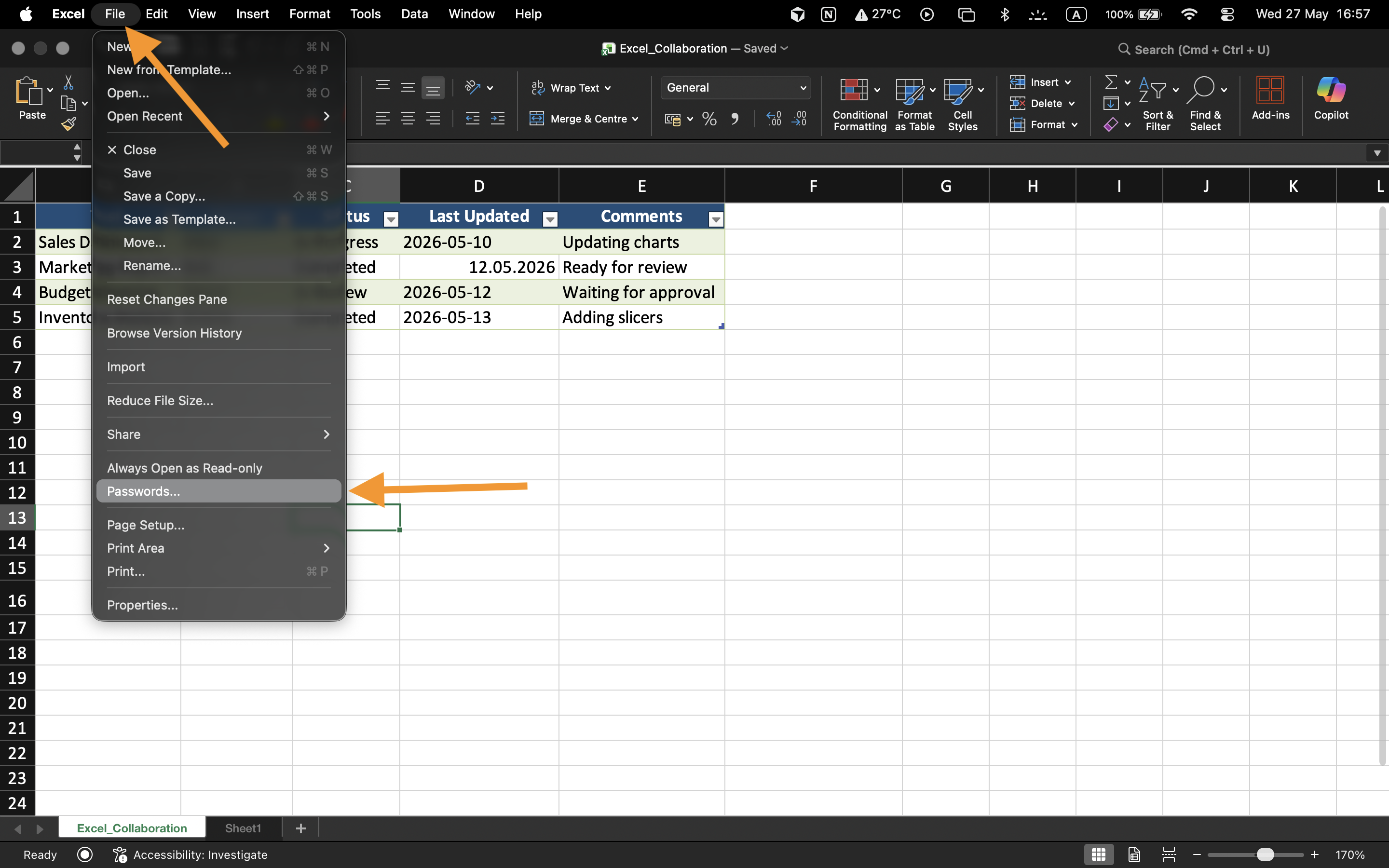
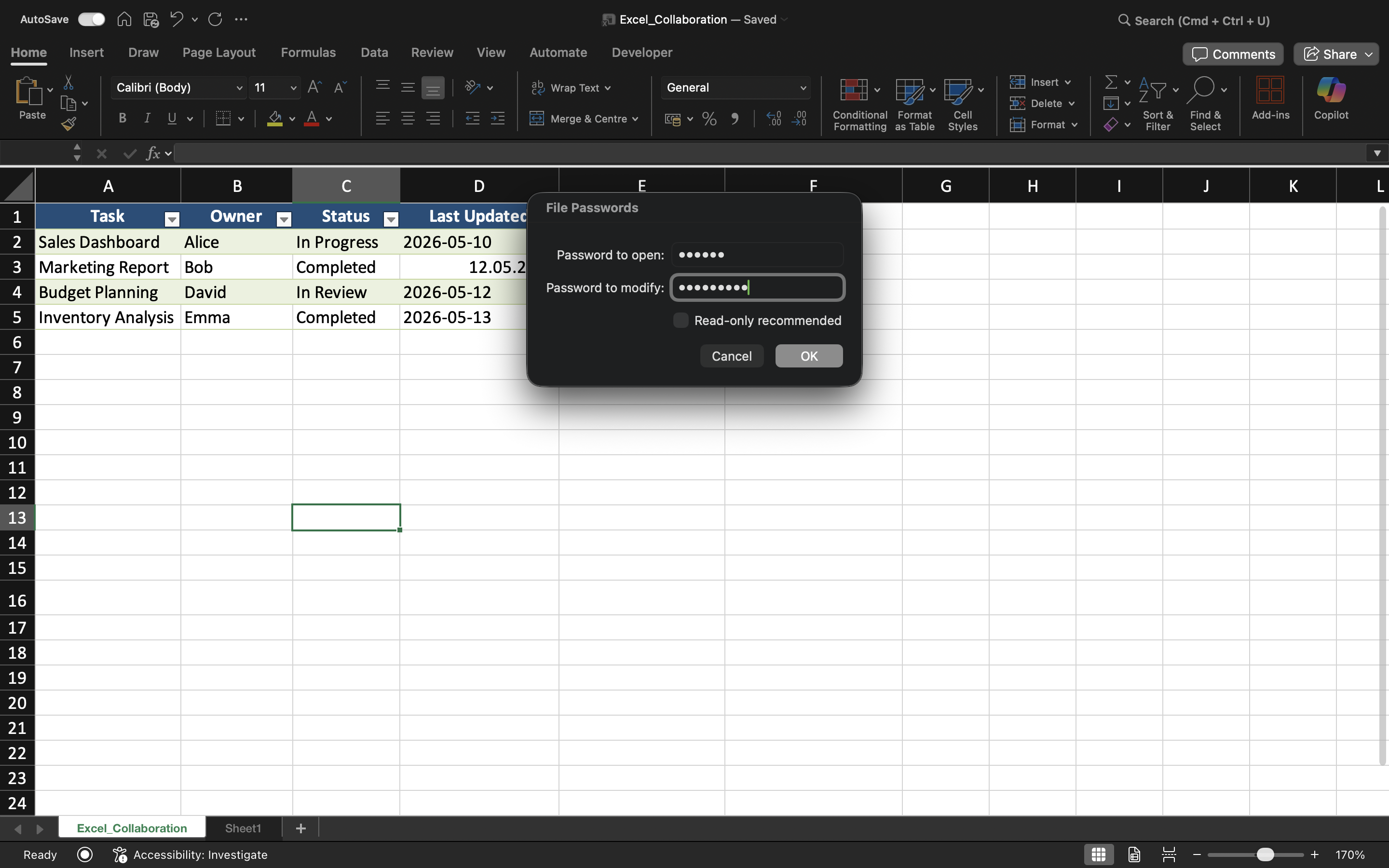
Sådan anvendes adgangskodebeskyttelse:
- Åbn projektmappen;
- Vælg Filer → Oplysninger;
- Vælg Beskyt projektmappe;
- Vælg Krypter med adgangskode;
- Indtast og bekræft adgangskoden.
Når filen er gemt, vil projektmappen kræve adgangskoden, hver gang brugere forsøger at åbne filen.
Forståelse af adgangskodebegrænsninger
Adgangskoder til projektmapper forbedrer filens sikkerhed, men svage adgangskoder kan stadig være sårbare over for uautoriseret adgang.
For bedre beskyttelse:
- Brug stærke adgangskoder;
- Undgå simple ord eller datoer;
- Opbevar adgangskoder sikkert;
- Del kun adgangskoder med autoriserede samarbejdspartnere.
Redigeringsbegrænsninger
Excel kan også beskytte redigering af projektmapper uden at blokere for filadgang. Dette gør det muligt for brugere at gennemgå indholdet, mens ændringer begrænses.
Denne type beskyttelse er nyttig for færdige rapporter, skabeloner eller delte dashboards, der ikke må ændres ved en fejl.
Hvornår adgangskodebeskyttelse er nyttig
Adgangskodebeskyttelse bruges ofte, når projektmapper indeholder fortrolige finansielle oplysninger, medarbejderdata, forretningsprognoser eller følsomme driftsrapporter. Det er især vigtigt, når filer deles uden for organisationen eller opbevares på eksterne enheder.
Opgave
Projektmappen indeholder fortrolige oplysninger om medarbejderløn, som kun skal være tilgængelige for autoriserede ledere. Målet er at beskytte projektmappen med en adgangskode og teste adgangsbegrænsninger.
- Åbn indstillingerne for projektmappebeskyttelse;
- Anvend en adgangskode til projektmappen;
- Gem og luk projektmappen;
- Genåbn filen og verificer adgangskodebeskyttelsen;
- Test redigeringsbegrænsninger på den beskyttede projektmappe.
Tak for dine kommentarer!
Spørg AI

Spørg AI

Spørg om hvad som helst eller prøv et af de foreslåede spørgsmål for at starte vores chat
Adgangskodebeskyttelse
Excel giver brugere mulighed for at anvende adgangskodebeskyttelse på projektmapper for at begrænse uautoriseret adgang. Adgangskoder hjælper med at beskytte følsomme forretningsfiler såsom finansielle rapporter, medarbejderregistre eller fortrolige planlægningsdokumenter. Adgangskodebeskyttelse tilføjer et ekstra lag af kontrol, når projektmapper deles mellem teams eller opbevares eksternt.
Forståelse af adgangskoder til projektmapper
Excel understøtter forskellige typer adgangskodebeskyttelse. Brugere kan kræve en adgangskode for at åbne en projektmappe eller begrænse redigeringstilladelser inde i filen.
En adgangskode til projektmappen hjælper med at forhindre uautoriserede brugere i at få adgang til indholdet. Redigeringsbegrænsninger gør det derimod muligt for brugere at åbne projektmappen, men begrænser adgangen til ændringer.
Beskyttelse af en projektmappe med adgangskode
Sådan anvendes adgangskodebeskyttelse:
- Åbn projektmappen;
- Vælg Filer → Oplysninger;
- Vælg Beskyt projektmappe;
- Vælg Krypter med adgangskode;
- Indtast og bekræft adgangskoden.
Når filen er gemt, vil projektmappen kræve adgangskoden, hver gang brugere forsøger at åbne filen.
Forståelse af adgangskodebegrænsninger
Adgangskoder til projektmapper forbedrer filens sikkerhed, men svage adgangskoder kan stadig være sårbare over for uautoriseret adgang.
For bedre beskyttelse:
- Brug stærke adgangskoder;
- Undgå simple ord eller datoer;
- Opbevar adgangskoder sikkert;
- Del kun adgangskoder med autoriserede samarbejdspartnere.
Redigeringsbegrænsninger
Excel kan også beskytte redigering af projektmapper uden at blokere for filadgang. Dette gør det muligt for brugere at gennemgå indholdet, mens ændringer begrænses.
Denne type beskyttelse er nyttig for færdige rapporter, skabeloner eller delte dashboards, der ikke må ændres ved en fejl.
Hvornår adgangskodebeskyttelse er nyttig
Adgangskodebeskyttelse bruges ofte, når projektmapper indeholder fortrolige finansielle oplysninger, medarbejderdata, forretningsprognoser eller følsomme driftsrapporter. Det er især vigtigt, når filer deles uden for organisationen eller opbevares på eksterne enheder.
Opgave
Projektmappen indeholder fortrolige oplysninger om medarbejderløn, som kun skal være tilgængelige for autoriserede ledere. Målet er at beskytte projektmappen med en adgangskode og teste adgangsbegrænsninger.
- Åbn indstillingerne for projektmappebeskyttelse;
- Anvend en adgangskode til projektmappen;
- Gem og luk projektmappen;
- Genåbn filen og verificer adgangskodebeskyttelsen;
- Test redigeringsbegrænsninger på den beskyttede projektmappe.
Tak for dine kommentarer!
