Controlling Direction
Stryg for at vise menuen
The flex-direction property enables us to determine the direction in which flex items are arranged. By default, this property is set to row, resulting in a left-to-right layout in browsers that use English as the default language. You can set it to:
flex-direction: row | column | row-reverse | column-reverse;
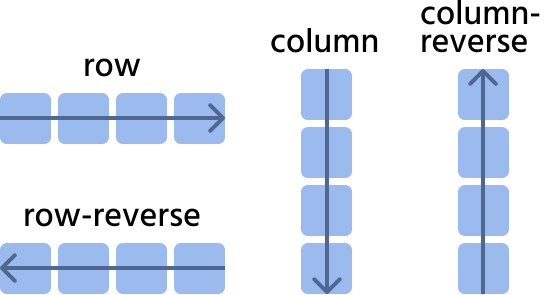
Let's consider the next website navigation as an example.
row

index.html

index.css
row-reverse
index.html
index.css
column
Pay attention to the width of the items; they cover the entire width of the parent.
index.html
index.css
column-reverse
index.html
index.css
Var alt klart?
Tak for dine kommentarer!
Sektion 4. Kapitel 2
Spørg AI

Spørg AI

Spørg om hvad som helst eller prøv et af de foreslåede spørgsmål for at starte vores chat
Sektion 4. Kapitel 2
