Challenge: Build a Vertical Blog Card with Flexbox
Stryg for at vise menuen
Task
Let's create a blog card. We need to change the default positioning behavior with the help of flex.
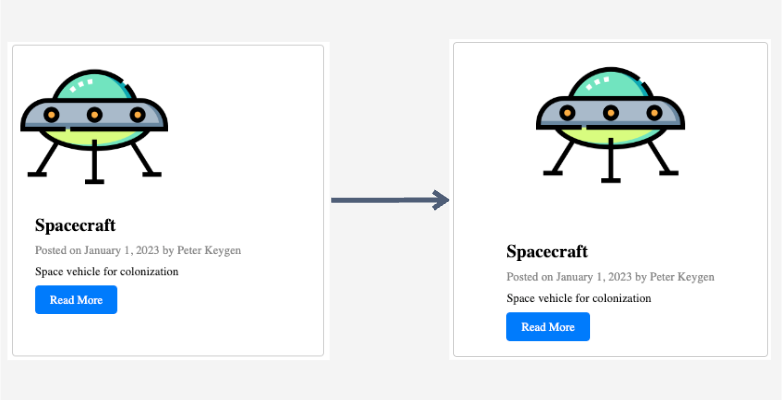
The task is to:
- Identify the parent element containing both the post image (
imgtag with thepost-imageclass name) and post information (divtag with thepost-infoclass name). - Apply flex properties to the parent element (
divtag with theblog-cardclass name). - Horizontally center the items within the card.
- Ensure that items cover the entire height of the card.

index.html

index.css
display: flex;can only be applied to the parent element.- The default flex direction is row, so we need to change it using the
flex-direction: column;property. - To center items horizontally, use
align-items: center;. - To space items vertically, use
justify-content: space-between;.
index.html
index.css
Var alt klart?
Tak for dine kommentarer!
Sektion 4. Kapitel 7
Spørg AI

Spørg AI

Spørg om hvad som helst eller prøv et af de foreslåede spørgsmål for at starte vores chat
Challenge: Build a Vertical Blog Card with Flexbox
Task
Let's create a blog card. We need to change the default positioning behavior with the help of flex.
The task is to:
- Identify the parent element containing both the post image (
imgtag with thepost-imageclass name) and post information (divtag with thepost-infoclass name). - Apply flex properties to the parent element (
divtag with theblog-cardclass name). - Horizontally center the items within the card.
- Ensure that items cover the entire height of the card.
index.html
index.css
display: flex;can only be applied to the parent element.- The default flex direction is row, so we need to change it using the
flex-direction: column;property. - To center items horizontally, use
align-items: center;. - To space items vertically, use
justify-content: space-between;.
index.html
index.css
Var alt klart?
Tak for dine kommentarer!
Sektion 4. Kapitel 7
