Tabeller
Stryg for at vise menuen
Områder er kraftfulde, men de er statiske. Når dine data vokser — nye rækker, nye kunder, nye transaktioner — har du brug for noget smartere. Det er her, Tabeller kommer ind i billedet.
Vigtige pointer
- En Tabel omdanner et område til et struktureret, voksende datasæt;
- Tryk på Ctrl / Cmd + T for at konvertere et hvilket som helst område til en Tabel;
- Tabeller tilføjer filtre, strukturerede referencer og automatisk udvidelse;
- Hver kolonne = én datatype. Hver række = én post. Ingen tomme rækker indeni.
Hvad er en Tabel?
En Tabel er et struktureret område, der fortæller Excel: "dette er et voksende datasæt, behandl det som sådan."
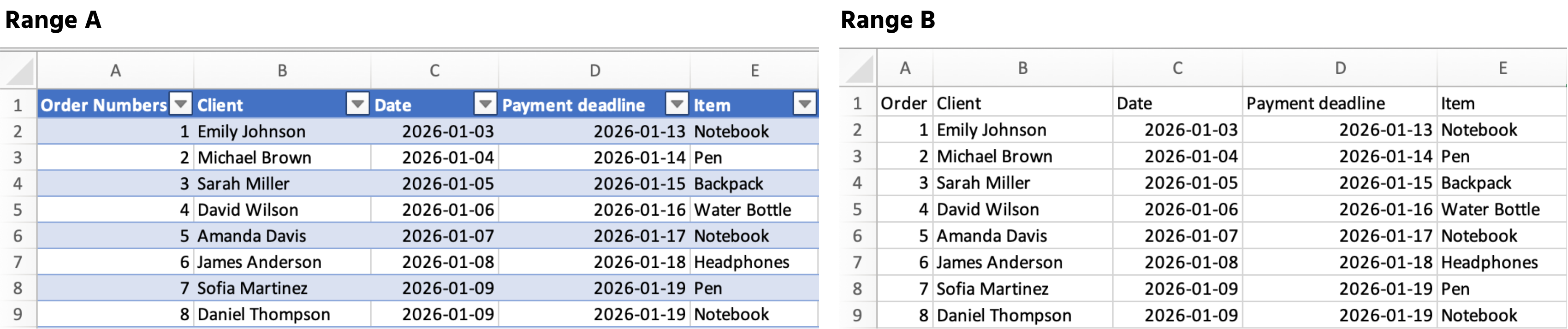
Når du konverterer et område til en Tabel, gør Excel automatisk følgende:
- Tilføjer filtre og sorteringsknapper til overskrifterne;
- Udvider formler og formatering til hver ny række;
- Bruger strukturerede referencer som
Sales[Total_Cost]i stedet forK2:K54.
Sådan opretter du en tabel
- Klik et vilkårligt sted inde i dine data;
- Tryk på Ctrl + T (Windows) eller Cmd + T (Mac);
- Bekræft, at dine data har overskrifter → klik på OK.
Tak for dine kommentarer!
Spørg AI

Spørg AI

Spørg om hvad som helst eller prøv et af de foreslåede spørgsmål for at starte vores chat
Tabeller
Områder er kraftfulde, men de er statiske. Når dine data vokser — nye rækker, nye kunder, nye transaktioner — har du brug for noget smartere. Det er her, Tabeller kommer ind i billedet.
Vigtige pointer
- En Tabel omdanner et område til et struktureret, voksende datasæt;
- Tryk på Ctrl / Cmd + T for at konvertere et hvilket som helst område til en Tabel;
- Tabeller tilføjer filtre, strukturerede referencer og automatisk udvidelse;
- Hver kolonne = én datatype. Hver række = én post. Ingen tomme rækker indeni.
Hvad er en Tabel?
En Tabel er et struktureret område, der fortæller Excel: "dette er et voksende datasæt, behandl det som sådan."
Når du konverterer et område til en Tabel, gør Excel automatisk følgende:
- Tilføjer filtre og sorteringsknapper til overskrifterne;
- Udvider formler og formatering til hver ny række;
- Bruger strukturerede referencer som
Sales[Total_Cost]i stedet forK2:K54.
Sådan opretter du en tabel
- Klik et vilkårligt sted inde i dine data;
- Tryk på Ctrl + T (Windows) eller Cmd + T (Mac);
- Bekræft, at dine data har overskrifter → klik på OK.
Tak for dine kommentarer!
