MATCH and XMATCH Explained
Stryg for at vise menuen
What the MATCH Function Does
The MATCH function searches for a value in a range and returns the position of that value.
Instead of returning the value itself, MATCH returns the relative position of the match.
This position can then be used by other functions such as INDEX.
Basic Syntax
=MATCH(lookup_value; lookup_array; match_type)
lookup_value: the value to search for;lookup_array: the range where Excel searches for the value;match_type: controls how Excel performs the match.
Match Type Options
Example Finding the Position of a Product
Assume the worksheet contains the following list: Product, Mouse, Keyboard, Monitor, Webcam. The list is located in range A3:A6.
To find the position of Monitor, use:
=MATCH("Monitor"; A4:A7; 0)
Excel searches the list and returns: 3. Because Monitor is the third item in the range.
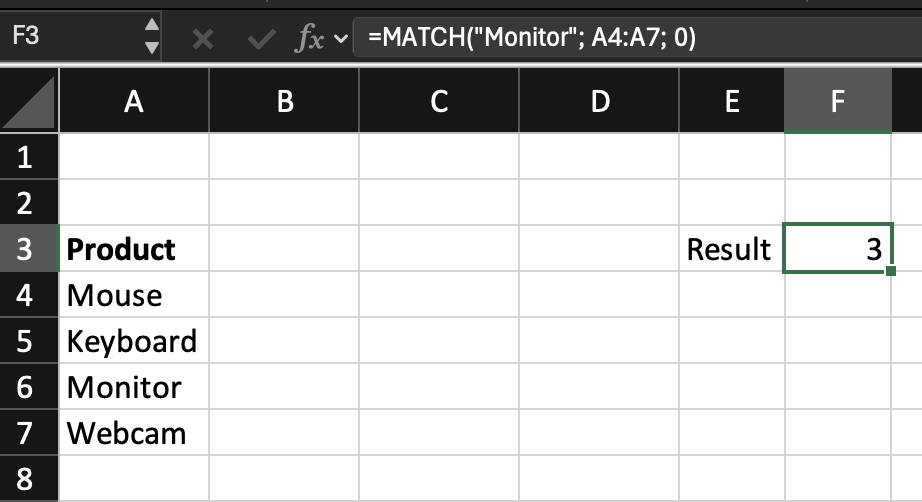
The returned number is relative to the selected range, not the worksheet. MATCH simply returns the position of the match.
XMATCH Function
XMATCH is the modern version of MATCH.
It works similarly but provides more flexibility.
Basic Syntax
=XMATCH(lookup_value; lookup_array)
XMATCH performs an exact match by default, so the match type argument is not required.
Example Using XMATCH
To find the position of Monitor:
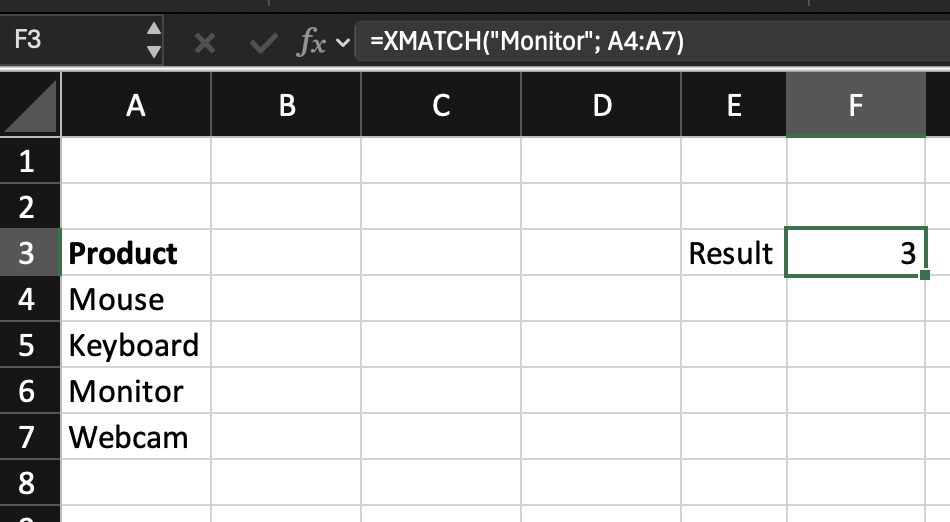
=XMATCH("Monitor"; A4:A7)
The result is also: 3
Why XMATCH Is Often Preferred
XMATCH improves several limitations of MATCH:
- Exact match is the default behavior;
- It supports reverse searches;
- It provides additional search options.
However, both functions return the position of the match, not the value itself.

MATCH and XMATCH do not return the value from a table.
They return the location of the value inside a range.
This position can then be used by INDEX to retrieve the corresponding value.
Task
Scenario
A worksheet contains a list of product names. A product name is entered in an input cell. Your goal is to return the position of that product inside the list.
Task Instructions
Use XMATCH to return the position of the selected department name inside the list.
Tak for dine kommentarer!
Spørg AI

Spørg AI

Spørg om hvad som helst eller prøv et af de foreslåede spørgsmål for at starte vores chat
