ChatGPT Interface Overview
Swipe to show menu
ChatGPT provides a user-friendly interface designed for efficient interaction with conversational AI. It allows you to ask questions, explore ideas, and get assistance with various tasks in one streamlined workspace. Understanding how the interface is organized helps you make the most of ChatGPT's features.
When you open ChatGPT, you'll see a clear layout centered around your conversation. At the bottom is the chat input area, where you type messages or prompts. Above it, the conversation history shows the ongoing dialogue between you and ChatGPT. In the menu or side panel, you can access settings to adjust preferences and manage your experience. Together, these elements create a smooth and efficient workspace.
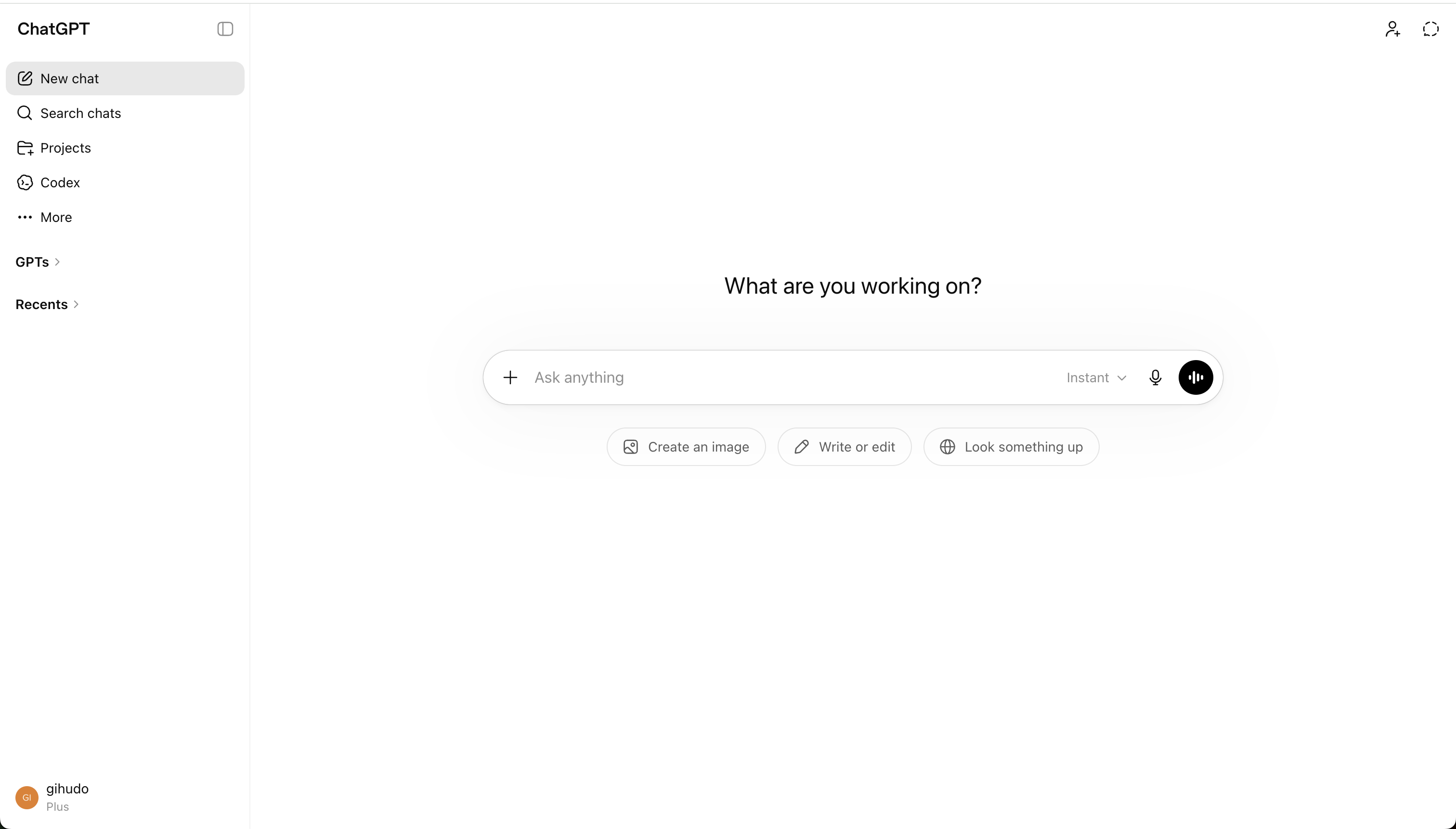

This is where you type your questions, prompts, or instructions. The input box typically supports multiline text, lets you paste content, and sometimes offers shortcuts or formatting options to enhance your prompts.
The main area of the interface displays the ongoing conversation, showing both your messages and ChatGPT’s responses in chronological order. You can scroll through previous exchanges to review or reference earlier parts of the conversation.
The settings menu provides options to change language preferences, adjust accessibility features, switch between light and dark modes, and manage notification preferences. Some versions may also allow you to set default behaviors or connect additional tools.
Many ChatGPT interfaces offer ways to export your conversations. You might find buttons to copy, download, or share your chat history, making it easy to save important exchanges or share them with others.
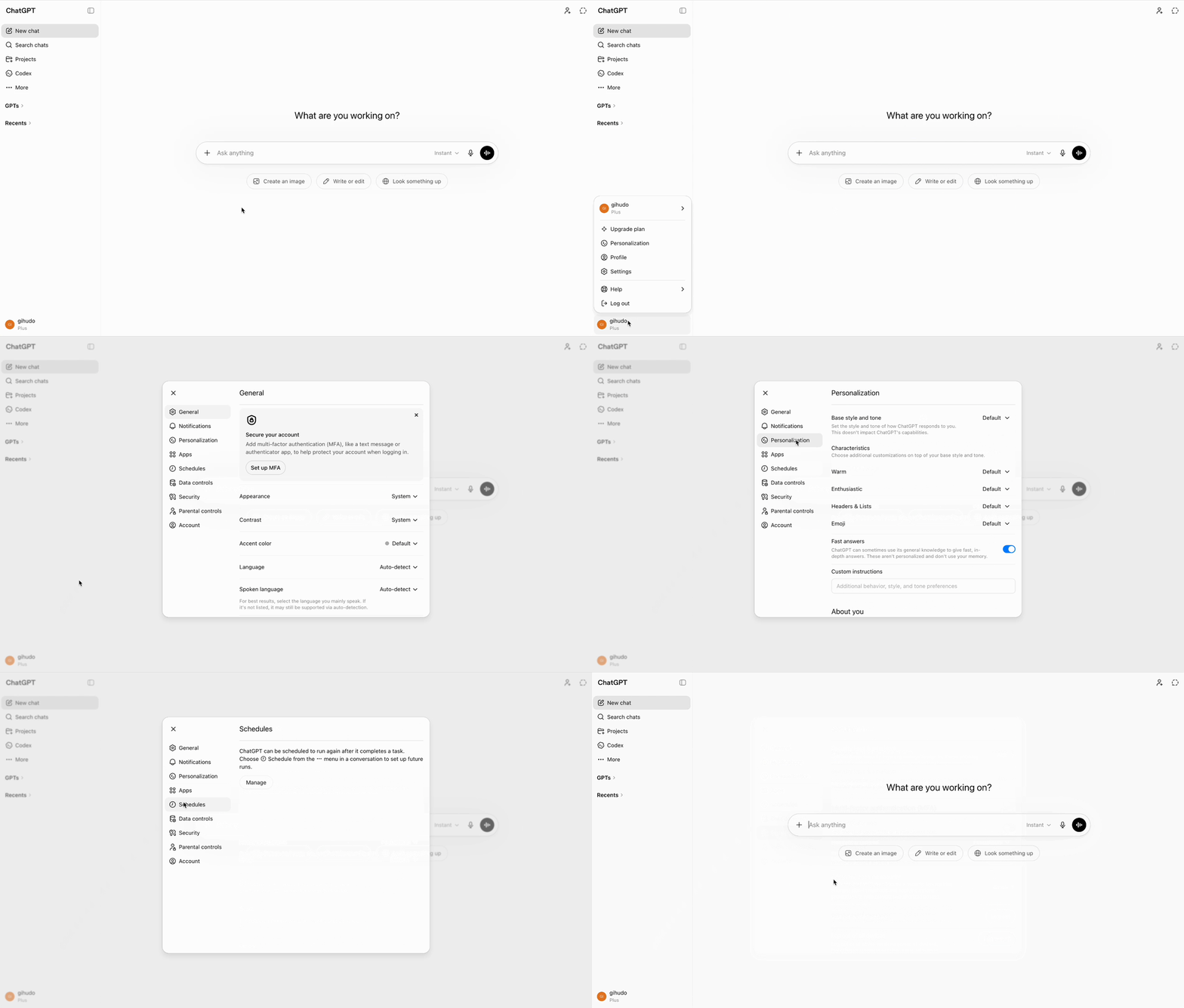

ChatGPT's interface includes accessibility features like keyboard navigation, screen reader support, and adjustable font sizes. You can also customize its appearance and behavior to make it more comfortable and efficient to use.
Navigating ChatGPT is simple. Use the chat area to follow conversations, adjust settings to fit your workflow, and export chats if needed. Customize display and accessibility options for a more comfortable experience.
Thanks for your feedback!
Ask AI

Ask AI

Ask anything or try one of the suggested questions to begin our chat
ChatGPT Interface Overview
ChatGPT provides a user-friendly interface designed for efficient interaction with conversational AI. It allows you to ask questions, explore ideas, and get assistance with various tasks in one streamlined workspace. Understanding how the interface is organized helps you make the most of ChatGPT's features.
When you open ChatGPT, you'll see a clear layout centered around your conversation. At the bottom is the chat input area, where you type messages or prompts. Above it, the conversation history shows the ongoing dialogue between you and ChatGPT. In the menu or side panel, you can access settings to adjust preferences and manage your experience. Together, these elements create a smooth and efficient workspace.
This is where you type your questions, prompts, or instructions. The input box typically supports multiline text, lets you paste content, and sometimes offers shortcuts or formatting options to enhance your prompts.
The main area of the interface displays the ongoing conversation, showing both your messages and ChatGPT’s responses in chronological order. You can scroll through previous exchanges to review or reference earlier parts of the conversation.
The settings menu provides options to change language preferences, adjust accessibility features, switch between light and dark modes, and manage notification preferences. Some versions may also allow you to set default behaviors or connect additional tools.
Many ChatGPT interfaces offer ways to export your conversations. You might find buttons to copy, download, or share your chat history, making it easy to save important exchanges or share them with others.
ChatGPT's interface includes accessibility features like keyboard navigation, screen reader support, and adjustable font sizes. You can also customize its appearance and behavior to make it more comfortable and efficient to use.
Navigating ChatGPT is simple. Use the chat area to follow conversations, adjust settings to fit your workflow, and export chats if needed. Customize display and accessibility options for a more comfortable experience.
Thanks for your feedback!
