Working with Files and Documents
Swipe to show menu
When working with files and documents in ChatGPT, you can use built-in file handling capabilities to streamline your workflow. You can upload files, process their contents, and ask ChatGPT to analyze, summarize, or extract information directly in the chat. This makes it easier to explore data, find insights, and prepare reports in a conversational way.
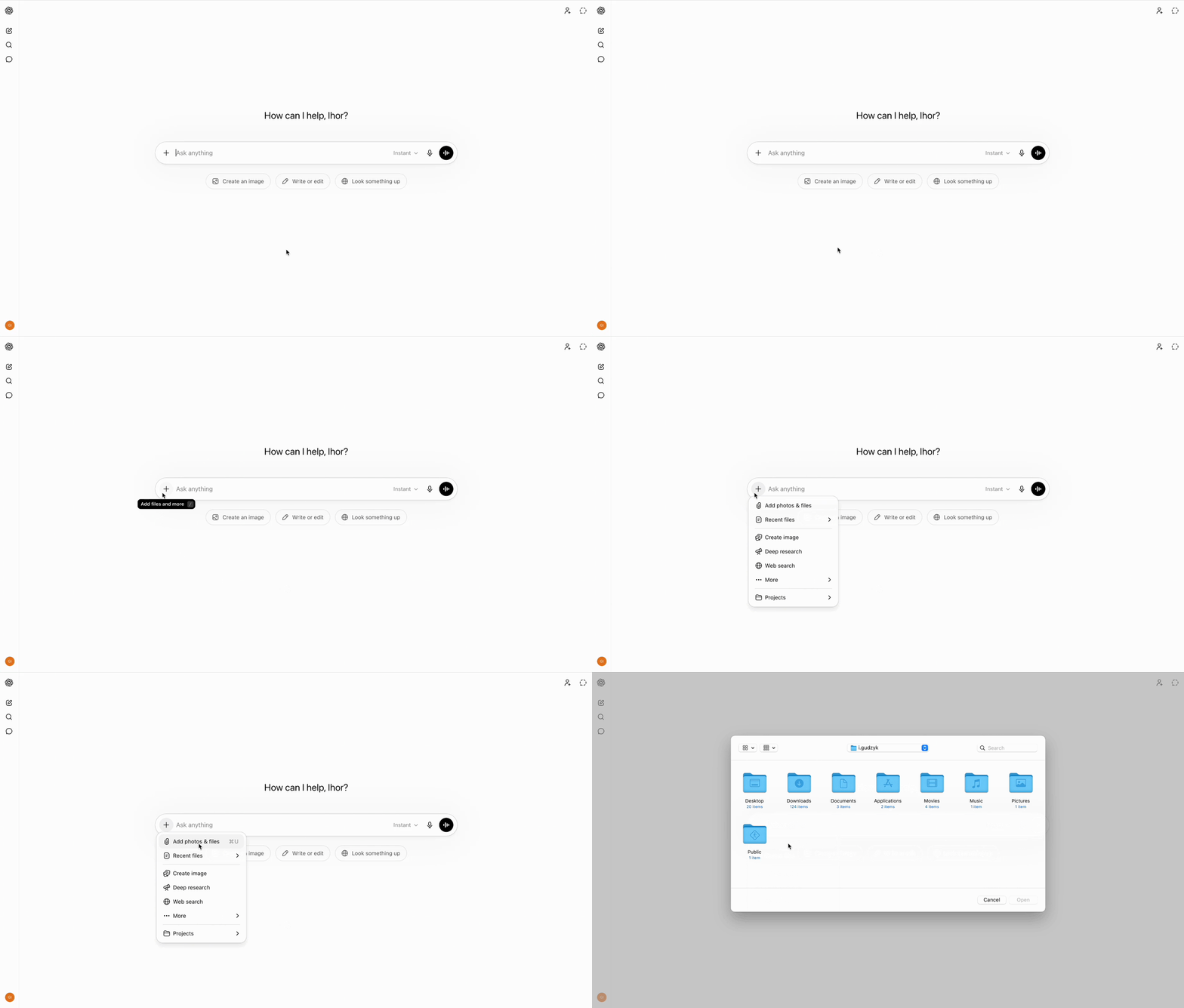
ChatGPT supports common file types such as text files, PDFs, Word documents, and spreadsheets. To upload a file, use the attachment or upload button in the chat interface. Once uploaded, you can prompt ChatGPT to perform tasks like summarizing the document, extracting key data, or analyzing its content.

Always consider security and privacy when uploading files to ChatGPT. Avoid sharing sensitive or confidential information unless you are sure it is safe to do so. Uploaded files may be processed on external servers, so it is important to review your organization’s data handling policies before using this feature for private documents.
For advanced document analysis, you can guide ChatGPT to perform more specific tasks, such as extracting tables from spreadsheets, comparing sections of text, or identifying sentiment and tone. You can also chain requests, for example, first asking for a summary, then requesting a breakdown of key metrics or arguments. By refining your prompts, you can extract highly customized information and get more value from ChatGPT's analytical capabilities.
Understanding how to securely and effectively manage files with ChatGPT opens up new possibilities for productivity and insight. Always prioritize data privacy, and explore these tools to unlock deeper value from your documents.

You can quickly generate concise summaries of lengthy documents. Simply ask for a summary after uploading your file, and ChatGPT will provide an overview of the main points.
You can prompt ChatGPT to list the most important facts, arguments, or findings from your document. This helps you focus on what matters most without reading the entire file.
ChatGPT can help uncover trends, patterns, or actionable insights from structured and unstructured documents. Ask specific questions about the content to receive tailored responses that highlight deeper meanings or implications.
Thanks for your feedback!
Ask AI

Ask AI

Ask anything or try one of the suggested questions to begin our chat
Working with Files and Documents
When working with files and documents in ChatGPT, you can use built-in file handling capabilities to streamline your workflow. You can upload files, process their contents, and ask ChatGPT to analyze, summarize, or extract information directly in the chat. This makes it easier to explore data, find insights, and prepare reports in a conversational way.
ChatGPT supports common file types such as text files, PDFs, Word documents, and spreadsheets. To upload a file, use the attachment or upload button in the chat interface. Once uploaded, you can prompt ChatGPT to perform tasks like summarizing the document, extracting key data, or analyzing its content.
Always consider security and privacy when uploading files to ChatGPT. Avoid sharing sensitive or confidential information unless you are sure it is safe to do so. Uploaded files may be processed on external servers, so it is important to review your organization’s data handling policies before using this feature for private documents.
For advanced document analysis, you can guide ChatGPT to perform more specific tasks, such as extracting tables from spreadsheets, comparing sections of text, or identifying sentiment and tone. You can also chain requests, for example, first asking for a summary, then requesting a breakdown of key metrics or arguments. By refining your prompts, you can extract highly customized information and get more value from ChatGPT's analytical capabilities.
Understanding how to securely and effectively manage files with ChatGPT opens up new possibilities for productivity and insight. Always prioritize data privacy, and explore these tools to unlock deeper value from your documents.
You can quickly generate concise summaries of lengthy documents. Simply ask for a summary after uploading your file, and ChatGPT will provide an overview of the main points.
You can prompt ChatGPT to list the most important facts, arguments, or findings from your document. This helps you focus on what matters most without reading the entire file.
ChatGPT can help uncover trends, patterns, or actionable insights from structured and unstructured documents. Ask specific questions about the content to receive tailored responses that highlight deeper meanings or implications.
Thanks for your feedback!
