Building a Guessing Game Console App
Swipe to show menu
In this chapter, get ready to level up your console application skills as we dive into the creation of an exciting Guess the Number game app. This interactive game will challenge players to exercise their intuition by guessing a randomly generated number within a predefined range. Along the way, we'll unravel the mysteries of fundamental concepts such as
- Random number generation;
- Input validation;
- User interaction;
- Even saving game results to a file.
Challenge
Imagine delving into an app that promises excitement and intrigue. Players are invited to guess a mysteriously chosen number within a predefined range. The app offers instant feedback on each guess and a meticulous tally of the attempts made.
This hands-on example is your chance to refine your skills in building CLI Apps and showcases the art of crafting interactive programs.
Resulting App
See the magic in action! Below is a GIF illustrating the exciting Guess the Number Game app that you'll be crafting:
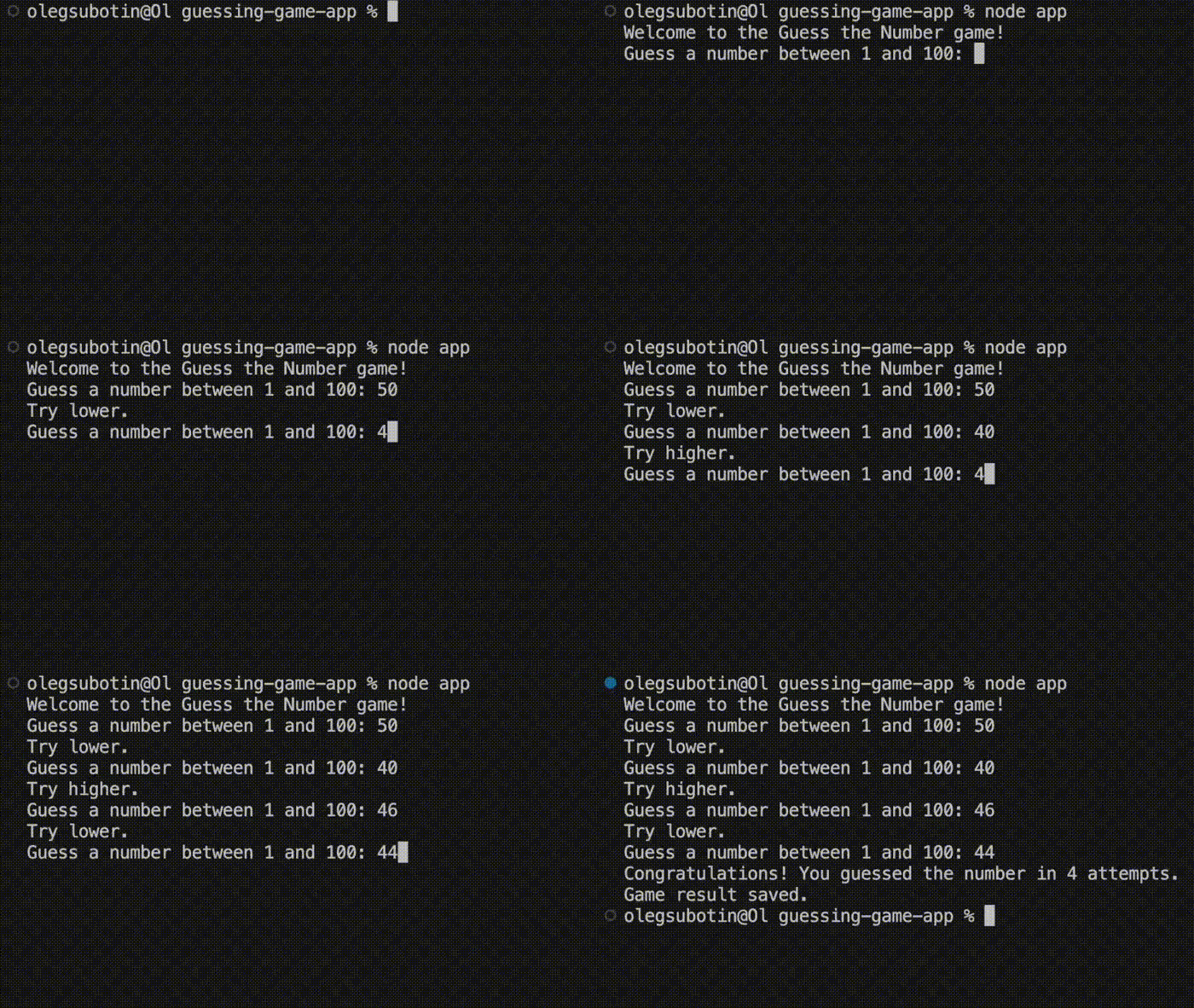
Building a Guessing Game Console App
You're presented with two paths. The first option beckons you to embark on the journey without assistance, while the second offers a helpful guide to ensure your success. Whether you dive in boldly or follow the structured guide, you're in for a fascinating experience that will leave you with a functional and captivating console app.
Masterplan
- Step 1: Setup and Initializations;
- Step 2: Define Game Parameters;
- Step 3: Define Utility Functions;
- Step 4: Game Logic;
- Step 5: Save Game Result;
- Step 6: Start the Game;
- Conclusion;
- Full App Code.
Step 1: Setup and Initializations
Prepare the canvas by creating a new directory and a file named app.js. Within this file, we conjure the necessary modules:
const readline = require('readline');
const fs = require('fs').promises;
Create a Readline interface:
const rl = readline.createInterface({
  input: process.stdin,
  output: process.stdout
});

-
readline: provides an interface for reading input from and writing output to the console; -
readline.createInterface({ ... }): creates an instance of thereadline.Interfaceclass. It accepts an object with theinputandoutputproperties; -
input: process.stdin: sets the input stream toprocess.stdin, allowing the program to read user input from the keyboard; -
output: process.stdout: sets the output stream toprocess.stdout, allowing the program to display text in the console.
Explanation: We import the necessary modules: readline for user interaction and fs.promises for file operations. Then, we create a Readline interface named rl to handle input and output.
Step 2: Define Game Parameters
Set the minimum and maximum numbers:
const minNumber = 1;
const maxNumber = 100;
Generate the secret number:
const secretNumber =
  Math.floor(Math.random() * (maxNumber - minNumber + 1)) + minNumber;
-
Math.random(): generates a random floating-point number between0(inclusive) and1(exclusive); -
maxNumber - minNumber + 1: calculates the range of possible numbers. Adding1ensures that bothminNumberandmaxNumberare included in the range; -
Math.random() * (maxNumber - minNumber + 1): generates a random number between0and the calculated range; -
Math.floor(...): rounds the generated floating-point number down to the nearest integer, ensuring that the result is a whole number within the desired range; -
... + minNumber: shifts the generated number so that the range starts atminNumberinstead of0.
Initialize the attempts counter:
let attempts = 0;
Explanation: We define the range of numbers (minNumber and maxNumber) within which the secret number will be generated. The secret number is randomly generated using Math.random() and assigned to secretNumber. The attempts variable is initialized to keep track of the user's attempts.
Step 3: Define Utility Functions
Equip with a utility function for impeccable validation:
function isValidGuess(guess) {
  return !isNaN(guess)
    && guess >= minNumber
    && guess <= maxNumber;
}
-
!isNaN(guess): checks whetherguessis a valid number. TheisNaN()function returnsfalsefor valid numbers, and the!operator reverses it totrue; -
guess >= minNumber: verifies thatguessis greater than or equal tominNumber, ensuring it is not below the allowed range; -
guess <= maxNumber: verifies thatguessis less than or equal tomaxNumber, ensuring it is not above the allowed range; -
&&: combines all conditions using the logical AND operator. Every condition must betruefor the entire expression to evaluate totrue.
Explanation: The isValidGuess function checks whether the user's guess is a valid number within the specified range (minNumber to maxNumber).
Step 4: Game Logic
The game's core mechanics through the playGame function:
function playGame() {
  rl.question(`Guess a number between ${minNumber} and ${maxNumber}: `, guess => {
    if (isValidGuess(guess)) {
      attempts++;
      const guessNumber = parseInt(guess);

      if (guessNumber === secretNumber) {
        console.log(`Congratulations! You guessed the number in ${attempts} attempts.`);
        saveGameResult(`Player won in ${attempts} attempts.`);
        rl.close();
      } else if (guessNumber < secretNumber) {
        console.log('Try higher.');
        playGame();
      } else {
        console.log('Try lower.');
        playGame();
      }
    } else {
      console.log('Please enter a valid number within the specified range.');
      playGame();
    }
  });
}
-
rl.question(\Guess a number between ${minNumber} and ${maxNumber}: `, guess => { ... }): prompts the user to enter a number within the specified range. The user's input is passed to the callback function as theguess` argument; -
if (isValidGuess(guess)) { ... }: checks whether the entered value is a valid guess using theisValidGuess()function; -
attempts++;: increments theattemptscounter to track how many guesses the player has made; -
const guessNumber = parseInt(guess);: converts the user's input from a string to an integer usingparseInt(); -
if (guessNumber === secretNumber) { ... }: checks whether the player's guess matches the secret number. If it does, the game displays a success message, saves the result, closes thereadlineinterface, and ends the game; -
else if (guessNumber < secretNumber) { ... }: informs the player that the secret number is higher and callsplayGame()again to continue the game; -
else { ... }: informs the player that the secret number is lower and callsplayGame()again to continue the game; -
else { ... }(after the validation check): handles invalid input by asking the player to enter a valid number within the allowed range and then callsplayGame()again.
Explanation: The playGame function forms the core game loop. It uses rl.question to prompt the user for a guess. If the guess is valid, the function checks if the guess matches the secret number. If not, it provides feedback to the user and continues the game loop recursively.
Step 5: Save Game Result
Implement the logic of saving the user's game achievements into the game_results.txt file.
async function saveGameResult(result) {
  try {
    await fs.appendFile('game_results.txt', `${result}\n`);
    console.log('Game result saved.');
  } catch (err) {
    console.log('Failed to save game result.');
  }
}
-
async function saveGameResult(result) { ... }: defines an asynchronous function namedsaveGameResult()that accepts aresultparameter and allows the use of theawaitkeyword inside the function body; -
try { ... } catch (err) { ... }: handles potential errors that may occur during the asynchronous file operation; -
await fs.appendFile('game_results.txt', \${result}\n`);: appends the providedresultfollowed by a newline character to thegame_results.txtfile. Theawait` keyword pauses execution until the file operation is completed successfully; -
console.log('Game result saved.');: displays a confirmation message when the game result is successfully written to the file; -
console.log('Failed to save game result.');: displays an error message if the file operation fails and an exception is caught by thecatchblock.
Explanation: The saveGameResult function uses fs.promises to append the game result to a file named game_results.txt. It provides feedback on the success or failure of saving the result.
Step 6: Start the Game
Create the welcome message and launch the game:
console.log('Welcome to the Guess the Number game!');
playGame();
Explanation: We display a welcome message and start the game loop by calling the playGame function.
Full App Code
const readline = require("readline");
const fs = require("fs").promises;

const rl = readline.createInterface({
  input: process.stdin,
  output: process.stdout,
});

const minNumber = 1;
const maxNumber = 100;

const secretNumber =
  Math.floor(Math.random() * (maxNumber - minNumber + 1)) + minNumber;
let attempts = 0;

function isValidGuess(guess) {
  return !isNaN(guess) && guess >= minNumber && guess <= maxNumber;
}

function playGame() {
  rl.question(
    `Guess a number between ${minNumber} and ${maxNumber}: `,
    (guess) => {
      if (isValidGuess(guess)) {
        attempts++;
        const guessNumber = parseInt(guess);

        if (guessNumber === secretNumber) {
          console.log(
            `Congratulations! You guessed the number in ${attempts} attempts.`
          );
          saveGameResult(`Player won in ${attempts} attempts.`);
          rl.close();
        } else if (guessNumber < secretNumber) {
          console.log("Try higher.");
          playGame();
        } else {
          console.log("Try lower.");
          playGame();
        }
      } else {
        console.log("Please enter a valid number within the specified range.");
        playGame();
      }
    }
  );
}

async function saveGameResult(result) {
  try {
    await fs.appendFile("game_results.txt", `${result}\n`);
    console.log("Game result saved.");
  } catch (err) {
    console.log("Failed to save game result.");
  }
}

console.log("Welcome to the Guess the Number game!");
playGame();
-
Lines 1-2: import the built-in
readlinemodule and thefsmodule'spromisesAPI for asynchronous file operations; -
Lines 4-7: create a readline interface named
rlfor reading user input and displaying output in the console; -
Lines 9-10: define the minimum and maximum values for the guessing range;
-
Lines 12-13: generate a random secret number within the specified range using
Math.random(); -
Line 14: initialize the
attemptscounter to track the number of guesses made by the player; -
Lines 16-18: define the
isValidGuess()function to validate that the entered value is a number within the allowed range; -
Lines 20-47: define the recursive
playGame()function that:- prompts the player to enter a guess;
- validates the entered value;
- checks whether the guess matches the secret number;
- provides feedback if the guess is too high or too low;
- continues the game by calling itself again when needed;
- saves the result and ends the game when the correct number is guessed;
-
Lines 49-56: define the asynchronous
saveGameResult()function that saves the game result to thegame_results.txtfile and handles potential errors; -
Line 58: displays a welcome message to the player;
-
Line 59: starts the game by calling the
playGame()function.
Summary
This program creates a number guessing game. The player attempts to guess a randomly generated number within a specified range. The game provides feedback after each guess, tracks the number of attempts, and saves successful results to a text file using asynchronous file operations.
Thanks for your feedback!
Ask AI

Ask AI

Ask anything or try one of the suggested questions to begin our chat
