Section 5. Chapter 1
Sorting Data in Excel
Swipe to show menu
Sorting your data in Excel isn't just about making things look tidy — it's about making your data work for you.
Key Points
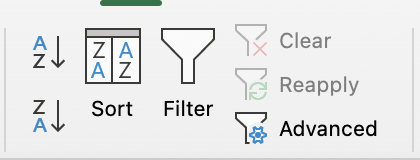
- Use the Sort button in the Data tab → Sort & Filter group to organize data alphabetically, numerically, or by date;
- Sort a single column or multiple columns to manage complex datasets more efficiently.
Task
Swipe to start coding
- Select the range
A3:I23.- Excel workflow:
Datatab →Sort & Filtergroup → clickSort→ tickMy data has headers→Sort by:Product Name→Sort On:Cell Values→Order:A to Z→OK. - Platform workflow:
Datatab → clickSort→ selectCustom Sort→ in the sort reminder dialog clickConfirm→ tickFirst row does not participate in sorting→Sort by:Product Name→Order:Ascending→Submit.
- Excel workflow:
- Select the range
A3:I23.- Excel workflow:
Datatab →Sort & Filtergroup → clickSort→ tickMy data has headers→Sort by:Unit Price→Sort On:Cell Values→Order:Smallest to Largest→OK. - Platform workflow:
Datatab → clickSort→ selectCustom Sort→ in the sort reminder dialog clickConfirm→ tickFirst row does not participate in sorting→Sort by:Unit Price→Order:Ascending→Submit.
- Excel workflow:
- Select the range
A3:I23.- Excel workflow:
Datatab →Sort & Filtergroup → clickSort→ tickMy data has headers→Sort by:Last Order Date→Sort On:Cell Values→Order:Oldest to Newest→OK. - Platform workflow:
Datatab → clickSort→ selectCustom Sort→ in the sort reminder dialog clickConfirm→ tickFirst row does not participate in sorting→Sort by:Last Order Date→Order:Ascending→Submit.
- Excel workflow:
 Switch to desktop for real-world practiceContinue from where you are using one of the options below
Everything was clear?
Thanks for your feedback!
Section 5. Chapter 1
Ask AI

Ask AI

Ask anything or try one of the suggested questions to begin our chat
