Sparklines
Swipe to show menu
Sparklines are the most compact way to add visual context to a table. Instead of asking the reader to look from a table cell to a separate chart somewhere else on the sheet, a sparkline puts the trend directly inside the cell.
They don't replace full charts. A sparkline can't show axis labels, exact values, or detailed comparisons across many products at once. What it does is let the reader scan a column of sparklines and immediately see which products are trending up, which are flat, and which are declining — without leaving the table.
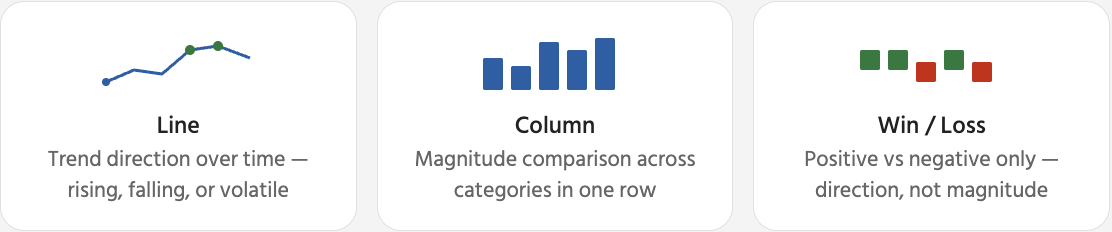
Once a sparkline is selected, a contextual Sparkline tab appears in the ribbon. This is where you control how the sparkline looks and which data points are emphasised. The most useful options are markers and point highlights — they help the reader quickly identify the peak and trough without reading the underlying numbers.

Removing sparklines: select the sparkline cell(s) → Sparkline tab → Clear → Clear Selected Sparklines. This removes only the visual indicator — the table data in the same row is completely unaffected. Pressing Delete removes the cell content, not the sparkline.
Thanks for your feedback!
Ask AI

Ask AI

Ask anything or try one of the suggested questions to begin our chat
Sparklines
Sparklines are the most compact way to add visual context to a table. Instead of asking the reader to look from a table cell to a separate chart somewhere else on the sheet, a sparkline puts the trend directly inside the cell.
They don't replace full charts. A sparkline can't show axis labels, exact values, or detailed comparisons across many products at once. What it does is let the reader scan a column of sparklines and immediately see which products are trending up, which are flat, and which are declining — without leaving the table.
Once a sparkline is selected, a contextual Sparkline tab appears in the ribbon. This is where you control how the sparkline looks and which data points are emphasised. The most useful options are markers and point highlights — they help the reader quickly identify the peak and trough without reading the underlying numbers.
Removing sparklines: select the sparkline cell(s) → Sparkline tab → Clear → Clear Selected Sparklines. This removes only the visual indicator — the table data in the same row is completely unaffected. Pressing Delete removes the cell content, not the sparkline.
Thanks for your feedback!
