Choosing the Right Chart Type
Swipe to show menu
Choosing the right chart type is an analytical skill.
Pie Chart
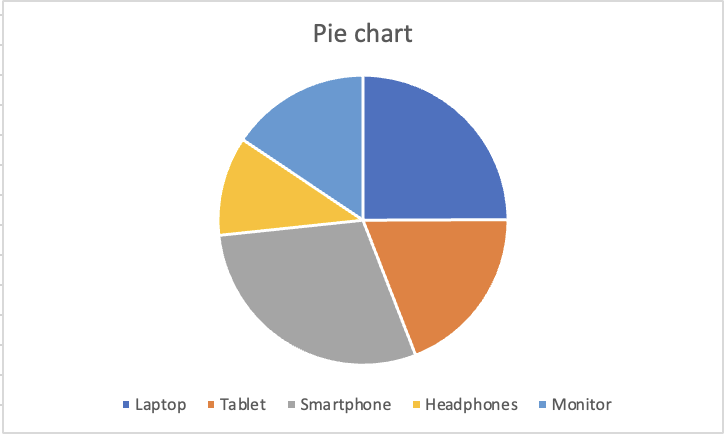
Shows how individual categories add up to 100%. Only effective when categories are few (ideally 5 or fewer) and differences between slices are large enough to see. Avoid when slices are similar in size.
Scatter Chart
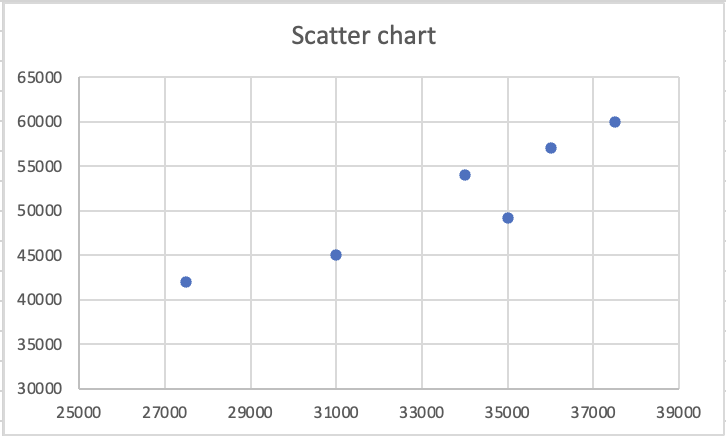
Each dot is a pair of values, one column becomes the X-axis, the other becomes the Y-axis. Used to identify correlation, clusters, or outliers between two numeric variables. Not suitable for categories.
In a column or line chart, one axis is categories and the other is values. In a scatter chart, both axes are numeric values, and Excel pairs them as coordinates. Each dot is not a category. It is a data point with both an X position and a Y position, where X comes from one column and Y comes from another.
This makes scatter charts powerful for a specific analytical question: when one value goes up, does the other go up too? If the dots form a diagonal pattern rising from bottom-left to top-right, the two variables move together. If the dots are scattered randomly, there is no visible relationship. A cluster of dots in one area signals that certain combinations of values appear repeatedly in the data.

Professional reporting avoids 3D charts entirely. The rule is simple: clarity takes priority over decoration. A 2D column chart that clearly communicates the data is always better than a 3D chart that looks impressive but introduces ambiguity.
Thanks for your feedback!
Ask AI

Ask AI

Ask anything or try one of the suggested questions to begin our chat
Choosing the Right Chart Type
Choosing the right chart type is an analytical skill.
Pie Chart
Shows how individual categories add up to 100%. Only effective when categories are few (ideally 5 or fewer) and differences between slices are large enough to see. Avoid when slices are similar in size.
Scatter Chart
Each dot is a pair of values, one column becomes the X-axis, the other becomes the Y-axis. Used to identify correlation, clusters, or outliers between two numeric variables. Not suitable for categories.
In a column or line chart, one axis is categories and the other is values. In a scatter chart, both axes are numeric values, and Excel pairs them as coordinates. Each dot is not a category. It is a data point with both an X position and a Y position, where X comes from one column and Y comes from another.
This makes scatter charts powerful for a specific analytical question: when one value goes up, does the other go up too? If the dots form a diagonal pattern rising from bottom-left to top-right, the two variables move together. If the dots are scattered randomly, there is no visible relationship. A cluster of dots in one area signals that certain combinations of values appear repeatedly in the data.
Professional reporting avoids 3D charts entirely. The rule is simple: clarity takes priority over decoration. A 2D column chart that clearly communicates the data is always better than a 3D chart that looks impressive but introduces ambiguity.
Thanks for your feedback!
