Method Parameters
Swipe to show menu
Sometimes you need to pass some data into the methods so it can process that data and give us some output. For example, you can create a method that calculates the sum of three numbers and outputs the result. Such a thing can be achieved using method parameters.
You can create a method with parameters using the following syntax:

main.cs
1234static void methodName(dataType parameter1, dataType parameter2, ...) { // Code to be executed }
Here is the usage of the parameters:
main.cs
12345static void sumOfThree(int a, int b, int c) { int sum = a + b + c; Console.WriteLine($"The sum is {sum}"); }

It's also possible to write expressions directly in string formatting, therefore writing Console.WriteLine($"The sum is {a + b + c}") is also valid in the above case.
In the above code the terms a, b, and c represent the passed data. When you are calling such a method you pass the data along with it. The syntax for calling such a method is the following:
main.cs
1methodName(argument1, argument2, ...);
For example:
main.cs
1sumOfThree(1, 2, 3);
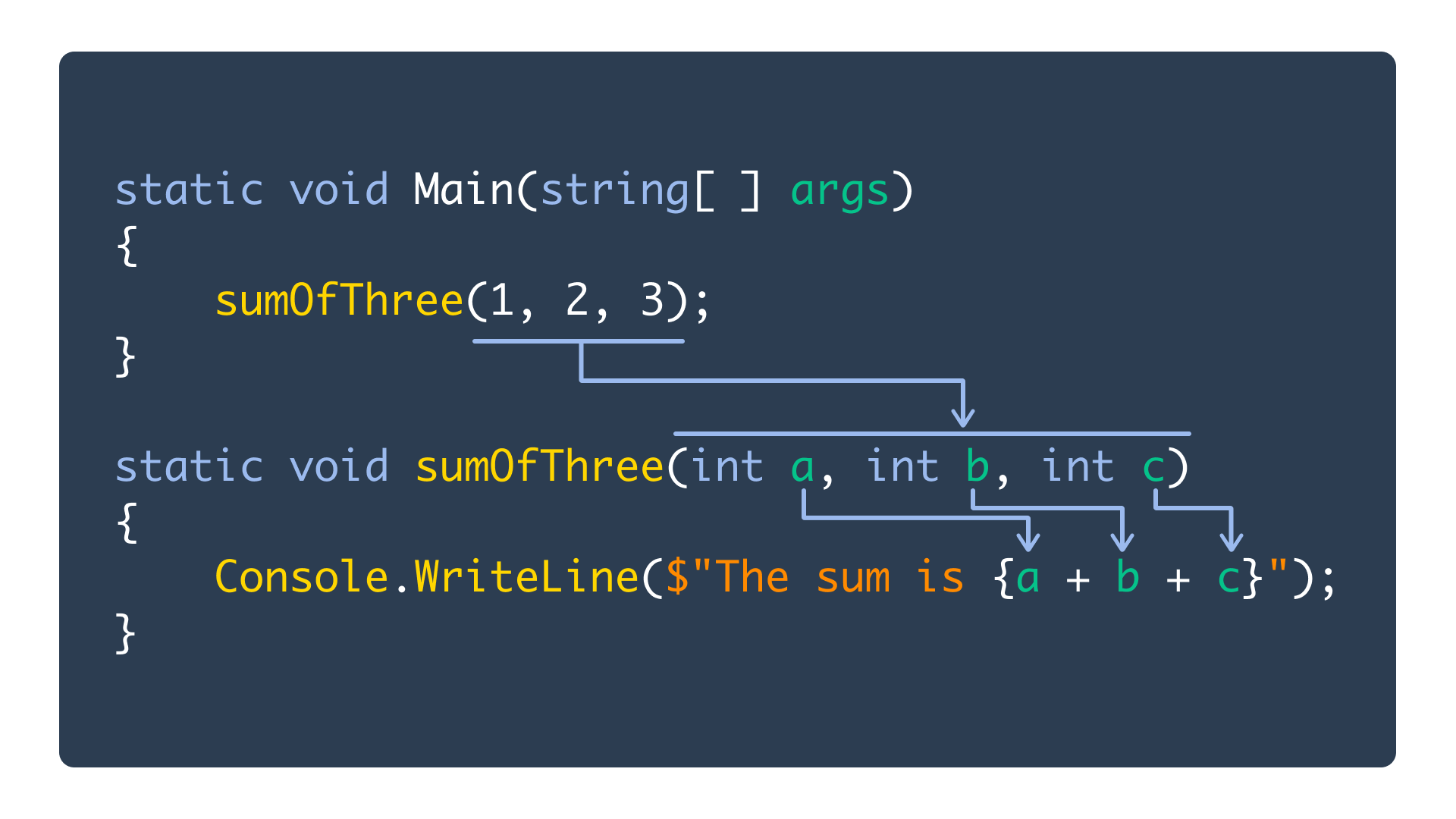
An argument is a value that you pass to a method when calling it, for example 1, 2, and 3 in the above example are arguments. On the other hand, a parameter is a variable declared in the method's definition to receive and work with those arguments. In the above case a, b, and c are the parameters.
Here is the full code for the above example:
main.cs
1234567891011121314151617using System; namespace ConsoleApp { internal class Program { static void sumOfThree(int a, int b, int c) { Console.WriteLine($"The sum is {a + b + c}"); } static void Main(string[] args) { sumOfThree(1, 2, 3); } } }
The following illustration explains the flow:
When calling a method, you must always provide the required amount of arguments, otherwise, the code might not compile:
main.cs
12345678910111213141516171819using System; namespace ConsoleApp { internal class Program { static void sumOfThree(int a, int b, int c) { int sum = a + b + c; Console.WriteLine($"The sum is {sum}"); } static void Main(string[] args) { //sumOfThree(1, 2); // Error sumOfThree(5, 6, 7); // Valid } } }
In the code above, line sumOfThree(1, 2) will throw an error, because there are only 2 arguments provided. Required 3.
Apart from that, the order of the arguments must also match the definition of the method:
main.cs
123456789static void exampleMethod(int a, string b, bool c) { Console.WriteLine(a); Console.WriteLine(b); Console.WriteLine(c); } exampleMethod("Hello", 1, true); // Invalid exampleMethod(true, "Hello", 1); // Invalid exampleMethod(1, "Hello", true); // Correct
Thanks for your feedback!
Ask AI

Ask AI

Ask anything or try one of the suggested questions to begin our chat
