Dictionary Comprehensions
Swipe to show menu
Dictionary comprehensions provide a concise way to create dictionaries in Python, similar to list comprehensions. They enable you to transform data into key-value pairs in a single line of code.
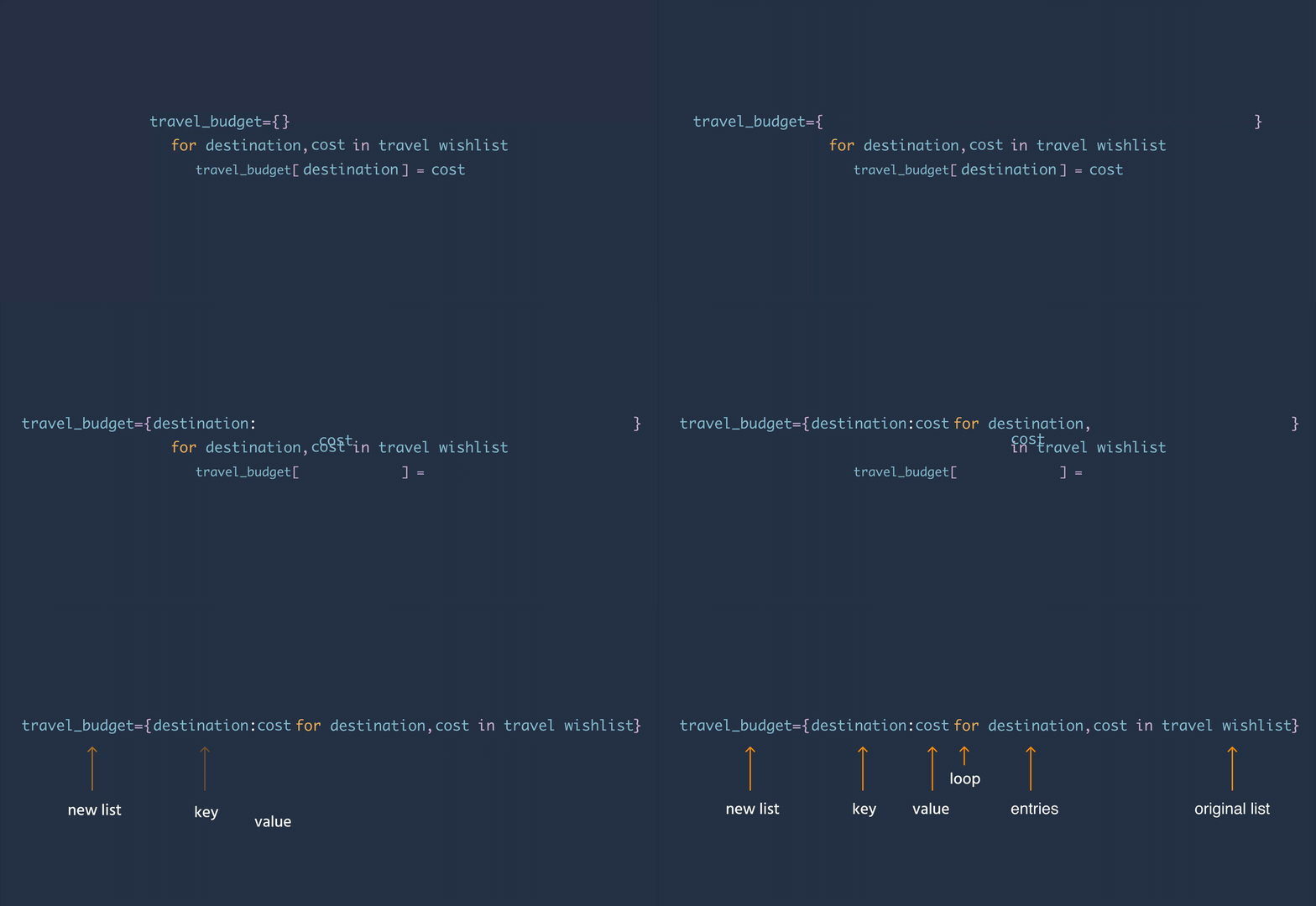
At its heart, a basic dictionary comprehension lets you construct a new dictionary by applying an expression to each key-value pair in an iterable variable.
{key_expression: value_expression for item in iterable}
key_expression: defines the key for each key-value pair;value_expression: defines the value corresponding to the key;iterable: the source of items to be processed (e.g., a list, range, or another iterable).

Unlike lists, dictionaries require both a key and a value, separated by a colon (:) and use {} instead of [].
12345678910111213141516travel_wishlist = [ ['Paris', 2000], ['Tokyo', 3000], ['New York', 2500], ['Kyoto', 1500], ['Sydney', 4000] ] # Initialize an empty dictionary travel_budget = {} # Populate the dictionary using a for loop for destination, cost in travel_wishlist: travel_budget[destination] = cost print(travel_budget)
This code iterates through the travel_wishlist list, where each sublist contains a destination and its budget. The for loop assigns the destination as the key and the budget as the value in the travel_budget dictionary.
123456789101112travel_wishlist = [ ['Paris', 2000], ['Tokyo', 3000], ['New York', 2500], ['Kyoto', 1500], ['Sydney', 4000] ] # Create the dictionary using dictionary comprehension travel_budget = {destination: cost for destination, cost in travel_wishlist} print(travel_budget)
This example uses dictionary comprehension to achieve the same result as the previous example. Each destination becomes a key, and its corresponding cost becomes the value in the travel_budget dictionary, all in a single line.
Handling ValueError When Unpacking Items with More Than Two Elements
When using dictionary comprehensions, you often unpack items from an iterable into variables for keys and values. If each item in your iterable contains more than two elements (such as a list of [city, country, budget]), trying to unpack into just two variables will cause a ValueError.
For example, if you write:
{city: country for city, country in travel_wishlist}
and travel_wishlist contains sublists with three elements, Python will raise this error:
ValueError: too many values to unpack (expected 2)
Why does this happen?
- Python expects to unpack exactly two values (for
cityandcountry), but each sublist has three. - This mismatch causes Python to throw a ValueError, clearly stating that more values are being provided than expected.
How can you handle this?
- Unpack all elements, but only use what you need:
for city, country, budget in travel_wishlist — assign each value to a variable.
- Ignore unused values with an underscore:
for city, country, _ in travel_wishlist — the underscore _ is a common convention for unused variables.
- Use slicing to select elements:
for city, country in [item[:2] for item in travel_wishlist] — slice each sublist to the first two elements before unpacking.
By matching the number of variables to the number of elements in each item, or by ignoring unused data, you avoid unpacking errors and keep your dictionary comprehensions clean and readable.
1234567891011121314151617181920# Example data: each tuple has three elements (city, country, budget) travel_wishlist = [ ("Paris", "France", 2000), ("Tokyo", "Japan", 3000), ("New York", "USA", 2500) ] # Attempting to unpack only two variables (incorrect) try: city_to_country = {city: country for city, country in travel_wishlist} except ValueError as e: print("Error:", e) # Correct: unpack all elements, using underscore for unused value city_to_country = {city: country for city, country, _ in travel_wishlist} print("Handled with underscore:", city_to_country) # Correct: use slicing to select only needed elements city_to_country = {item[0]: item[1] for item in travel_wishlist} print("Handled with slicing:", city_to_country)
Swipe to start coding
A traveler wants to organize their travel_wishlist by mapping each city name to its corresponding country. To achieve this efficiently, you need to transform the data into a dictionary.
- Extract city names and their corresponding countries from
travel_wishlist. - Store the resulting dictionary in
city_to_country.
Solution
 Switch to desktop for real-world practiceContinue from where you are using one of the options below
Thanks for your feedback!

single
Ask AI

Ask AI

Ask anything or try one of the suggested questions to begin our chat
